t 1.877.708.1184 f 604.708.1185 www.mplighting.com
16 West 4th Avenue, Vancouver BC V5Y 1G3, Canada
Copyright © MP Lighting. All technical information in this document is subject to change. 06-2011
1
4
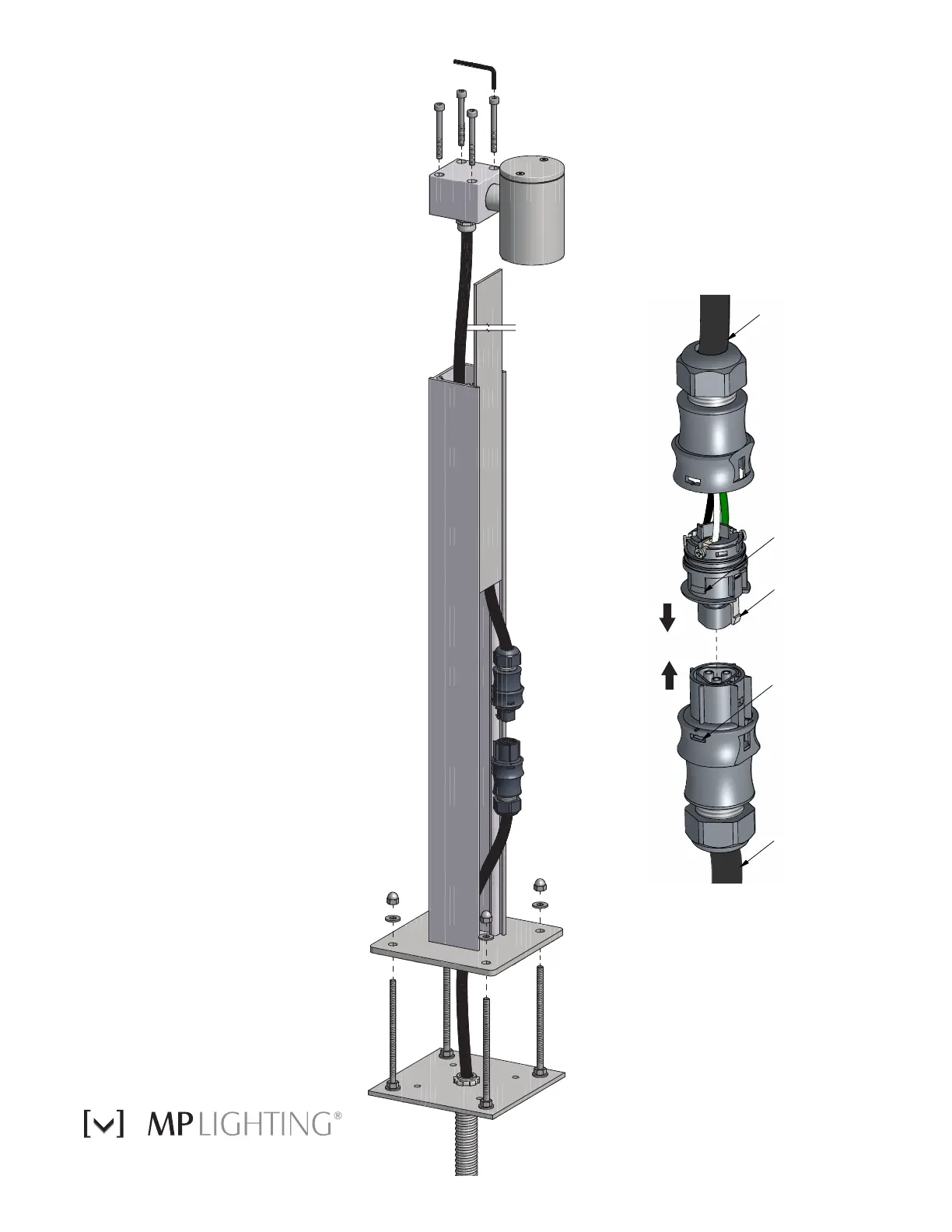
Remove side cover
plate on fixture.
Reconnect both halves
of waterproof connector.
Separate RST
waterproof connectors
and connect wires.
5
2
Pull cabtire cable
through base plate.
3
Remove protective
sleeves from studs
and fasten base to
mounting studs.
Replace cover plate and
mount fixture head by
tightening hex screws with
Allen key.
6
Black
Locking
Tabs
Grey
Locking Tab
Black
Locking Tabs
Separate RST connectors by
depressing grey locking tab
and pulling apart.
Next open connector half
way by depressing two black
locking tabs.
Connect line, neutral and
ground wires to screw terminals
then tighten gland nut firmly.
RST Connector Instructions
•
•
•
Cabtire Cable
Cabtire Cable
Fixture
LED92
Installation
Instructions



 To Previous Page
 Loading...