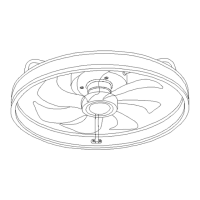
This document describes the Mpayel ceiling fan with light, model number 8002 (available in Black, White, or Brown). It functions as both a ceiling fan and a light fixture, designed for indoor use.
Important Technical Specifications
- Model Number: 8002-Black/White/Brown
- Voltage: 85~265 V
- Brand: Mpayel
- Light Kit: 18W
- Fan Support Weight: The outlet box and ceiling support structure must be securely mounted and capable of supporting at least 45 KGs (approximately 99 lbs). For fan support, the outlet box should be marked acceptable for fan support of 15.88kg (35 lbs) or less.
- Blade Clearance: A minimum of 7 feet (2.13 meters) clearance between the floor and the fan blade tips is required. The fan blades should also be at least 18 inches (45.72 centimeters) from walls or other upright structures.
- Wire Size (A.W.G):
- Up to 50 ft: 14 A.W.G
- 50-100 ft: 12 A.W.G
- The minimum wire should be a 3-conductor (2-wire with ground).
Usage Features
The ceiling fan is operated via a hand-held remote control, which requires AAA/1.5V batteries. The remote offers a range of functions for both the fan and the light.
Light Functions:
- Light ON/OFF: Turns the light on or off.
- ALL OFF: Turns off all functions (fan and light).
- Color Temperature Switch: Adjusts the color temperature of the light.
- Small Night Light: Activates a low-intensity night light mode.
- Brightness Adjustment: Buttons to enhance (+) or weaken (-) the brightness (click or long press).
- Color Temperature Adjustment: Buttons to increase (+) or decrease (-) the color temperature (long press).
Fan Functions:
- Fan Speed: Six fan speeds are available, with 1 being the weakest and 6 the strongest.
- Nature Wind: Activates a natural breeze simulation mode.
- Fan OFF: Turns the fan off.
- Rotation Direction (F/R): Tapping this button will stop the fan and then restart it in the opposite clockwise direction. This allows for seasonal adjustment of airflow:
- Summer: Clockwise rotation for a cooling effect.
- Winter: Counterclockwise rotation to circulate warm air.
- 2-hour Countdown (2H): Turns the fan off automatically after a 2-hour countdown.
Smart Features (via APP):
The fan light supports smart control via a dedicated mobile application.
- APP Download: Scan the provided QR code to download the APP and register an account.
- Device Addition: Log in, click "+" to add the device. You can edit the device name, room, and choose the device type (e.g., fan light).
- Pairing: After adding the device, click its icon to enter the detail page. Power off the device for 1-2 seconds, then power it on. Click the "Pairing" button. If the device beeps twice, pairing is successful. Multiple devices can be matched simultaneously.
- Control: Once paired, the APP can be used to control the devices.
- Remote Code Matching: Long press the "SET UP" button on the remote within 5 seconds of turning on the light. If the light beeps twice, the code is successfully matched.
Assembly and Installation
The manual provides a step-by-step guide for assembly and installation, emphasizing safety precautions.
Ground Assembly Procedure:
- Twist the light cover counterclockwise and remove it.
- Pull out the socket of the light strip.
- Twist out the screw locking the round hole in the disc, then loosen the remaining two screws.
- Twist the disc clockwise and remove it.
- Fix the three fan blades with screws.
- Align the disc with the screw, snap it in, and tighten the screw.
- Connect the light strip socket.
- Rotate the shade clockwise to secure it.
Suspension:
Installation requires turning off the electricity at the main fuse box or circuit panel.
- Concrete Ceiling: Mark the location, drill two holes, and secure the mounting bracket with two expansion screws.
- Wood Ceiling: Mark the location, secure the mounting bracket with four screws, and add spacers to each screw.
Wiring:
Connect the ceiling fan wires (fire wire to fire wire, zero wire to zero wire) to the reserved wires from the ceiling plate. Carefully lift the fan and ensure it is safely attached to the hook. The wiring diagram illustrates connections for the controller output, product motor input, three-position terminal, power neutral line, ground wire, power cord, synchronous motor, LED output, and product LED input.
Safety Rules
- Always turn off electricity at the main fuse box or circuit panel before beginning installation or maintenance.
- All wiring must comply with local electrical codes or the National Electrical Code. Installation should be performed by a qualified licensed electrician.
- Use gloves when handling fan parts with sharp edges to avoid personal injury.
- Ensure adequate clearance for blades (7 feet from floor, 18 inches from walls/structures).
- Mount the fan only to an outlet box marked acceptable for fan support, using provided mounting screws. Most light fixture outlet boxes are not suitable and may need replacement.
- The outlet box and ceiling support structure must support at least 45 KGs.
- Exercise caution when working around or cleaning the fan to prevent injury or damage.
- Do not use water or detergents for cleaning; use a dry dust cloth or lightly dampened cloth.
- After electrical connections, push spliced conductors upward into the outlet box, spreading wires apart with the grounded conductor and equipment-grounding conductor on opposite sides.
- Electrical diagrams are for reference only.
- The fan is suitable for indoor use only.
- WARNING: Do not operate this fan with a variable (Rh-eostat) wall controller or dimmer switch, as it can damage the remote control unit.
Troubleshooting
The manual provides a troubleshooting guide for common issues:
- Fan Will Not Start:
- Probable Cause: Blown fuse/circuit breaker, loose power line/switch wire connections, dead remote battery, reversing switch in neutral.
- Suggested Remedy: Check fuses/breakers, tighten connections (with power off), replace battery, ensure reversing switch is fully engaged.
- Fan Sounds Noisy:
- Probable Cause: Loose screws in motor housing, rattling wire connectors, motor noise from solid-state variable speed control.
- Suggested Remedy: Tighten motor housing screws, secure wire connectors (with power off), avoid solid-state controls.
- Fan Wobbles Excessively:
- Probable Cause: Loose setscrew in downrod support, loose setscrew in downrod/hanger ball assembly, insecure hanger bracket/ceiling outlet box.
- Suggested Remedy: Tighten setscrews in downrod support and hanging plate assembly, tighten hanger bracket screws to the outlet box, and secure the outlet box.
Maintenance Features
- Periodic Cleaning: The only required maintenance is periodic cleaning.
- Cleaning Method: Use only a soft brush or lint-free cloth to avoid scratching the finish.
- Avoid Abrasives: Abrasive cleaning agents are not required and should be avoided to prevent damage to the finish.
- Water Caution: Do not use water to clean the ceiling fan, as it could damage the motor or finish and create a risk of electrical shock.
Warranty
The product comes with a warranty against defects in materials and workmanship for a period of 6 months from the date of purchase. The warranty becomes void if the product has been misused, damaged by accident, or improperly used.

 Need help?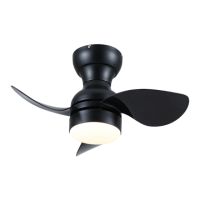

 To Next Page
 General