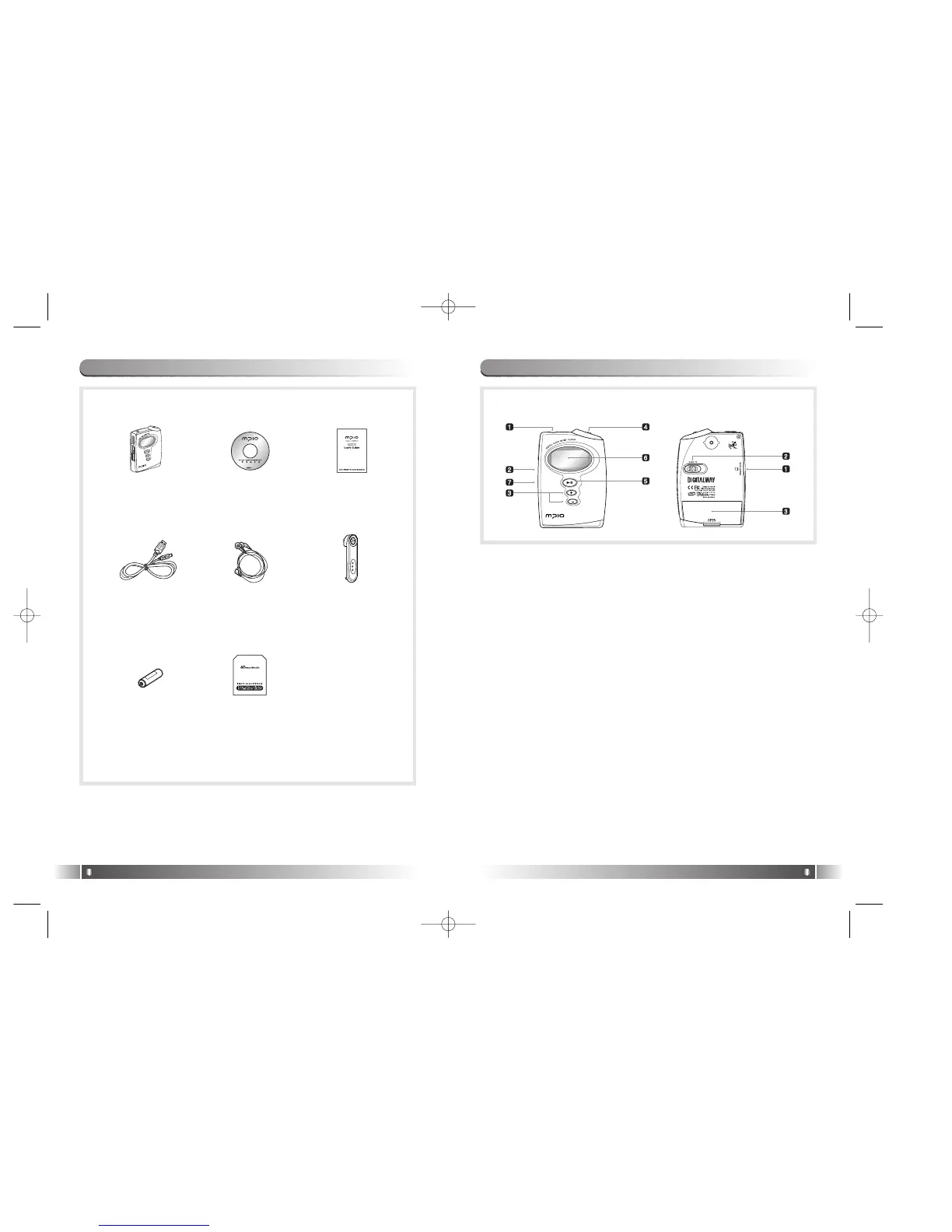
[Front]
1. Earphone Jack
2. Hold Slider :
- If you push the Hold Slider to the direction of the arrow, it will be
changed into the locking status, not reacting to the button press. It
prevents a misoperation of the button while carrying the player with
you.
3. +,- Button : Control the volume.
4. Joy Stick Key :
- You can change the status of Music Switch and setup of each menu
items.
5. Play/Pause Button :
- It has Power ON/OFF & Play/Pause functions.
6. LCD - It displays a file information and current setup status of menu.
7. USB Port - Access to the PC by connecting the USB cable.
[Rear]
1. Smart Media Card Slot : Insert the Smart Media Card.
2. Eject Slider : Remove the Smart Media Card by pushing the button to
the direction of the arrow.
3. Battery Cover : Open the battery cover and insert the battery while
matching the polarity, and close the battery cover.
7. Control's Overview
English
11
6. Accessories
English
10
MP3-Player
User's ManualProduct
Installation CD
Belt ClipEarphone
Battery
USB Cable
Dust Card
[Front] [Rear]
FY-Eng-EU1 12/24/96 7:37 PM Page 10



 To Next Page