28
GB
TEMPERATURE SETTING
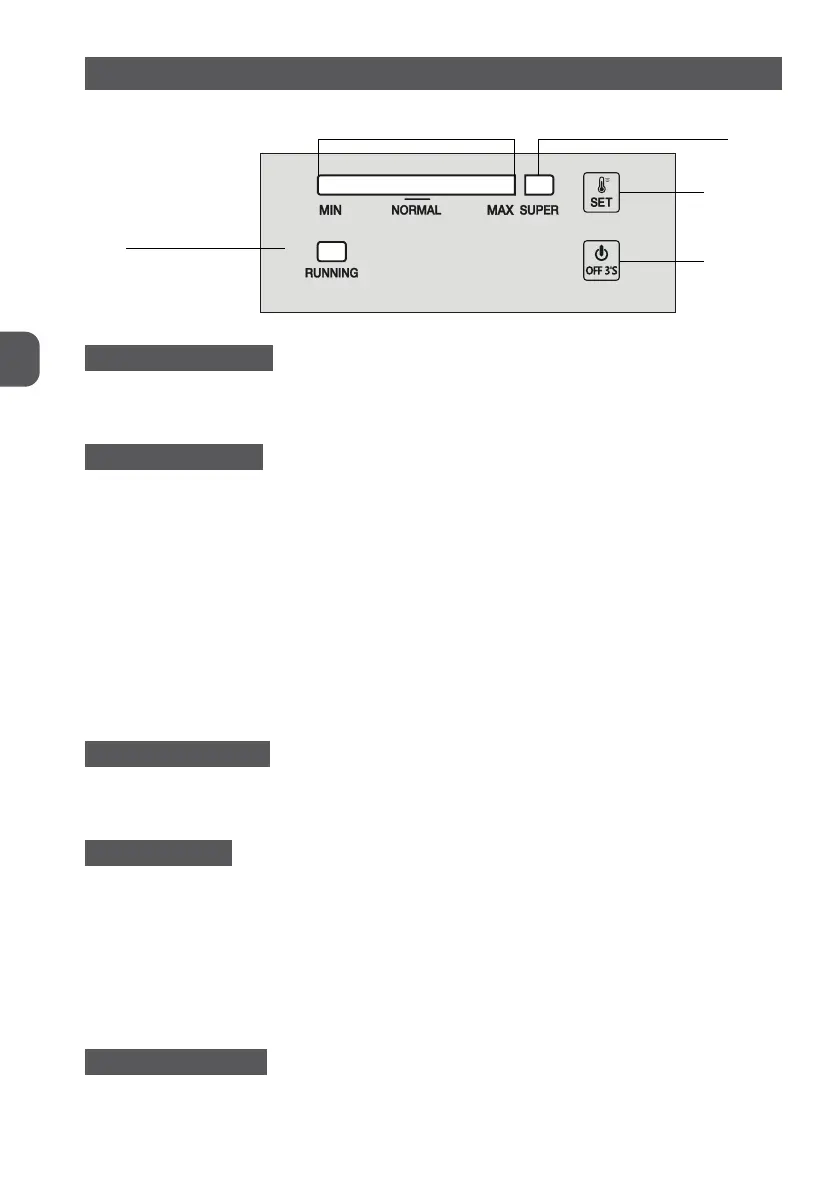
Temperature indicator light Fast freezing indicator light
Set key
OFF key
Running indicator light
ELECTRICAL CONNECTION
When the appliance is plugged in, all LED indicator lights will flash once. Then the appliance
will resume the mode previously set before the electrical outage.
TEMPERATURE SETTING
Setting: Press “SET” button, enter the temperature setting mode. The temperature indicator
bar of temperature goes up a scale by each press. This setting runs in cycles. Temperature
can run from Scale MIN to Scale MAX. Scale MAX is the coldest. The temperature is auto-
matically set in 5 seconds after last press.
Super Freezing
Press “SET” button consecutively to enter “SUPER” freezing mode from Scale MAX, the indicator
bar on the left hereby will turn dark whereas the indicator light of “SUPER” turns on. This
mode is automatically set in 5 seconds after last press.
The compressor keeps working in “SUPER” freezing mode.
If the “SUPER” mode keeps running for 52 hours and not stopped manually, the system will
automatically cut out this mode, with the temperature back at Scale 5.
POWER ON & POWER OFF
If the appliance is working, press “ON/OFF” for 3 seconds to turn off.
If the appliance is off, press “ON/OFF” for 3 seconds to turn on.
INDICATOR LIGHTS
Temperature Indicator Light (Bright Blue): To adjust the temperature from Scale MIN to
Scale MAX. MAX is the coldest.
Super Freezing Indicator Light (Bright Blue): Light on = in “SUPER” mode; light off = exit
“SUPER” mode.
Running Indicator Light (Bright Green): Light on = compressor in work; light off = compres-
sor stops.
30 minutes after the last operation, the indicator light will be on in half luminance.
RESUMPTION FUNCTION
The appliance will automatically resume the mode previously set before the electrical outage.


 To Next Page