31
EN
Wash the device and internal accessories with cool water. After cleaning, rinse with clean
water and wipe dry.
When everything dry out, the device can be turned on and used again.
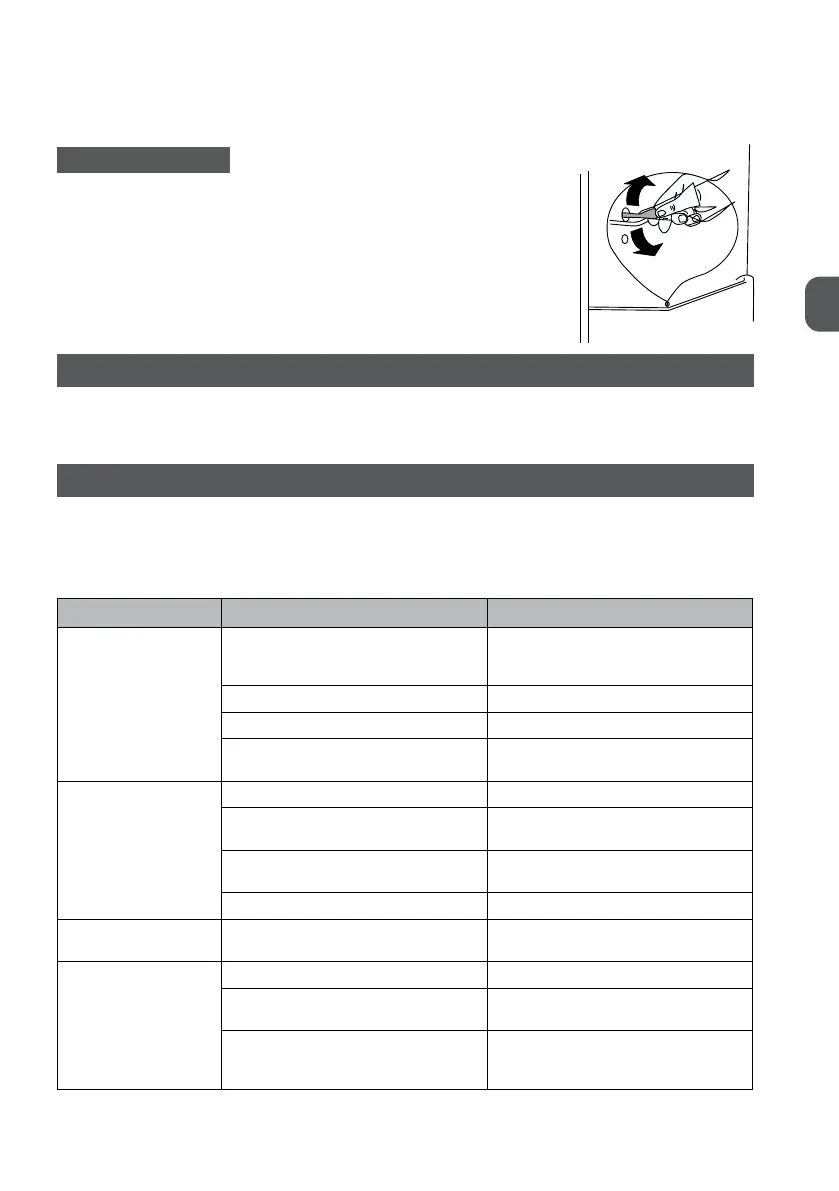
DRAIN HOLE CLEANING
To prevent water from remaining in the refrigerator, the hole situ-
ated at the back of the refrigerator compartment should be clean
periodically. Use detergent to clean the hole and follow the instruc-
tions presented in the picture on the right side.
LIGHT REPLACEMENT
The interior lighting is of the LED type. To replace them, contact a qualified technician.
PROBLEM SOLVING
Caution! Turn off the power before starting any repair. Only a qualified electrician or other competent person
may perform repairs not described in this Manual.
Important! During normal operation, the device may make various noises (compressor, refrigerant circulation).
Problem Possible cause Solution
The device is not
working.
The device is turned off. If the control knob is in the 0 position,
the refrigerator will be turned off. Turn to
position 1 to turn on the cooler.
Mains plug not connected or loose. Insert the plug into the socket.
The fuse has blown or is defective Check fuse and replace if necessary.
The socket is not working Mains failures should be repaired by an
electrician.
The food is warm. The temperature is not properly set. Refer to the "Temperature Setting" section.
The door has been open for too long. Keep the door open only as long as
necessary.
A large amount of warm food has been
placed in the appliance in the last 24 hours.
Temporarily set the temperature control to
the lowest value.
The device is located near heat sources. Refer to the "Mounting Location" section.
The device cools too
much
The temperature is set too low. Temporarily set the temperature control to
the highest value.
Unusual noises The device is not levelled. Adjust the feet.
The device is touching the back wall or
other objects.
Move the device slightly.
A component on the back of the device,
such as a tube, touches another part or
wall.
If necessary, carefully bend this part away
from the wrong side.


 To Next Page