14
EN
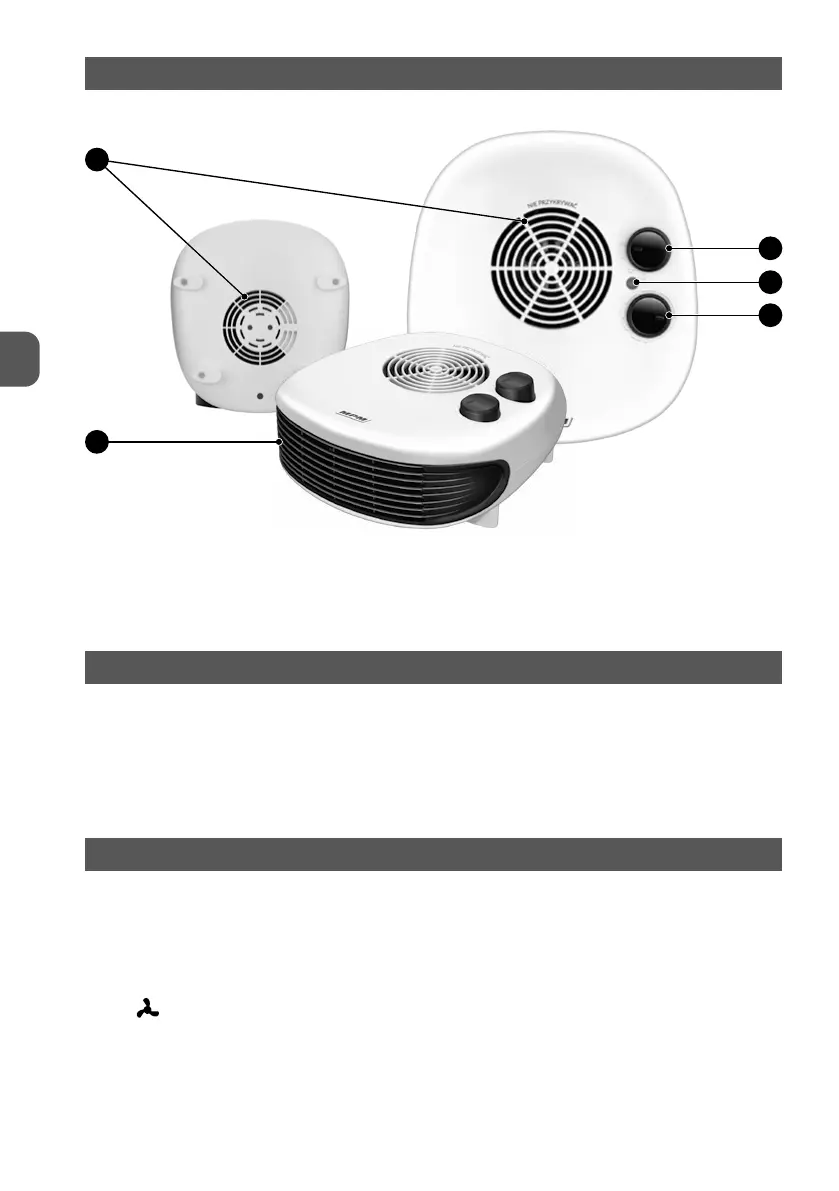
FAN HEATER OVERVIEW
1
2
3
4
5
1. Air intake grilles
2. Function selection knob
3. Thermostat control light
4. Thermostat knob
5. Air outlet grille
BEFORE FIRST USE
1. Remove the fan heater from the box and discard all bags, stickers and filling materials.
2. Inspect the fan heater for damage during transport. If you suspect the fan heater is damaged,
do not use it and contact the seller.
3. When turned on for the first time, the fan heater may smell of hot electrical appliance. This is
normal and will subside after some time of use.
USING THE FAN HEATER
1. Check if the power cord is not damaged
2. Place the fan heater on a flat, dry, stable, even and horizontal surface
3. Connect the device to the mains
4. Use the function selection knob (2) to select the appropriate mode:
- „0” - fan heater off
- „
” - cold airflow
- „1” - hot airflow (1000W)
- „2” – very hot airflow(2000W)
5. The fan heater is equipped with a thermostat knob (4). Set the desired temperature with the
knob. When the desired temperature is reached, the device will switch off - it will resume


 To Next Page