Need help?
Do you have a question about the Mpow BH281A and is the answer not in the manual?
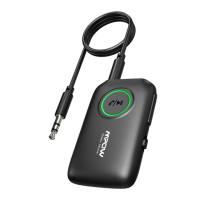
Details Bluetooth version 5.0 and CSR 8670 chipset for the transmitter.
Identifies the product as BH281A with an operational range of 15 meters.
Specifies operating frequency range and battery capacity of 250 mAh li-ion.
Lists supported codecs: aptX™ low latency, aptX™, and SBC for audio transmission.
Details the Micro USB charging port and the 3.5mm audio output port.
Explains the Multifunction button for pairing and the Power Switch.
BH281A supports aptX™ LL and aptX™ for low latency audio experience.
Instructions for powering the device on and off using the power switch.
Steps to enter pairing mode for connecting Bluetooth devices.
Guide for connecting the transmitter to a Bluetooth headphone or speaker.
Procedure to pair a second Bluetooth headphone or speaker simultaneously.
How the device automatically reconnects to previously paired devices.
Instructions on how to clear the transmitter's saved pairing history.
Details on low battery warning signals and charging status indicators.
Key notes on pairing, potential issues, and device compatibility.
Equipment tested and found to comply with FCC limits for Class B digital device.
User guidance on correcting potential radio interference issues.
Device must not cause harmful interference and must accept received interference.
This document outlines the operation and features of the BH281A Bluetooth Transmitter, a device designed to enable wireless audio transmission. The transmitter facilitates the connection of non-Bluetooth audio sources, such as televisions or computers, to Bluetooth headphones or speakers, allowing for a wireless listening experience.
The BH281A acts as a bridge, converting audio signals from wired sources into Bluetooth signals that can be received by compatible wireless audio devices. It supports Bluetooth version 5.0 and utilizes the A2DP protocol for audio streaming. A key feature of this transmitter is its support for various Bluetooth audio codecs, including aptX™ low latency (APTX LL), aptX™ (APTX), and SBC. The inclusion of aptX™ low latency is particularly beneficial for applications where minimizing audio delay is crucial, such as watching videos or playing games, ensuring that the audio remains synchronized with the visual content. However, to fully utilize the low latency function, the connected Bluetooth headphones or speakers must also support aptX™ low latency. If the receiving device only supports standard aptX™ or SBC, the transmission will default to the highest common supported codec.
The device is capable of connecting to up to two Bluetooth headphones or speakers simultaneously, enabling a shared listening experience. This dual-connection capability is useful for situations where two individuals wish to listen to the same audio source wirelessly. The pairing process involves activating the pairing mode on the transmitter and then on the receiving Bluetooth devices. The BH281A prioritizes reconnection to the last two paired devices upon power-on, streamlining the user experience for frequent users. If reconnection fails within a specified timeframe, the device automatically enters pairing mode, or the user can manually initiate it.
Operating the BH281A is straightforward, with a focus on ease of use. The device features a simple power switch for turning it on and off. Upon powering on, a blue indicator light flashes quickly to signify pairing mode or once every second for reconnection state. Powering off is indicated by the red indicator light flashing twice. An automatic standby function conserves battery life: if no operation or connection occurs in power-on state, the device enters standby, disabling pairing mode and turning off the blue indicator light. To re-enable pairing from standby, a short press of the multifunction button is required.
The multifunction button serves multiple purposes: a short press activates pairing mode, while a long press (5 seconds) clears the pairing list. This allows users to easily manage their connected devices or reset the pairing history.
Connecting to the first Bluetooth headphone involves connecting the BH281A to an audio source (e.g., TV, computer) via an audio cable, then activating pairing mode on both the transmitter and the headphone. The distance between the BH281A and the receiving device should be kept within 1 meter during the connection process, which typically takes 5-30 seconds. Different lighting modes on the blue indicator light signify the active codec: a steady blue light for SBC, a flash every 10 seconds for APTX, and two flashes every 10 seconds for APTX LL.
For connecting a second Bluetooth headphone, the process is similar: after the first headphone is connected, the second headphone is turned on and put into its Bluetooth pairing mode. A short press of the multifunction button on the BH281A then initiates pairing with the second device. Again, a close proximity (within 1 meter) is recommended for a successful connection, which may take 5-30 seconds. The red indicator light will flash once to confirm the connection of the second device. The lighting modes for the blue indicator light will then reflect the codecs supported by both headphones: steady blue for SBC (if either headphone only supports SBC), a flash every 10 seconds for APTX (if both support APTX), and two flashes every 10 seconds for APTX LL (if both support APTX LL).
The BH281A incorporates features to ensure its longevity and reliable performance. It includes a low battery warning system, where a red indicator light flashes when the battery level is critically low. This prompts the user to charge the device using a 5V power source via the Micro USB charging port. During charging, the red indicator light remains on, turning off once the transmitter is fully charged.
For optimal performance, several recommendations are provided. If the BH281A fails to pair with two devices simultaneously, rebooting the device and attempting to pair again is suggested. To avoid potential issues such as intermittent music, no sound, or disconnections when using two headphones, it is recommended to use headphones with the same chips. Furthermore, for a better overall music quality, selecting headphones of the same model when pairing two simultaneously with the BH281A is advised.
It is important to note that the BH281A is specifically designed to be paired with Bluetooth headphones or Bluetooth speakers and cannot be paired with smartphones or other similar devices. This specialization ensures its dedicated function as an audio transmitter.
Regarding charging, it is mentioned that charging the device during operation may introduce noise or current sounds due to potential power or current instability. This suggests that for the best audio experience, charging should ideally be done when the device is not actively transmitting audio.
The device also includes a clear pairing list function, activated by a long press of the multifunction button for 5 seconds while the device is powered on. This action is indicated by the red and blue indicator lights flashing twice simultaneously (appearing as a mixed color due to overlap), after which the BH281A enters pairing mode, ready for new connections. This feature is useful for troubleshooting pairing issues or for preparing the device for new connections.
 General
| Bluetooth Version | 5.0 |
|---|---|
| Bluetooth Range | 10 meters (33 feet) |
| Input | 3.5mm audio jack |
| Transmission Range | 10 meters (33 feet) |
| Compatibility | Bluetooth-enabled devices |

 To Next Page