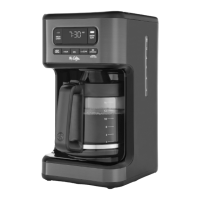
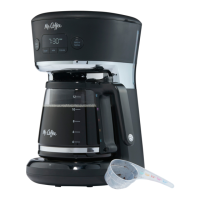
The Mr. Coffee Pod + 10-Cup Space Saving Combo Brewer is a versatile coffee maker designed for both single-serve pods and traditional carafe brewing, offering flexibility and convenience for various coffee preferences.
Function Description:
This combo brewer allows users to brew coffee in two distinct ways:
- Single-Serve Pods: Ideal for individual servings, this mode utilizes coffee pods to quickly brew a fresh cup.
- 10-Cup Carafe: For larger quantities, the brewer can prepare up to 10 cups of coffee into a thermal carafe, suitable for multiple servings or entertaining.
The device features a "Strong Brew Function" which slows down the brewing process to ensure hot water fully saturates the coffee grounds, extracting bolder flavors. This function includes a pause in the brewing process to enhance flavor extraction. Additionally, a "Brew Later Function" allows users to program the coffeemaker to start brewing at a desired later time, providing convenience for morning routines.
Important Technical Specifications:
While specific power ratings (voltage, wattage) are not explicitly detailed, the manual mentions that the appliance has a polarized plug, indicating it is designed for North American electrical outlets. The carafe capacity is 10 cups, with single-serve options for 8 oz, 10 oz, and 12 oz. The water reservoir has a MAX fill line, and the advanced water filtration system is designed to reduce impurities like chlorine and calcium. The product number is BVMC-SS12XTH 2121469, and the part number is P.N. NWL0001317331.
Usage Features:
- Control Panel: The brewer is equipped with an intuitive control panel featuring:
- Brew Later Button and Indicator: For programming delayed brewing.
- Clock Display: Shows the current time and programmed brew time.
- AM/PM Indicator: For time display.
- Water Indicator: Likely indicates water level or status.
- Ounces and Cups Indicators: To display selected brew size.
- Strong Indicator and Button: To activate and show the strong brew function.
- Brew Now Button and Indicator: To initiate immediate brewing.
- Size Button: To select desired cup or carafe size (4, 6, 8, 10 cups for carafe; 8, 10, 12 oz for single serve).
- Minute and Hour Buttons: For setting the clock and brew later time.
- Water Reservoir: A removable water reservoir with a lid and an advanced water filtration holder and cartridge ensures fresh, filtered water for brewing.
- Brew Basket: This component is essential for both carafe and single-cup brewing. For single-cup use, a "Pod Holder" is inserted into the brew basket.
- Thermal Carafe: Designed to keep coffee warm.
- Drip Tray: Catches drips and spills, maintaining cleanliness.
- Grab-a-cup Auto Pause Lever: Allows users to pour a cup mid-brew without making a mess.
- Single Cup Sensor: Likely detects the presence of a single-serve pod or reusable filter.
- Coffeemaker Extras (not included with all models): These include an advanced water filtration holder, an advanced water filtration cartridge, and a reusable single-serve coffee filter, enhancing the brewing experience and reducing waste.
- Setting the Clock: The clock is set using the HR and MIN buttons, with a 5-second inactivity period to confirm the time.
- Brewing a Single Cup:
- Fill the water reservoir to the MAX line with cold, fresh water.
- Place the Pod Holder inside the Brew Basket.
- Insert a coffee pod or a reusable single-serve coffee filter (with grounds) into the Pod Holder and close its lid.
- Slide the Brew Basket into place and position a mug under it.
- Select the desired cup size (8, 10, or 12 oz) using the SIZE button.
- Press BREW NOW to start brewing. An audible signal indicates completion.
- Brewing a Carafe:
- Fill the water reservoir to the MAX line with cold, fresh water.
- Slide out the Brew Basket, remove the Pod Holder (if present), and place a 10-12 cup paper filter or a reusable coffee filter (not included) inside.
- Scoop the desired amount of coffee grounds into the filter (refer to the Coffee Measurement Chart).
- Slide the Brew Basket back into place and position the thermal carafe on the drip tray.
- Select the desired cup size (4, 6, 8, or 10 cups) using the SIZE button.
- Press BREW NOW to start brewing. An audible signal indicates completion.
- Strong Brew Function: Activate by pressing the STRONG button once before brewing. The Strong Indicator will illuminate. To turn off, press STRONG again.
- Brew Later Function:
- Set the clock first.
- Follow the steps for brewing a single cup or carafe.
- Press BREW LATER. The Brew Later Indicator will light up, the clock will flash, and SET BREW LATER will illuminate.
- Set the desired brew time using the HR and MIN buttons. After 5 seconds of inactivity, the time is set, and SET BREW LATER changes to BREW LATER.
- To cancel, press BREW LATER again. The coffeemaker remembers the set time until changed or unplugged, but the BREW LATER button must be pressed each time for delayed brewing.
- Water Quality: Emphasizes using fresh, cold, filtered water to avoid impurities and enhance coffee taste.
Maintenance Features:
- Cleanliness: Regular cleaning is crucial for optimal coffee taste.
- Daily Cleaning:
- Unplug the coffeemaker and allow it to cool.
- Remove and wash the Carafe, Carafe Lid, Brew Basket, Pod Holder, Removable Water Reservoir, and Reusable Single Serve Coffee Filter with mild detergent and water.
- The Brew Basket, Pod Holder, and Reusable Single Serve Coffee Filter are top-rack dishwasher safe.
- The Carafe, Carafe Lid, and Removable Water Reservoir are NOT dishwasher safe and should be hand washed.
- Decalcifying: Minerals (calcium/limestone) can build up and affect performance.
- Frequency: Every 80 brew cycles for soft water, every 40 brew cycles for hard water.
- Process:
- Remove the Advanced Water Filtration System from the reservoir.
- Prepare 4 cups (20 fl. oz.) of undiluted white household vinegar and pour it into the water reservoir.
- Place an empty 10-12 cup basket-style paper filter or Mr. Coffee Reusable Coffee Filter (not included) into the Brew Basket and slide it into place.
- Place the empty carafe on the drip tray.
- Select 4 cups using the SIZE button, then press BREW NOW to brew the cleaning solution.
- After brewing, let stand for 30 minutes.
- Discard the solution and rinse the carafe.
- Fill the reservoir with 10 cups of fresh water.
- Place the empty carafe back on the unit.
- Remove and discard the paper filter (or rinse the reusable filter).
- Press BREW NOW to complete a full brew cycle with hot water.
- Discard water and rinse the carafe.
- Repeat steps 8-12 once more for thorough rinsing.
- Carafe Use and Care: To remove white or brown stains from hard water or coffee, fill the carafe with equal parts water and vinegar, let it stand for 20 minutes, then discard and rinse. Avoid abrasive cleaners.
- Advanced Water Filtration System Maintenance:
- Soak the cartridge in cold water for 5 minutes, then rinse for 1 minute.
- Insert a new cartridge into the bottom hatch of the filtration system.
- Place the system in the designated slot in the water reservoir.
- Replace the cartridge after 30 days or 30 uses, whichever comes first.
Troubleshooting: The manual provides a comprehensive troubleshooting guide covering issues such as the BREW NOW light not illuminating, coffee not brewing, slow brewing, filter basket overflow, coffee not being hot, and bad-tasting coffee, offering possible causes and solutions for each. It also addresses display issues (e.g., "No Water" flashing, "Add Water" sign with a full reservoir) and single-cup coffee taste issues.
Warranty: A 1-year limited warranty covers defects in material and workmanship. Sunbeam, at its option, will repair or replace defective products. The warranty is valid for the original retail purchaser and requires proof of purchase. It does not cover damage from negligent use, misuse, improper voltage, unauthorized repairs, or acts of God. Service can be obtained by calling 1-800-MR COFFEE.

 Need help?
 General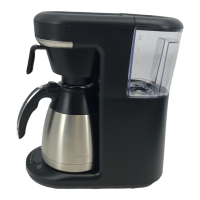

 To Next Page