EasyManua.ls Logo

MrCool MST05 - Page 11

MrCool MST05
20 pages
Print Icon
To Next Page IconTo Next Page
To Previous Page IconTo Previous Page
Loading...
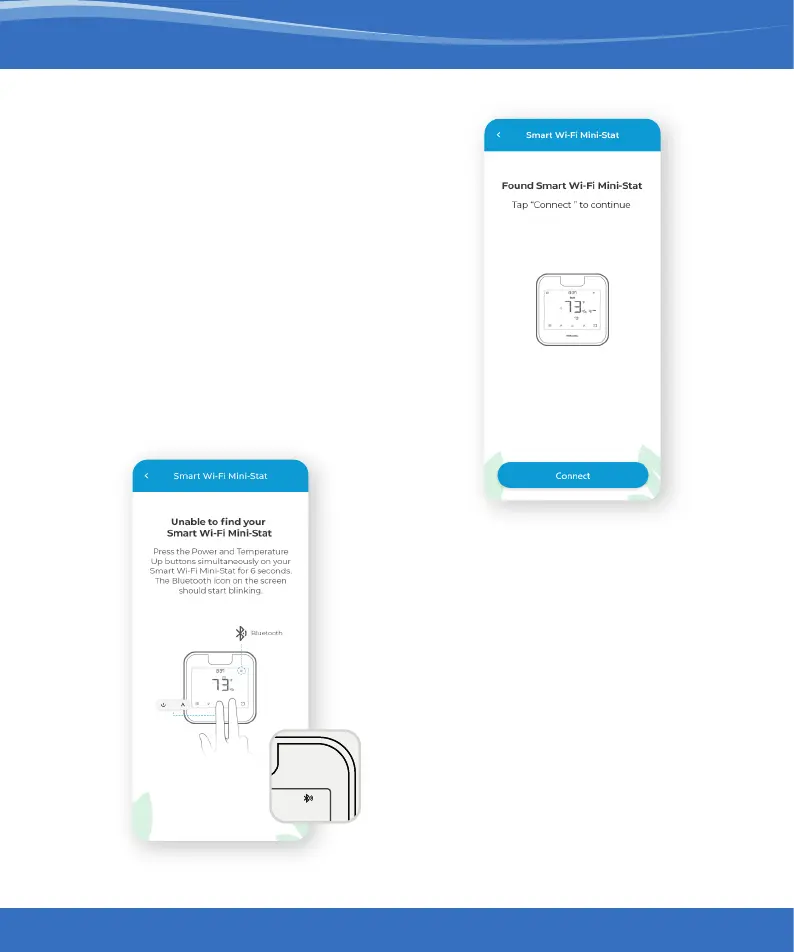
Step 3:
Wait for Smart Wi-Fi Mini-Stat
to appear on the screen.
Then, tap ‘Connect’.
Note:
In case Smart Wi-Fi Mini-Stat
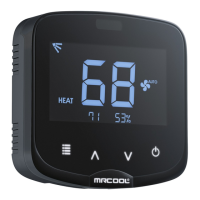
does not appear, touch and hold the
Power and Temperature Up buttons
simultaneously for 6 seconds.
The Bluetooth icon on the screen
should start blinking and the app
will automatically move
to the next screen.
73
70.8
Cooling to
45%
Heating to
13:37
AM
PM
f
DR
Heat
Aux
Fan
Auto
Cool
Dry
Following
Schedule
Permanent
Hold
Temporary
Hold
Cancel
Hold
Sensor
Linked
Auto
Quiet
Fan
On
Fan
Circ
Fan On
Aux Heat On
73
70.8
Cooling to
45%
Heating to
13:37
AM
PM
f
DR
Heat
Aux
Fan
Auto
Cool
Dry
Following
Schedule
Permanent
Hold
Temporary
Hold
Cancel
Hold
Sensor
Linked
Auto
Quiet
Fan
On
Fan
Circ
Fan On
Aux Heat On
10
mrcool.com