(4) Make sure the connection is solid between battery or motor. The ongoing vibration may cause bad connection of power
terminal and make the drone uncontrollable.
Battery Installation & Charging
Controller
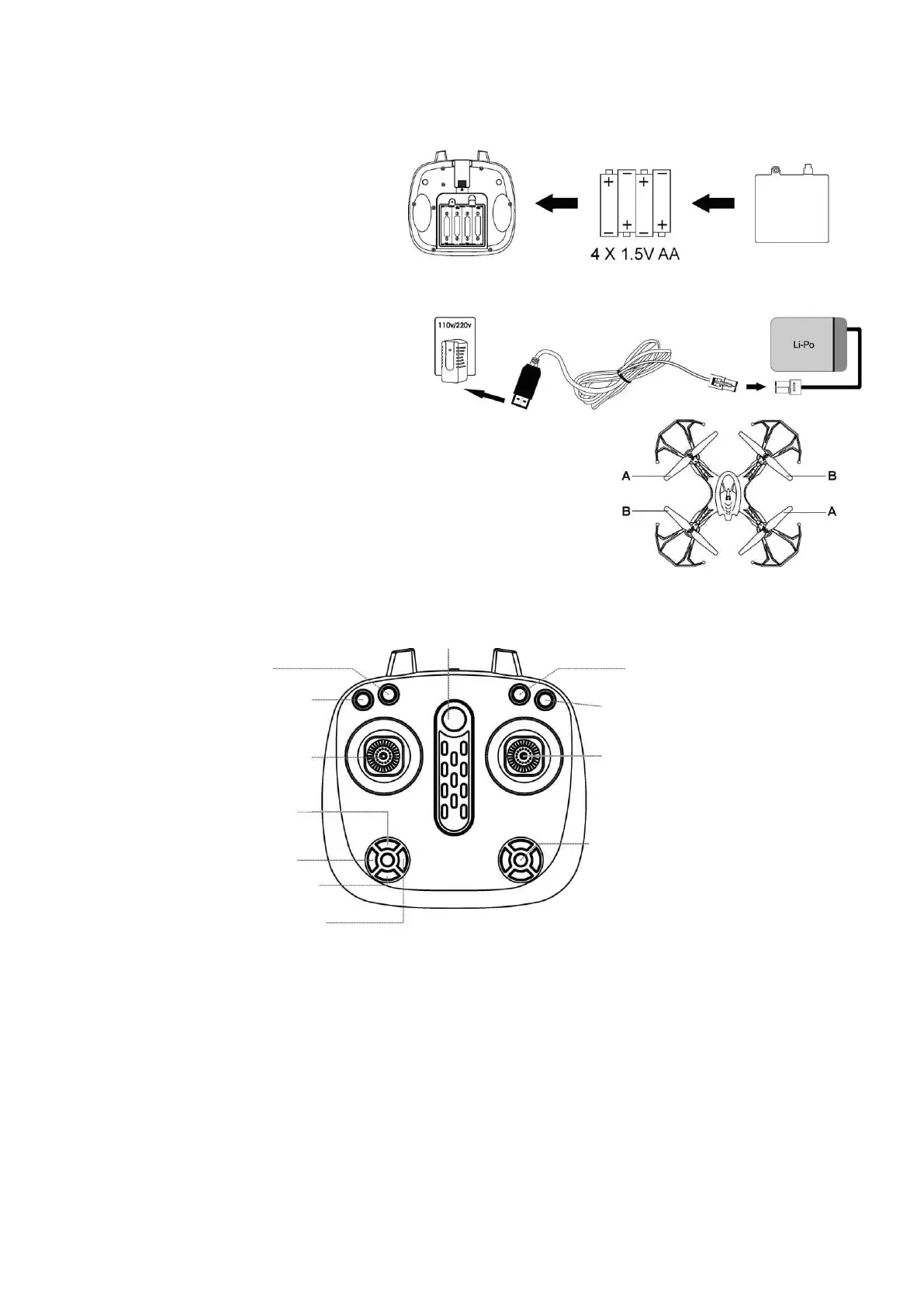
To install batteries: Open the cover of battery case,
insert 4 x 1.5V AA batteries, according to the indicated
polarity (batteries not included).
Note: Battery installation should be done under adult supervision only! Do not mix old and new batteries. Do not mix different
types of batteries.
Charging
Connect one side of the USB connector with the Li-Po
battery, and the other side into the USB port of any
standard AC adapter (Not included) of smartphones.
Drone
Replacing the damaged blades: Your set will come with 4 spare rotors, two type A and
two type B. You will see the "A" and "B" word on the canopy, then put the rotor on the
motor accordingly.
Remote Control
2. Take-off (short press)
Land (short press)
4. GPS On/Off
GPS On: Di~Di (Long beep)
GPS Off: Di (Short beep)
6. Right joystick (Rudder)
(Forward/Backward/Leftward/
Rightward)
8. Headless mode (Short press)
One Key Return (Long press)


 To Next Page
 Loading...