4 .One key take off and landing
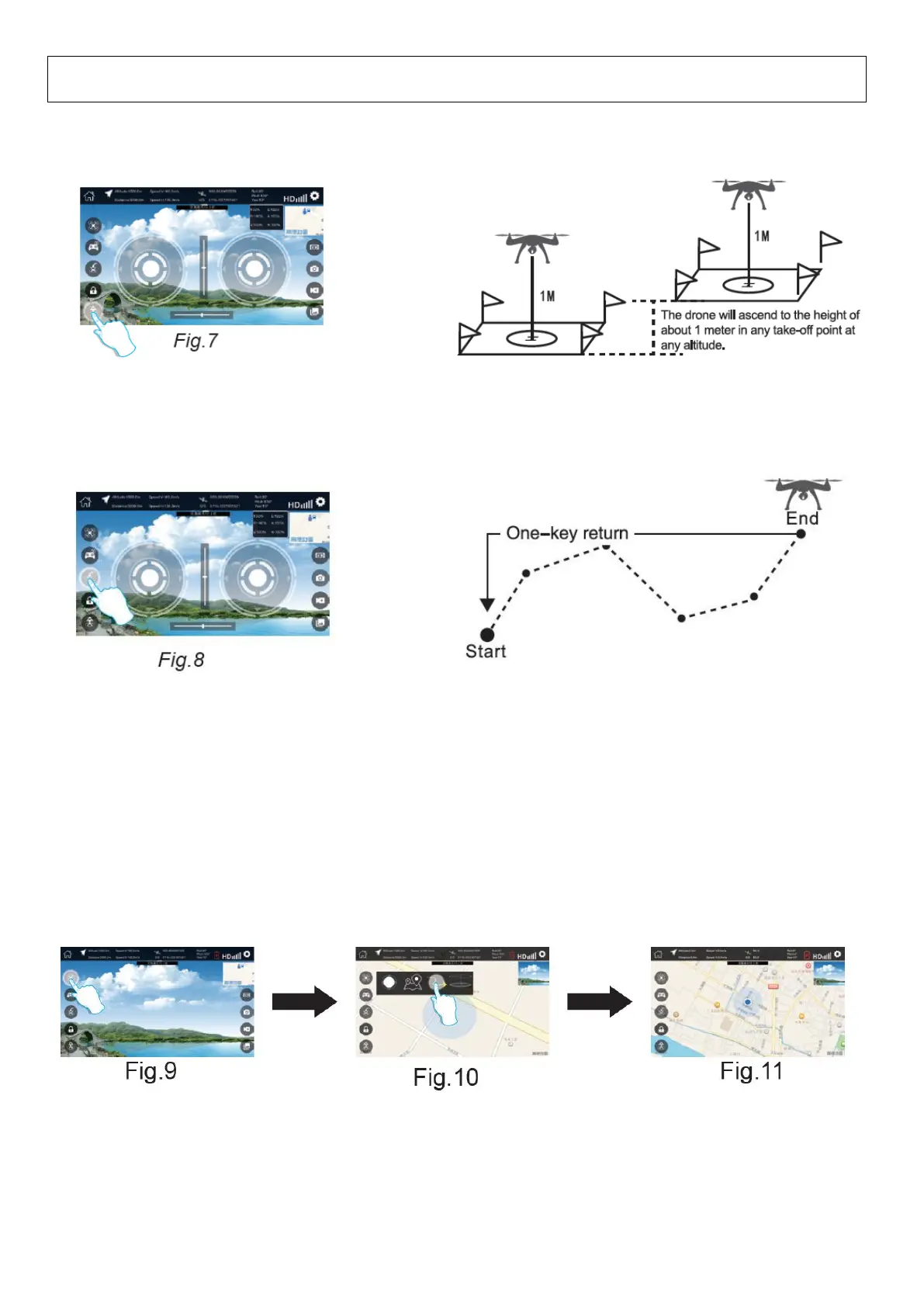
After unlock, the motors will running normally, press “one key take off/landing ” key, the drone will rise about 1 meter or
more, then you can keep it steady fly above; if you press “one key take off/landing” key, again, then it can automatically
landing.
5. One key return
(1)When the drone fly away, press “one key return” (Fig.8), then it will return to its original place. Note: (1) when
the drone LED lights flash slowly, it indicates the drone is low power. Thus you have to pay more attention to it, fly it
within your sight or landing it.
(2) In addition, the drone will automatically return to its original place if low power or lose 2.4G/WIFI signals.
WARNING
Note:
1. After you use “follow me/Waypoint flight/Surround mode” function, you have to press “joystick control mode” key, to enter
into joystick control mode. Or else, the one key take off/landing, one key return or other function cannot be used, or the drone
will be fly away or missing, pls remember this.
2. We do not suggest to use other function when the drone is under “follow me/Waypoint flight/Surround mode” mode, or else,
the drone will fly away or missing. Please use other function after “follow me/ Waypoint flight/Surround mode” function is
finished.
6. Waypoint mode (Not available for this drone)
7. Follow me
Enter the main interface, open the function menu and press “follow me” button(Fig.9 to 10), the drone automatically follow
your mobile phone , and the distance is abased on your location and drone location when you press the button.
Notice: after changing the location of the drone, If the drone does not have the power or exit follow me function, use one
key return function, the return landing point of the drone is not the initial take-off location, but the follow me mode final
location.
8. Surround mode (Not available for this drone)
Joystick control mode, waypoint flight mode, follow me mode, surround mode and other functions enabled.lt ¥U MG ^ must be
performed after unlocking the drone and then clicking on the one key take-off. Otherwise, the button icon will be invalid.


 To Next Page
 Loading...