HOW TO THE DRONE WITH APP (just app, no remote controller)
1. Turn on the drone
Turn on the drone, put it on a (horizontal) flat place, the drone leds will be flash normally. Note: the drone is with GPS, so
please fly it outside the house, and make sure the space is big enough, not to much electromagnetic interference around;
2. Magnetometer calibrate(Compass Calibration)
It is easy to be distrubed by electromagnetic interference around, so please compass calibration;
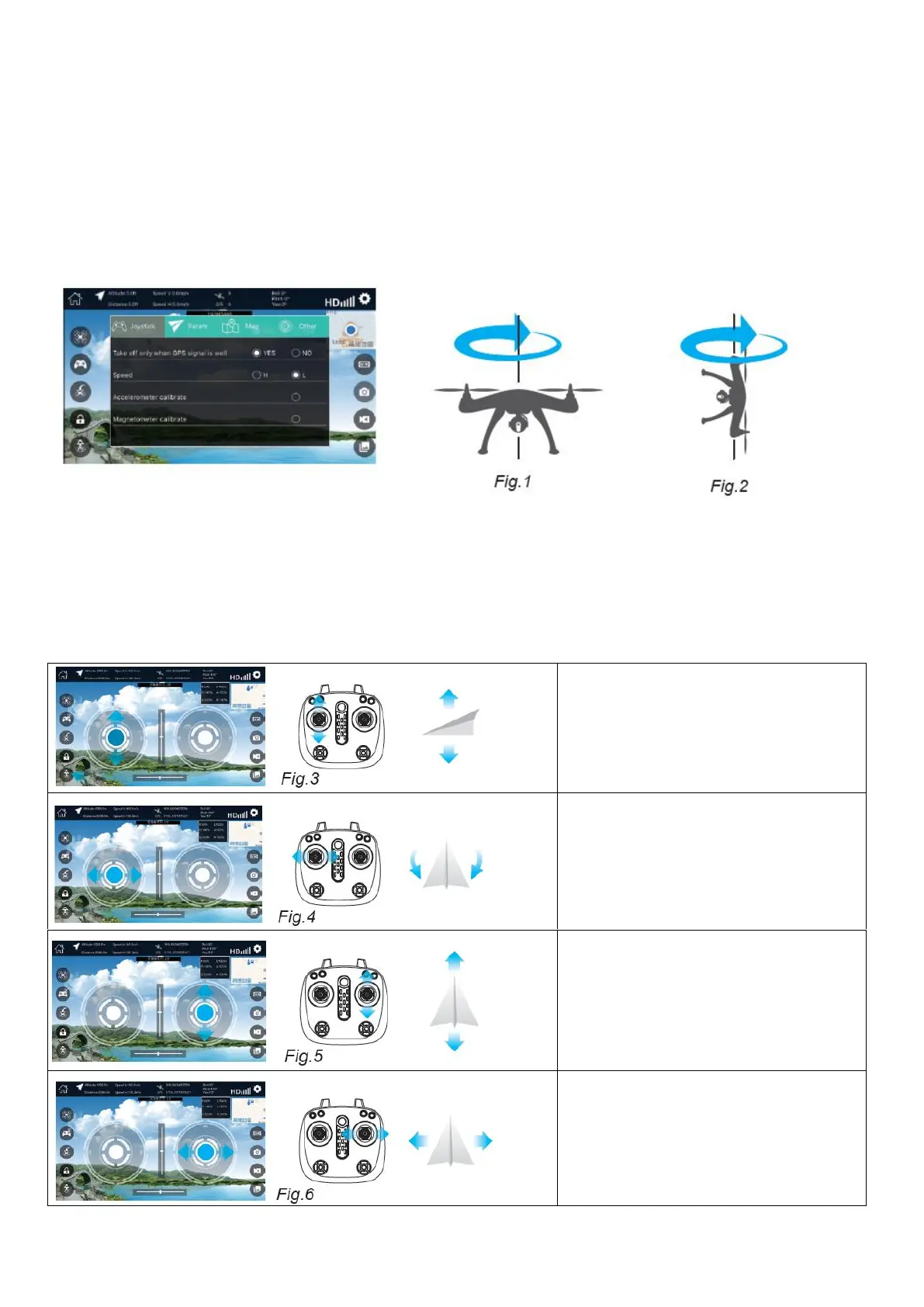
(1) Open the app and enter into the app setting,there are 4 options, pls press “Joystick” and page down , you will find
“Magnetometer calibrate”; and then the drone body leds will flash quickly, indicating that it can be calibrated now. so please
Hold the drone on hand, rotate it Horizontally for 3 circles first, then Vertically (camera facing up) for 3 circles, afterwards
place it on a flat surface, the LED lights flashes slowly and Magnetometer(compass) calibration is completed.
(2) Searching for GPS signal
After completing the Magnetometer (compass) calibration, keep waiting for 30-40 seconds until the drone LED lights stop
flashing and remain ON, GPS signal has been well received.
3. Fly the drone
Press the “display joystick control” and you will see the virtual joystick interface, press “unlocking” key, then the motors start
to run. Note: There is a warning “Yes or No” that appears after you press the “unlocking key,one key take off/landing” button,
You should press “Yes” to confirm the function when prepared well, and press “No” to cancel the request.
1. Press “one key take off” key or push the
left joysticker to up, it will up. If push down,
it will down too. If press one key landing, it
will landing.


 To Next Page
 Loading...