INTRODUCTION 12
Control Panel Description
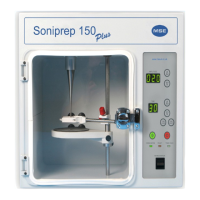
The control panel is situated on the right hand side of the unit. A brief
description of their individual functions follows:
Amplitude Meter - The meter is calibrated in microns and monitors the probe
amplitude, that is, the actual movement peak-to-peak that is taking place at the
transducer/probe interface. Multiplying the meter indication by the
transformation ratio of the particular probe in use (See Table 1) allows actual
movement of the probe tip to be determined.
Power Control –The UP and DOWN arrows next to the Amplitude meter
window are used to increase or decrease the amplitude level displayed on the
amplitude meter. (In order to set the amplitude level the green start button
has to be pressed first)
This control permits stepped selection of power output to the transducer,
providing an accurate and reproducible amplitude setting for the particular
probe in use.
Timer - This is a 99 minute timing unit which can be used for timed runs or in a
continous running mode. At the end of a timed run the Soniprep will turn itself
off and the timer will reset itself to the last selected time. The timed run will start
when the GREEN start button is pressed.
The timed run required is selected by the UP and DOWN arrows next to the
TIME window. Set the time required and press START (green switch). The
sonication lamp will be illuminated, ultra sonication will commence and the timer
will start run-down to zero. When the time selected has expired, the unit will
switch off automatically and the sonication lamp will go off.
Time Hold Switch - When selected and the start (GREEN) button is pressed
the unit will operate continuously and the minutes of operation will count up.
Sonication Lamp - When the lamp is illuminated, it indicates that the power is
through to the transducer and there fore to the probe.


 To Next Page