English
En-7
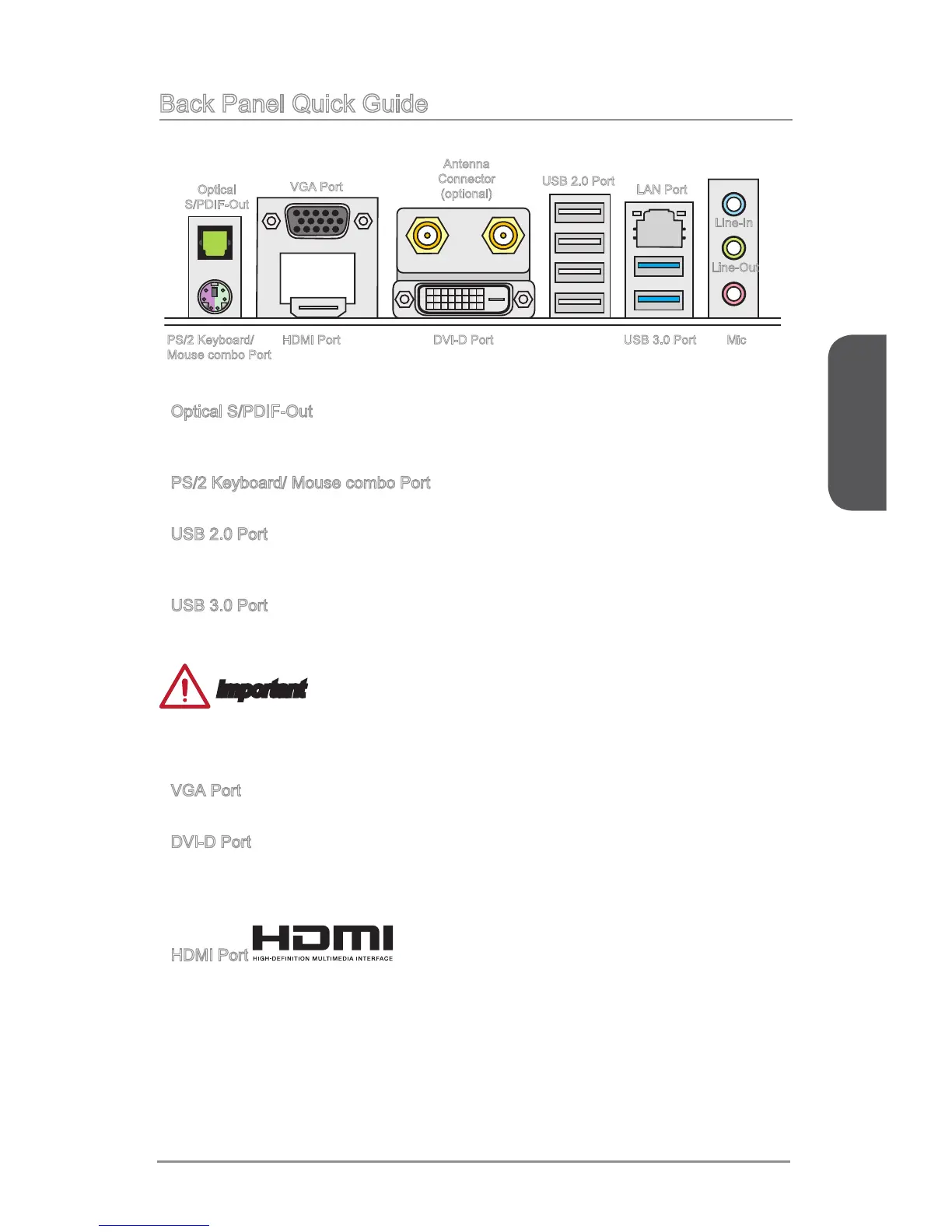
Back Panel Quick Guide
Optical S/PDIF-Out
This S/PDIF (Sony & Philips Digital Interconnect Format) connector is provided for
digital audio transmission to external speakers through an optical ber cable.
PS/2 Keyboard/ Mouse combo Port
The PS/2
®
keyboard/ mouse DIN connector for PS/2
®
keyboard/ mouse.
USB 2.0 Port
The USB 2.0 port is for attaching USB 2.0 devices such as keyboard, mouse, or other
USB 2.0-compatible devices.
USB 3.0 Port
USB 3.0 port is backward-compatible with USB 2.0 devices. It supports data transfer
rate up to 5 Gbit/s (SuperSpeed).
Important
In order to use USB 3.0 devices, you must connect to a USB 3.0 port. If a USB cable
is used, it must be USB 3.0 compliant.
VGA Port
The DB15-pin female connector is provided for monitor.
DVI-D Port
The DVI-D (Digital Visual Interface- Digital) connector can be connected to a LCD
monitor, or a CRT monitor with an adapter. To connect a monitor, please refer to the
monitor’s manual for more information.
HDMI Port
The High-Denition Multimedia Interface (HDMI) is an all-digital audio-video interface
that is capable of transmitting uncompressed streams. HDMI supports all types of TV
formats, including standard, enhanced, or high-denition video, plus multi-channel
digital audio on a single cable.
▶
▶
▶
▶
▶
▶
▶
Line-In
Line-Out
MicUSB 3.0 Port
LAN Port
PS/2 Keyboard/
Mouse combo Port
USB 2.0 Port
HDMI Port
VGA Port
DVI-D Port
Antenna
Connector
(optional)
Optical
S/PDIF-Out




 To Next Page