12
Gaming
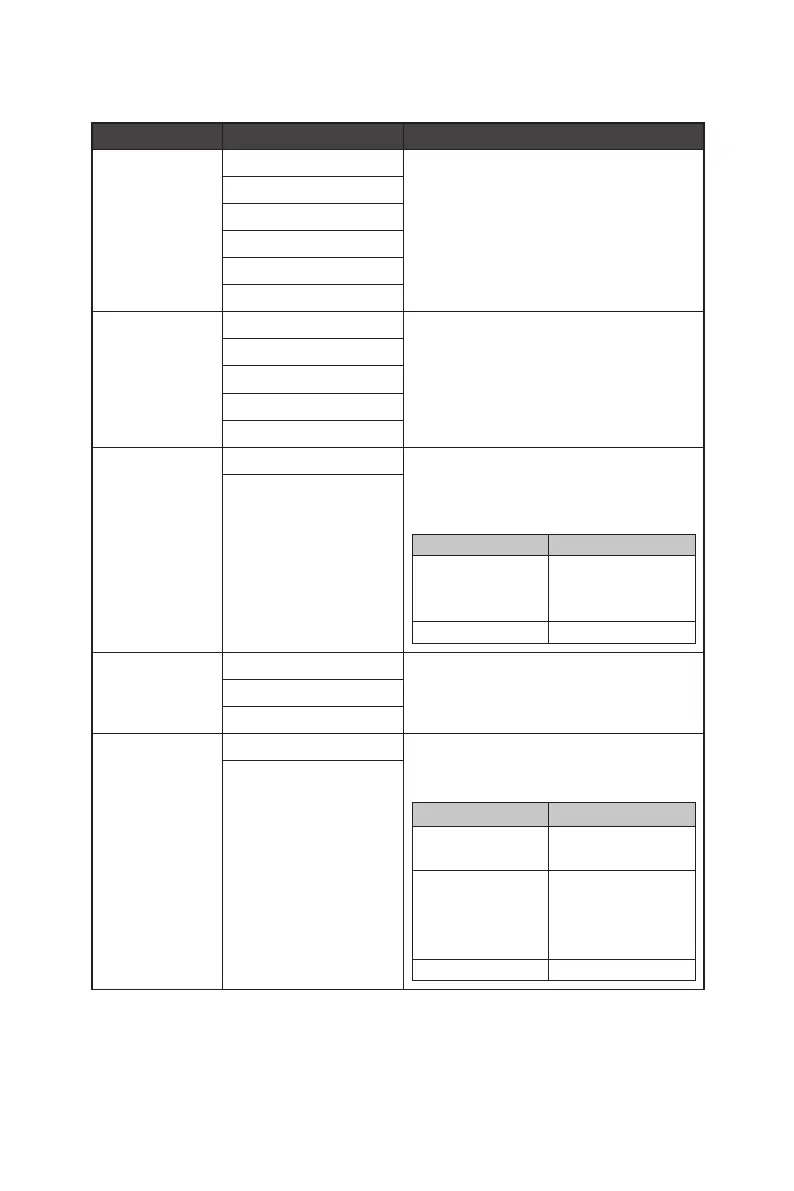
1st Level Menu 2nd/3rd Level Menu Description
Game Mode Premium Color ∙ Use Up or Down Button to select and preview
mode effects.
∙ Press the OK Button to confirm and apply your
mode type.
User
FPS
Racing
RTS
RPG
Night Vision OFF ∙ This function optimizes background brightness
and is recommended for FPS games.
Normal
Strong
Strongest
A.I.
AI Vision OFF ∙ AI Vision enhances image quality by optimizing
the contrast of images and background
brightness.
∙ Activating AI Vision will affect:
Affected Function Function Status
» Night Vision
» Brightness
» HDCR
Unable to select
» MPRT Set to OFF
ON
Response Time Normal ∙ Setting to Fastest will reach the shortest
response time and help improve blurred images
when playing very fast games.
Fast
Fastest
MPRT OFF ∙ MPRT is available when the refresh rate is over
85Hz.
∙ Activating MPRT will affect:
Affected Function Function Status
» Response Time
» Brightness
Unable to select
» Adaptive-Sync
» HDCR
» PIP/PBP
» AI Vision
Set to OFF
» Screen Size 1:1 Set to Auto
ON




 To Next Page