Home
MSI
Touch Panel
MS-9A91
Page 22
MSI MS-9A91 - Page 22
30 pages
Manual
Save Page as PDF
To Next Page
To Next Page
To Previous Page
To Previous Page
Loading...
2-6
Getting Started
MS-9A91
h
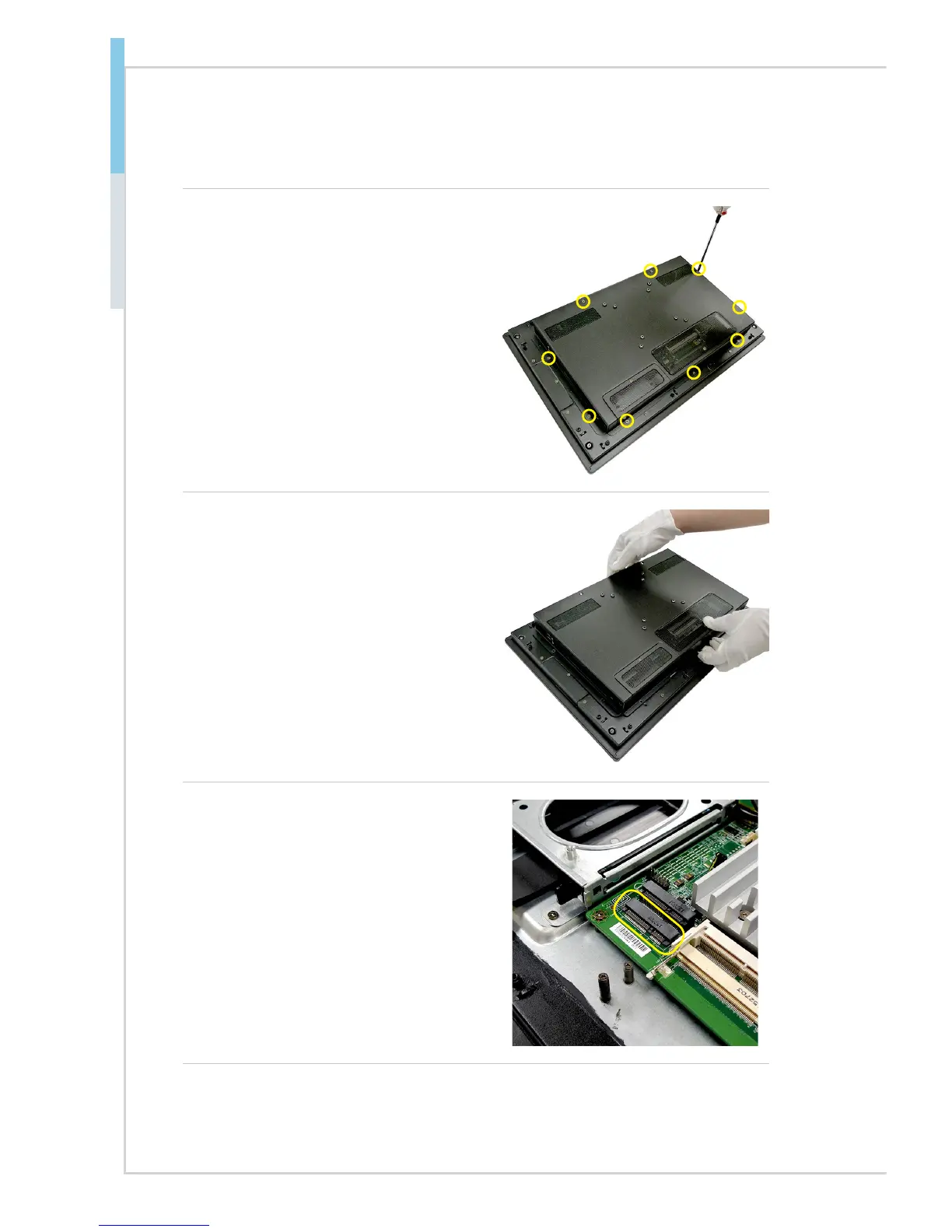
Installing WiFi/Bluetooth Card
1. Locate the screws that secure the
system rear cover
. Unscrew them
and keep them for later use.
2. Pull the rear cover carefully upwards
and set it aside for later use.
3. Locate the Mini-PCIe slot.
21
23
Table of Contents
Main Page
Default Chapter
2
Copyright Notice
2
Revision History
2
Technical Support
2
Safety Instructions
3
Chemical Substances Information
4
CE Conformity
5
FCC-A Radio Frequency Interference Statement
5
WEEE Statement
5
Japan JIS C 0950 Material Declaration
6
Turkey EEE Regulation
6
Ukraine Restriction of Hazardous Substances
6
Vietnam Rohs
7
Table of Contents
8
1 Overview
9
System Overview
10
Touch Screen
11
System Specifications
13
Power Supply
14
ME Overview
15
2 Getting Started
17
Installing Components
18
Mounting the System
28
Vesa Mounting
30



 To Next Page