En-31
Englsh
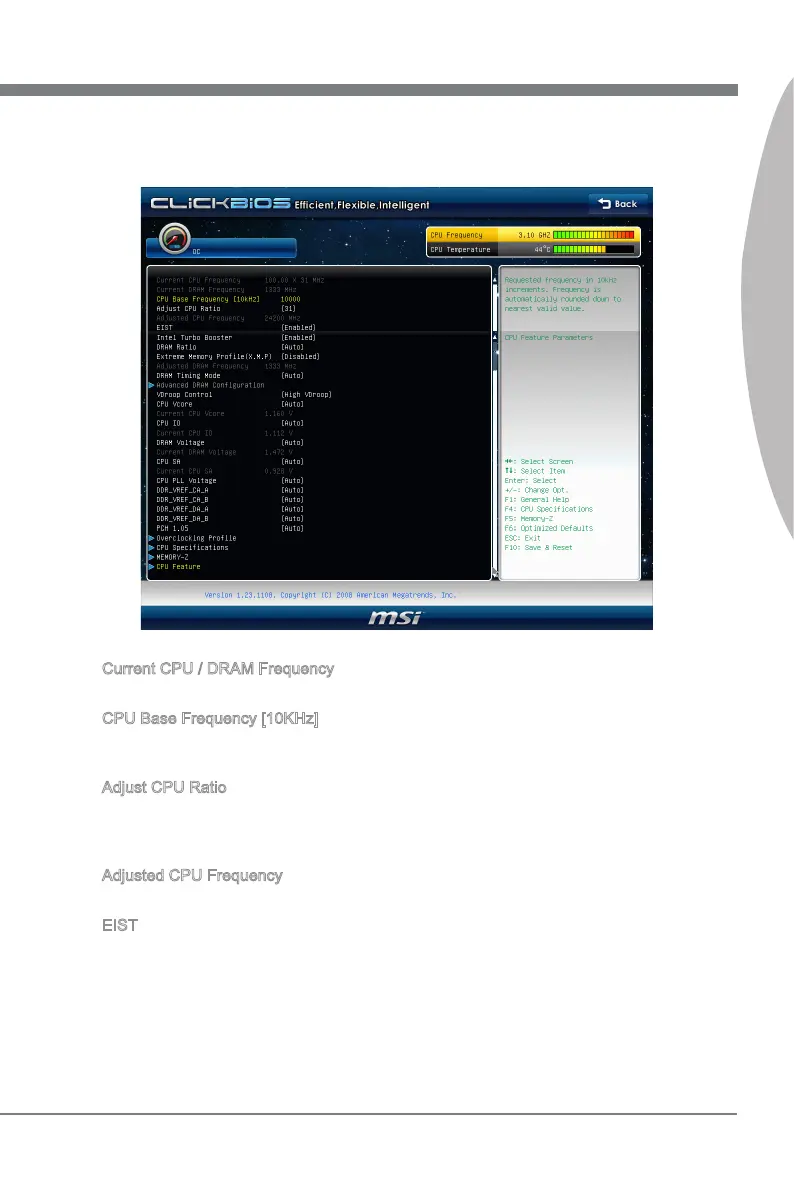
OC Menu Introducton : Ths menu s for advanced user who want to overclock the
manboard.
4.
Current CPU / DRAM Frequency
These tems show the current clocks of CPU and Memory speed. Read-only.
CPU Base Frequency [10KHz]
Ths tem allows you to set the CPU Base clock (n 10KHz). You may overclock the CPU
by adjustng ths value. Please note the overclockng behavor s not guaranteed.
Adjust CPU Rato
Ths tem controls the multpler that s used to determne the nternal clock speed of the
processor relatve to the external or motherboard clock speed. It s avalable only when
the processor supports ths functon.
Adjusted CPU Frequency
It shows the adjusted CPU frequency. Read-only.
EIST
The Enhanced Intel SpeedStep technology allows you to set the performance level of
the mcroprocessor. Ths eld wll appear after you nstalled the CPU whch supports
speedstep technology.
▶
▶
▶
▶
▶



 To Next Page
 Loading...