12
OSD Setup
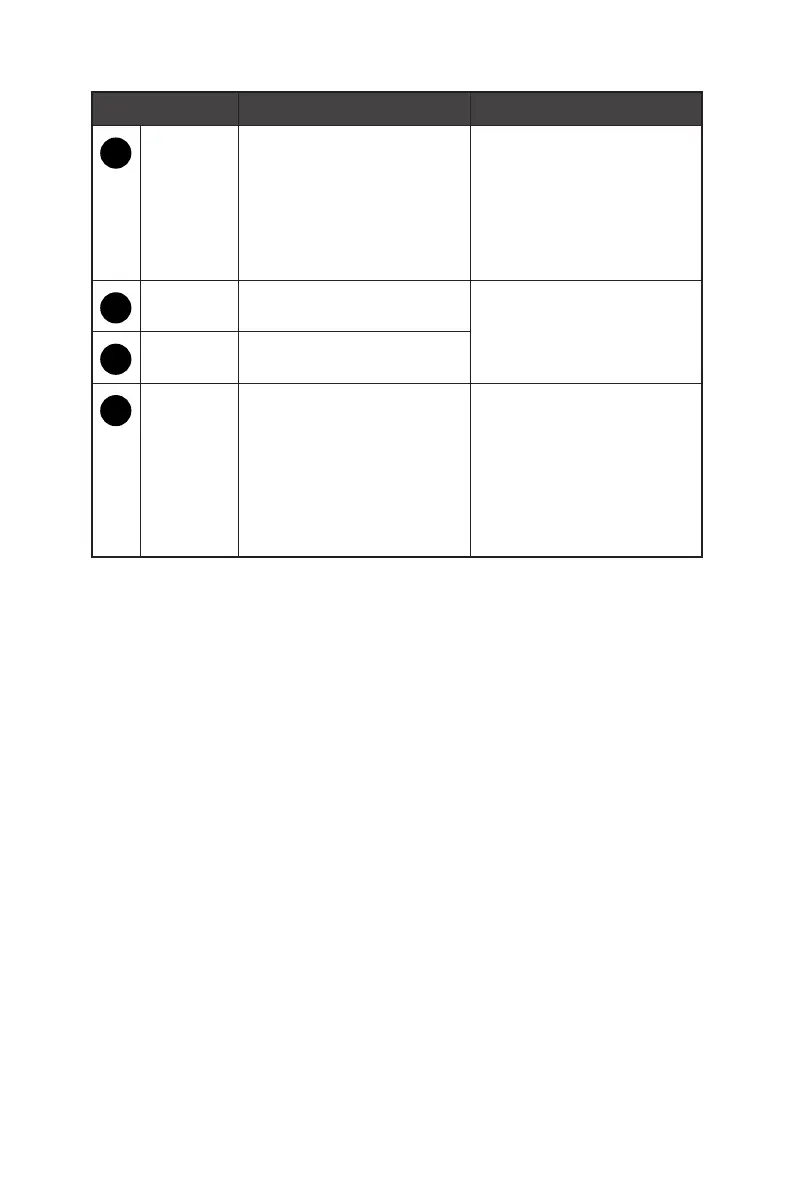
OSD Key Hot Key (When OSD is OFF) OSD Setup (When OSD is ON)
1
AUTO /
SOURCE /
EXIT
∙ Selecting the video input
from external sources
∙ Activating the Auto
Adjustment function to
optimize the horizontal
position, vertical position,
clock and focus
∙ Returning to the previous
menu
∙ Exiting from the OSD Main
Menu
2
VOLUME
/ +
∙ Activating the Volume
control
∙ Adjusting function values
3
Eco Mode
/ -
∙ Activating the Eco Mode
4
MENU /
ENTER
∙ Activating the OSD Main
Menu
∙ To lock/unlock the OSD,
press and hold the MENU
button while the monitor
is off and then press the
power button to turn the
monitor on.
∙ Confirming the selection


 To Next Page