2-8 2-9
Introductions
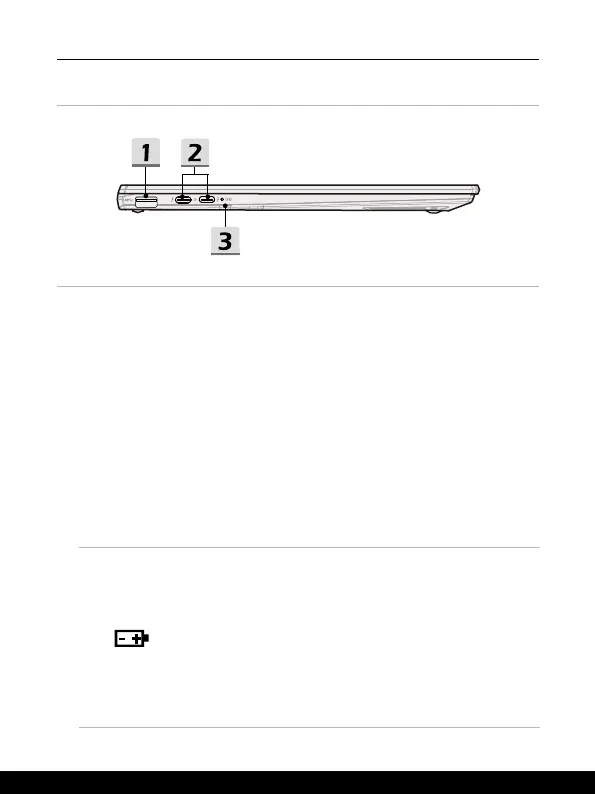
Left Side View
1. USB 3.2 Gen 1 Port
USB 3.2 Gen 1, the SuperSpeed USB, supports high-speed data transfer for the
connected devices, such as storage devices, hard drives, or video cameras.
2. Power/ Thunderbolt (USB-C) combo port
• Always plug an authorized PD adapter with USB-C connector to supply power to
the notebook and charge the battery pack.
• Thunderbolt™ 4, optionally supports USB4, PCIe, HDMI™, DisplayPort
connection; 8K display monitor output; up to 40Gbps transfer rate.
• Supports Power Delivery function with variable up to 100W power input and
maximum 5V/3A or 5V/1.5A power output when AC or DC power is connected. )
• Supports using a power bank to supply power to the notebook and charge the
battery pack. Make sure the charging power output of the power bank meets the
minimum requirements of the notebook.
3. Status LED
Battery Status
• LED turns white when the battery is being charged.
• LED turns white and blinks when the battery is in fast
charging.
• LED turns amber while the battery is in low capacity status.
• LED turns amber and blinks if the battery fails. If the
problem persists, please contact your local authorized
retailer or service center.
• Battery LED goes out when the battery is fully charged or
when AC adapter is disconnected.




 To Next Page