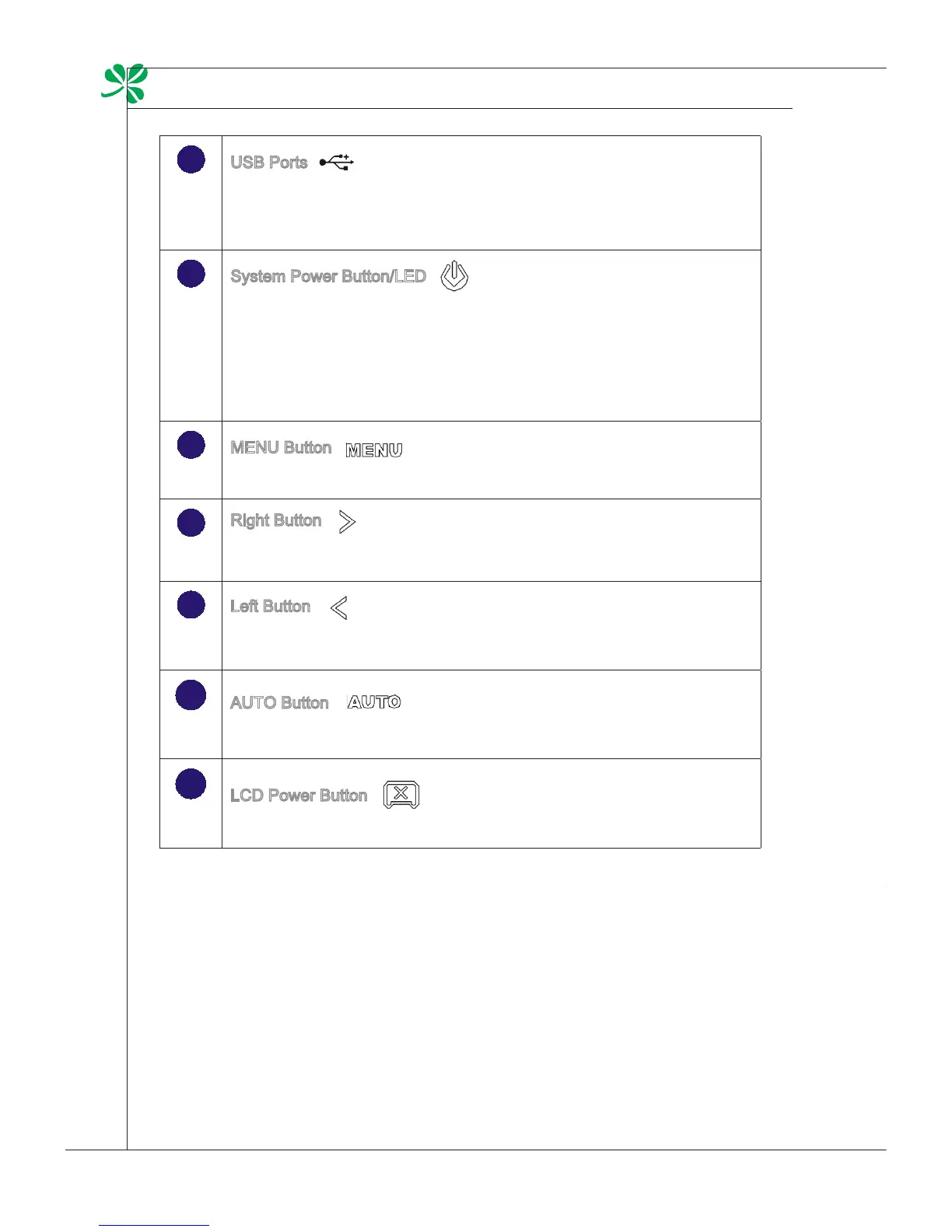
USB Ports
- The USB (Universal Serial Bus) port is provided for attaching USB
devices such as mouse, keyboard, printer, scanner, camera, PDA or
other USB-compatible devices.
System Power Button/LED
- Press the system power button to turn the system on or o.
The power LED glows when the system is turned on and goes o when
the system is shut down.
In terms of power saving, the LED blinks in S3 (Suspend to RAM)
mode and goes o in S4 (Suspend to Disk) mode. Pressing the system
power button will wake the system up from power saving mode.
MENU Button
- Press this button to view the OSD menu or enter into the sub menu.
Right Button
- This button indicates the cursor movement or OSD manual selection
in incremental values.
Left Button
- This button indicates the cursor movement or OSD manual selection
in decremental values.
AUTO Button
- Press this button to view the video mode menu or exit the submenu.
LCD Power Button
- Press this button to power ON/OFF the monitor.
mainboard sPecifications
Processor
Socket 478 for Intel
®
Pentium
®
Dual-Core or Celeron
®
and Core
TM
2 Duo proces-
sors
Front Side Bus (FSB) up to 1066 MHz
Thermal Design Power (TDP) 35 W
Chipset
NVIDIA
®
ION (MCP7A-LP) chipset
Thermal Design Power (TDP) 17 W
Memory
2 DDR2 667/ 800 SO-DIMM slots (200 pins/ 1.8V)
Supports the maximum of 8 GB
LAN
Gigabit Fast Ethernet by Realtek
®
8111DL GbE controller
Audio
HDA Codec by Realtek
®
ALC888
Compliant with Azalia 1.0 specs
Form Factor
197mm x 210mm
■
■
■
■
■
■
■
■
■
■
■



 To Next Page