2
Updating X870E DYNAMIC DASHBOARD firmware
with Firmware Tool
Follow the steps below to update the DYNAMIC DASHBOARD firmware with Firmware Tool.
Important
If your device is working properly, please do not update the firmware.
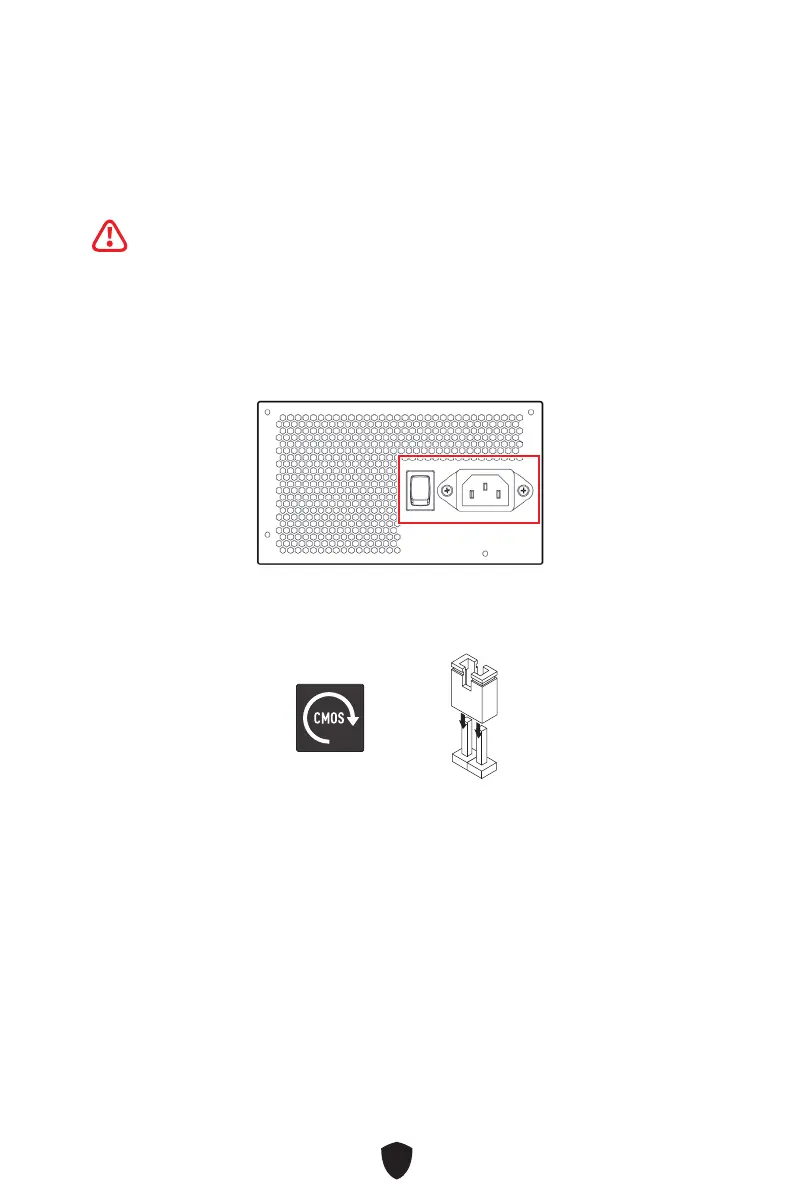
1. Discharge before turning on.
A. Flip the power switch to the O position.
B. Unplug the power cord from the power supply unit.
C. Press and hold the CLEAR CMOS button for 3 seconds and wait for 3 minutes,
or use a jumper cap to short the JBAT1 pins for 3 minutes and then remove the
jumper cap.
or
D. Plug in the power cord and flip the power switch to the I position.
2. Boot into the Windows 10 / Windows 11 operating system.
3. Download DYNAMIC DASHBOARD III Firmware Tool from MSI website at http://msi.com
4. Close all 3rd party software that will read smbus.
(EX : CPUID HWMonitor / AIDA64/ HWiNFO)
5. Exit MSI Center from system tray






 To Next Page