3
6. Unzip file X870E_DYNAMIC_DASHBOARD_Tool.zip
7. Double-click on X870E_DYNAMIC_DASHBOARD.exe under A25xxxxxx_A25xxxxxx folder.
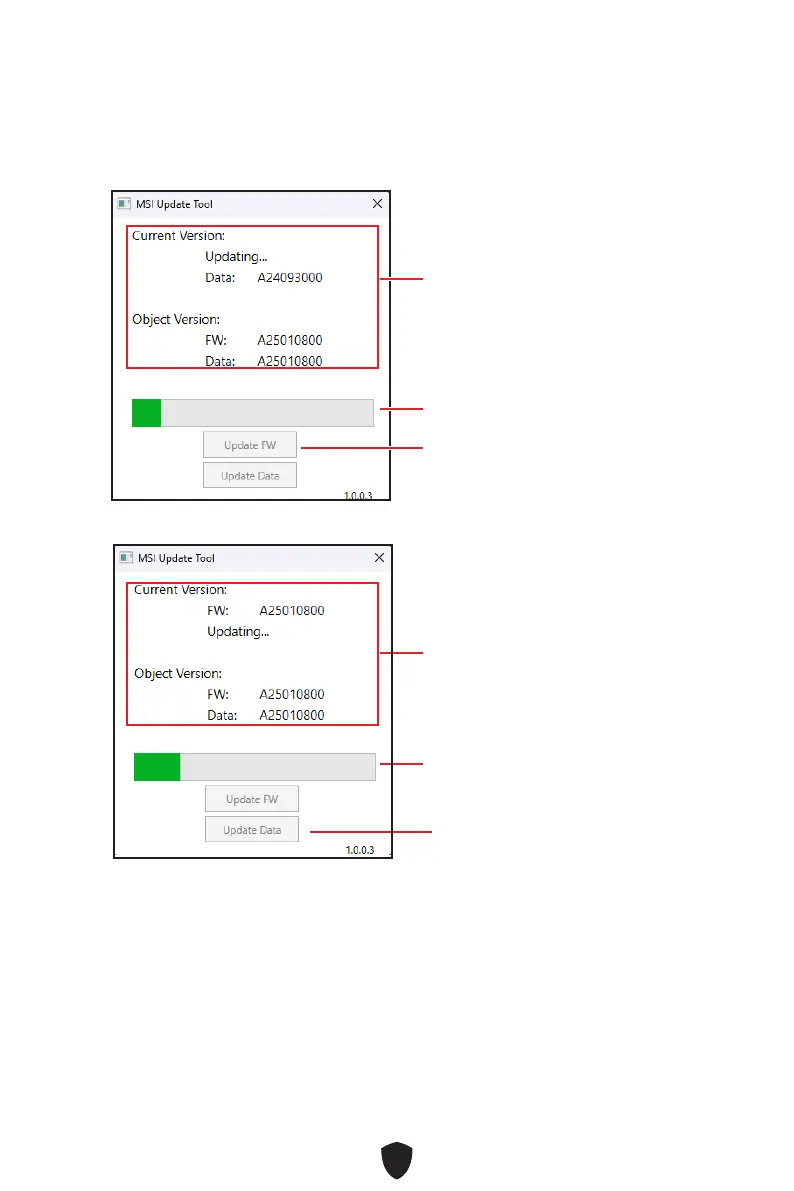
8. Click on Update FW button to update DYNAMIC DASHBOARD firmware.
9. Click on Update Data button to update DYNAMIC DASHBOARD Data.
10. The update progress bar will indicate the progress of the update. It will take
several minutes to update the controller. Do not disturb or shut off the power
during this update . When the update is complete, the update tool will prompt you
to restart your computer, click Yes button to restart.
Version: Only need to
update when the Object Version
is newer than the MCU Version.
Update progress bar
FW update button
Version: Only need to
update when the Object Version
is newer than the MCU Version.
Update progress bar
Data update button
11.
Power on the system.







 To Next Page