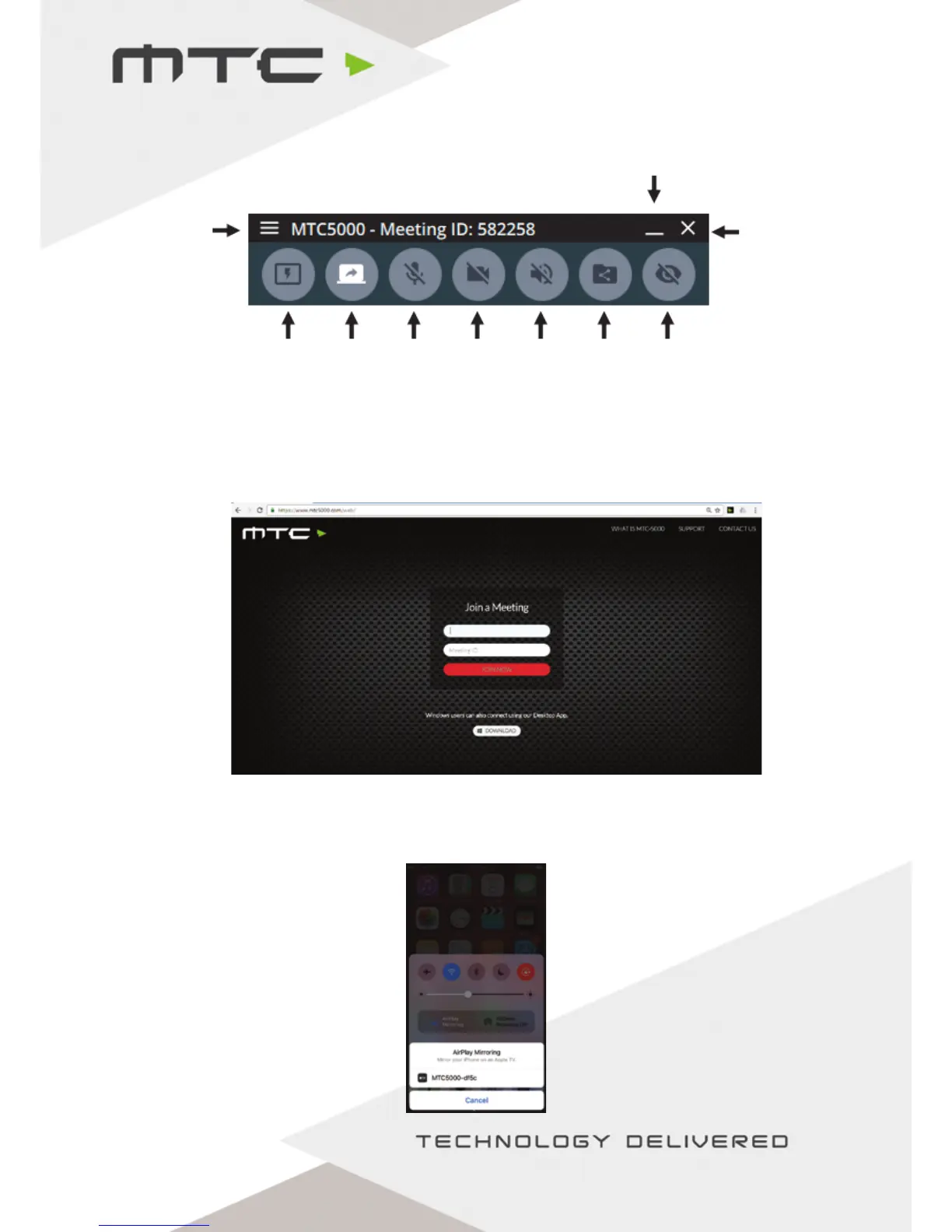
(i) Connecting using the Windows® application
Go to https://www.mtc5000.com to download the Windows® Application and follow the on-screen
instructions to install on the PC and join a session.
(ii) Connecting using your web browser
Open Google Chrome® on Windows®, Mac® or Chromebook®. Go to https://www.mtc5000.com/ - you
will see the below page and follow the instructions onscreen (Internet connection required).
(iii) Connect iOS devices using AirPlay®
Ensure the iOS device is on the same network as MTC-5000 or is connected to the MTC-5000 Access
Point. Swipe up from the bottom of the screen on the iOS device to reveal the Control Centre.
Menu Close
Minimize
Make
active
display
Toggle
screen
sharing
Toggle
Mic
Toggle
Webcam
Toggle
Speaker
Audio
Share
files
View
active
display
www.mtc-technologies.com info@mtc-technologies.com


 To Next Page