EasyManua.ls Logo

MTI BST8-10A30V - User Manual

MTI BST8-10A30V
13 pages
Print Icon
To Next Page IconTo Next Page
Loading...
Item Qty. Description
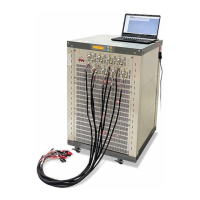
Main Machine 1 Battery Analyzer
Software Disc 1 Driver, testing and calibration software
RS232 1 Connecting PC to main machine
USB to RS232 Converter 1 Convert RS232 to USB if no serial port on the
PC
Cable with clamp 8 Clamp the battery for testing
Power Cable 1 Plug to power
Dear Customer,
Thanks for purchasing MTI’s product, once you receive the shipping package form us, please carefully check the
packing list:
Please call us at 1-510-525-3070 or email info@mtixtl.com
if you are lack of any item above.
Make sure you have installed MS Excel and Access in your computer.
Pre-testing
1. Insert the disc to your computer disc-driver, copy the folder “MTI-TC” from the disc to the place where you
can easily find it, note that you must copy it to the hard drive with a NTFS file system, to check it, double click
“Computer”---right click any of your hard drive---“properties”, a window would pop up:
Question and Answer IconNeed help?

Do you have a question about the MTI BST8-10A30V and is the answer not in the manual?

Overview

This document describes a battery analyzer, including its setup, operation, and maintenance.

Function Description

The MTI battery analyzer is designed for testing various types of batteries. It provides two primary methods for testing: cylinder channels for cylindrical batteries and clamp cable channels for other battery types. The device features 8 independent channels, allowing for simultaneous testing of multiple batteries. It comes with software for controlling the testing process, setting parameters, and analyzing data. The software allows for various testing steps such as constant current discharge, constant voltage charge, constant power discharge, constant resistance charge, and cycling, with customizable cut-off conditions based on time, voltage, current, power, resistance, and cycles. The device is capable of recording and storing testing data, which can then be viewed and analyzed using the BTSDA software. The BTSDA software provides tools for visualizing data curves, comparing data from different channels, and exporting data for further analysis.

Important Technical Specifications

  • Channels: 8 independent channels.
  • Connectivity: RS232 for connecting to a PC. Includes a USB to RS232 converter for PCs without a serial port.
  • Software: Includes driver, testing, and calibration software. Requires MS Excel and Access for full functionality.
  • File System Requirement: Software must be copied to a hard drive with an NTFS file system.
  • Power: Requires a power cable (included).
  • Accessories: Includes a main machine (battery analyzer), software disc, RS232 cable, USB to RS232 converter, 8 clamp cables, and a power cable.
  • Multi-port Control: Can control up to 10 sets of battery analyzers from one computer using a multi-port cable (ordered separately).
  • Data Storage: Testing information is stored in NDA files with a specific naming format (year_month_day_hour_minute_second_unit number_channel number.nda) in the "TC5.3/COM3/data" folder.

Usage Features

Pre-testing Setup:

  1. Software Installation: Copy the "MTI-TC" folder from the provided disc to a hard drive with an NTFS file system on your computer.
  2. Hardware Connection:
    • Connect the device to your computer using the RS232 cable.
    • If your PC lacks a serial port, use the RS232 to USB adapter.
    • Plug the USB port of the adapter into your computer.
  3. Driver Installation:
    • When the "Found New Hardware" prompt appears, close or cancel it.
    • Right-click "Computer" on the desktop, go to "Properties," then "Device Manager," "Other Devices," and right-click "USB-Serial Controller" to select "Update Driver Software."
    • Choose "Browse my computer for driver software" and navigate to the "RS232 USB VISTA32" folder within "MTI-TC," ensuring "Include subfolders" is checked.
    • Click "Next" to complete the installation. Note the assigned COM number.
  4. Battery Connection:
    • Cylinder Channel: Insert cylindrical batteries into the channels. The height is adjustable by a set screw. The upper contact is positive, and the lower is negative. The device includes protection against reverse pole connection.
    • Clamp Cable Channel: Use the clamp cables for other battery types. The red clamp connects to positive, and the black to negative. Larger clamps are for current, smaller for voltage. Protection against reverse pole connection is included. For button cells, a separate holder can be ordered.

Testing Operation:

  1. Launch Software: Power on the machine. Navigate to the "TC5.3" folder and execute "BtsControl.exe."
  2. Device Recognition: The GUI will display the status of the 8 channels. If the unit is not found within 1 minute, check cable connections, power, and driver installation. If issues persist, click the COM port in the port area, then "set" on the menu, set the unit number to 90, and click "search."
  3. Setting Test Parameters:
    • Right-click a channel block to access the menu.
    • Select "Startup" to define testing steps (e.g., Constant Current Discharge, Constant Voltage Charge, Cycle) and cut-off conditions (Time, Voltage, Current, -△V, Power, Resistance, Jump to, Cycles, Current-Stop).
    • Example steps: Discharge at 1000mA (cut-off 2.75V), Rest (1 min), Charge at 1500mA (cut-off 4.2V), Constant Voltage Charge at 4.2V (cut-off when current drops to 25), Rest (5 min), Cycle steps 1-5 (9999 times), Stop.
    • Set "Delay Prot" (protection mode delay), "CapPerVal" (specific capacity calculation), and "Record Condition" (data logging interval).
    • Define "Protect Param" (Hi Voltage, Low Voltage, Current Range) for safety.
    • Input "Base Information" for easy data search.
    • Use "Bak Setting" to backup the current step, "NDB Setting" to record all steps, "Clear Step" to clear a step, "Save File" to save settings, and "Open File" to load settings.
    • Click "OK" to start testing.
  4. Monitoring and Control:
    • The "Normal View" displays real-time voltage, current, and capacity.
    • "Batch Startup" allows adding battery batch numbers.
    • "Stop" halts the testing procedure.
    • "Continue" resumes testing from a stopped point.
    • "Jump" allows changing the active testing step.
    • "Move" transfers a testing to another channel.
    • "Reset Step" modifies parameters without disturbing testing.
    • "Copy Step" duplicates a step.
    • "Channel Info" displays channel information.
    • "Backup Setting" backs up data.
  5. Data History and Analysis (BTSDA Software):
    • Launch "BTSDA.exe" from the "TC5.3" folder.
    • Click "History" at the bottom left to search for data.
    • Find the right folder for storing data.
    • Input the Unit No. and Channel No.
    • Select the time frame.
    • Click "Search" to retrieve data.
    • The "Menu Area" allows setting case number, language, and interface style.
    • The "Data Area" displays detailed test data.
    • The "Curve Area" shows voltage, current, and capacity curves over time.
    • Change the setting of the curve/data display by clicking "Menu Area" and selecting "Curve Type."
    • Add more curve types (X and Y axis) as needed.
    • Export data to Excel or TXT files.
    • Compare curves from different channels using the "Curve contrast pane" from the "Menu area."

Maintenance Features

  1. Environment: Place the device in a ventilated, dry, dustless, non-explosive/flammable environment.
  2. Cleaning: Regularly clean the surface and check channel wire connections.
  3. Calibration: Use calibration software and related tools to calibrate the device annually.
  4. Data Backup: Termly backup the data in the "data" folder.
  5. Software Updates: Uninstall/delete older software versions before installing new ones.
  6. Support: Visit MTI's website (www.mtixtl.com) for the latest software versions and contact MTI's engineer for support within 24 hours for any questions.

MTI BST8-10A30V Specifications

General IconGeneral
BrandMTI
ModelBST8-10A30V
CategoryMeasuring Instruments
LanguageEnglish