19
LanguageSettings
You can change the language of your phone system in two simple
steps.
Pull up > tap >Settings>Language & input> Language.
Select a language from the list given.
SecuritySettings
Here’s how to protect your phone and SIM card from unauthorized use.
Pull up > tap >Settings>Security>Screen lock .You can select
the screen lock. When power on your phone or unlock touch screen
devices you will be required to input pattern/PIN/password/voice, and etc.
The following is the introduction function:
None Disable thescreen
lock
PIN Use the PIN to
unlock
Swipe Select the swipe to
unlock
Password Use the password
lock screen
Pattern Creating Your
Screen Unlock
Pattern
ManagingYourDeviceMemory
Pull up > > tap >Settings>Storage.
You can view the space information of the SD card and the phone
storage.
20
ResettoFactorySettings
Pull up > tap >Settings >Backup & reset>Factory data
reset>Reset phone>Erase everything.
WARNING: All your personal information and downloaded applications on
your phone will be erased after the resetting.
Google
Pull up > tap to google GO
Clock
Pull up > tap >Clock, you can view the clock or set the
alarm.
Tap the top of the screen icon can be switched to the countdown and
stopwatch functions from the clock interface.
Calculator
You can use the phone directly perform simple mathematical
calculations.
1. Pull up > tap Calculator.
2. Click the button corresponding with the calculator display, perform
basic arithmetic.
TIPS: Tap Menu Key > Advanced panel to use scientific calculation.
21
ForYourSafety
GeneralSafety
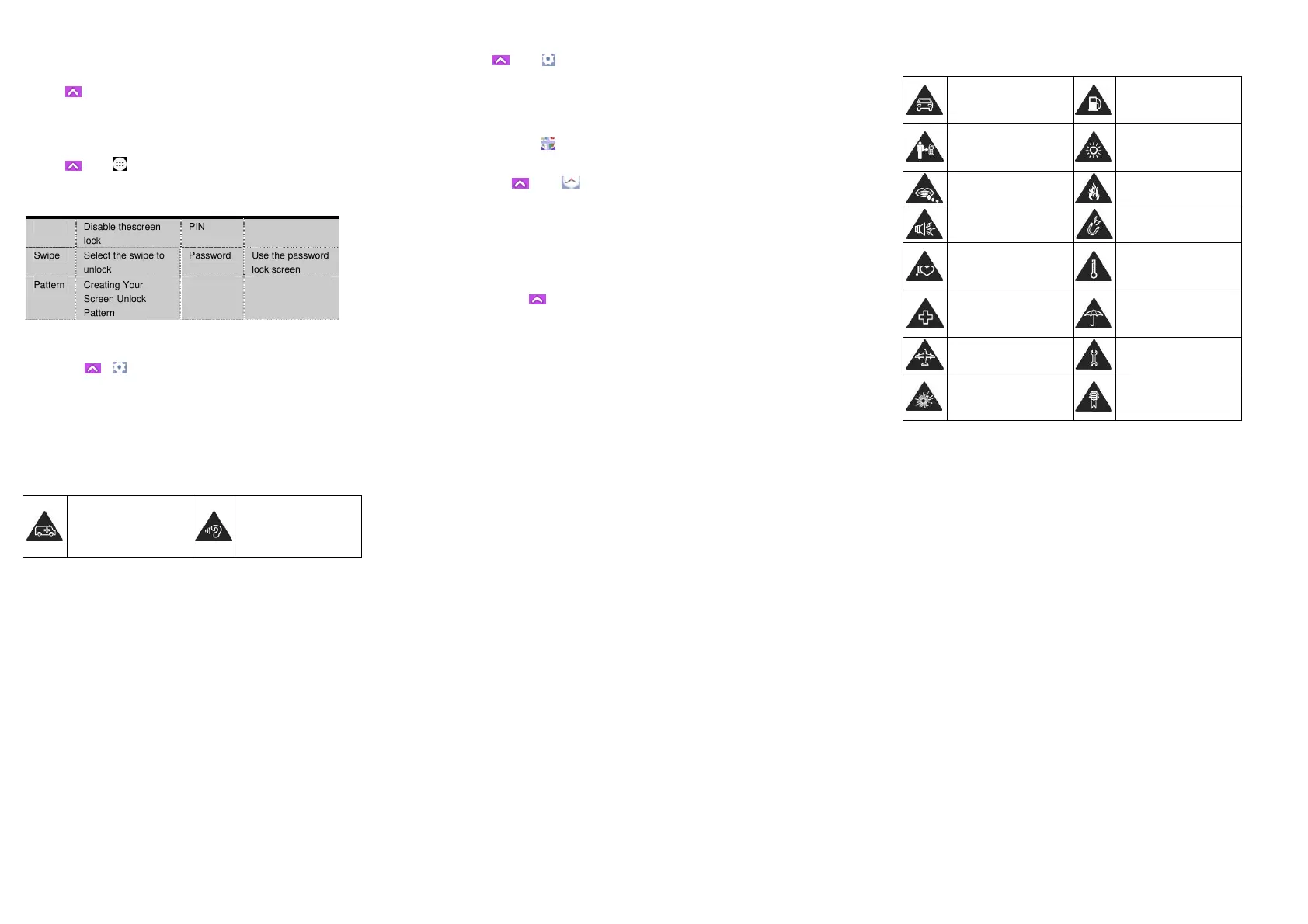
Don’t make or receive
handheld calls while driving.
And never text while driving.
Don’t use at petrol stations.
Keep your phone at least 15
mm away from your ear or
body while making calls.
Your phone may produce a
bright or flashing light.
Small parts may cause a
choking.
Don’t dispose of your phone
in fire.
Your phone can produce a
loud sound.
Avoid contacting with
anything magnetic.
Keep away from
pacemakers and other
electronic medical devices.
Avoid extreme
temperatures.
Switch off when asked to in
hospitals and medical
facilities.
Avoid contacting with
liquids. Keep your phone
dry.
Switch off when told to in
aircrafts and airports.
Don’t take your phone apart.
Switch off when near
explosive materials or
liquids.
Only use approved
accessories.
22
Don’t rely on your phone for
emergency
communications.
To prevent possible hearing
damage, do not listen at
high volume levels for long
periods.
Distraction
Driving
Full attention must be given to driving at all times in order to reduce the
risk of an accident. Using a phone while driving (even with a hands free kit)
can cause distraction and lead to an accident. You must comply with local
laws and regulations restricting the use of wireless devices while driving.
OperatingMachinery
Full attention must be given to operating the machinery in order to
reduce the risk of an accident.
ProductHandling
GeneralStatementonHandlingandUse
You alone are responsible for how you use your phone and any
consequences of its use.
You must always switch off your phone wherever the use of a phone is
prohibited. Use of your phone is subject to safety measures designed to
protect users and their environment.
Always treat your phone and its accessories with care and keep it in a clean
and dust-free place.
23
Do not expose your phone or its accessories to open flames or lit tobacco
products.
Do not expose your phone or its accessories to liquid, moisture or high
humidity.
Do not drop, throw or try to bend your phone or its accessories.
Do not use harsh chemicals, cleaning solvents, or aerosols to clean the
device or its accessories.
Do not paint your phone or its accessories.
Do not attempt to disassemble your phone or its accessories, only
authorized personnel can do so.
Do not expose your phone or its accessories to extreme temperatures,
minimum - [5] and maximum + [50] degrees Celsius.
Please check local regulations for disposal of electronic products.
Do not carry your phone in your back pocket as it could break when you sit
down.
SmallChildren
Do not leave your phone and its accessories within the reach of small
children or allow them to play with it.
They could hurt themselves or others, or could accidentally damage
the phone.
Your phone contains small parts with sharp edges that may cause an
injury or may become detached and create a choking hazard.
24
Demagnetization
To avoid the risk of demagnetization, do not allow electronic devices or
magnetic media close to your phone for a long time.
ElectrostaticDischarge(ESD)
Do not touch the SIM card’s metal connectors.
Antenna
Do not touch the antenna unnecessarily.
NormalUsePosition
When placing or receiving a phone call, hold your phone to your ear,
with the bottom towards your mouth.
AirBags
Do not place a phone in the area over an air bag or in the air bag
deployment area.
Store the phone safely before driving your vehicle.
Seizures/Blackouts
The phone can produce a bright or flashing light.
RepetitiveMotionInjuries
To minimize the risk of RSI when texting or playing games with your
phone:
Do not grip the phone too tightly.
Press the buttons lightly.
Use the special features which are designed to minimize the times of
pressing buttons, such as Message Templates and Predictive Text.


 To Next Page
 Loading...