Adjusting the rear wheel track
1 . Jack-lift the tractor rear part to sepa-
rate the wheels from the ground.
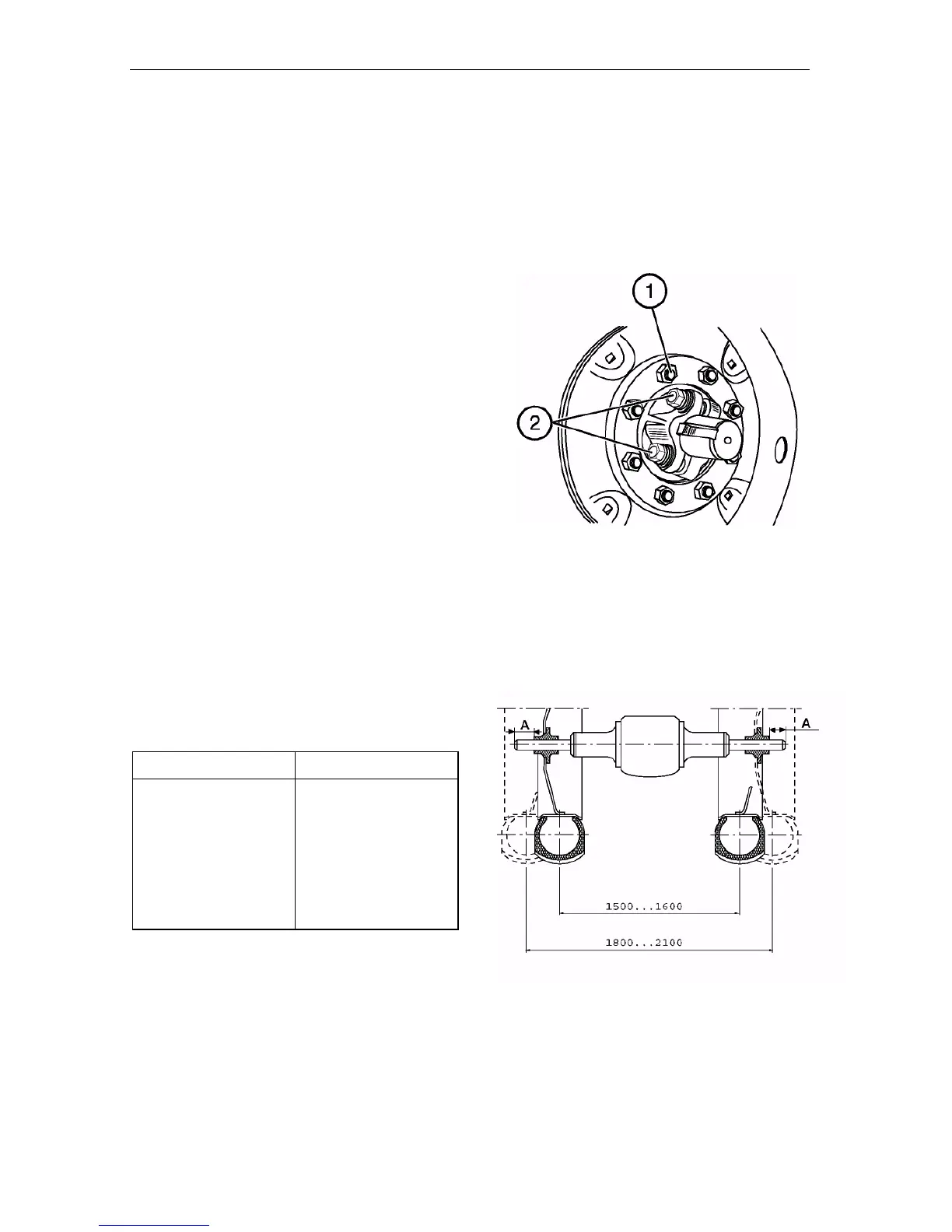
2 . Unscrew the wheel fastening nuts
(1) and remove the wheels.
3 . Loosen the four bolts (2) of the rear
wheel hubs by 3…5 turns.
4 . Move the hub in one or other direc-
tion to obtain the track width (use the
table given below to determine the
track width by measuring the dis-
tance “A” from the half-axle end to
the hub face.
5 . Tighten the four hub fixing bolts with
the torque of 280-300 N m (28…30
kgf m).
6 . Mount the wheel and tighten the nuts
with the torque of 210-260 N m.
7 . Repeat these operations on the op-
posite wheel.
NOTE: Track width of up to 1600 mm
can be obtained without changing the
wheel disk position. To obtain the
track width up to 2100 mm, transpose
the rear wheels assembled with the
hubs as shown in the figure.
When transposing the rear wheels, pay
attention that wheel rotation would coin-
cide with the direction of the arrow on the
tyre sidewall.


 To Next Page