Controls and Instrumentation
Gearbox two-lever control
The 7F/2R mechanical two-range fixed-
ratio transmission gearbox with two-lever
control (gears are shifted and the ranges
are selected by means of separate levers).
Jointly with the synchronized accelerator,
the gearbox allows obtaining 14 forward
and 4 reverse gears.
Selecting the ranges and shifting the
gears
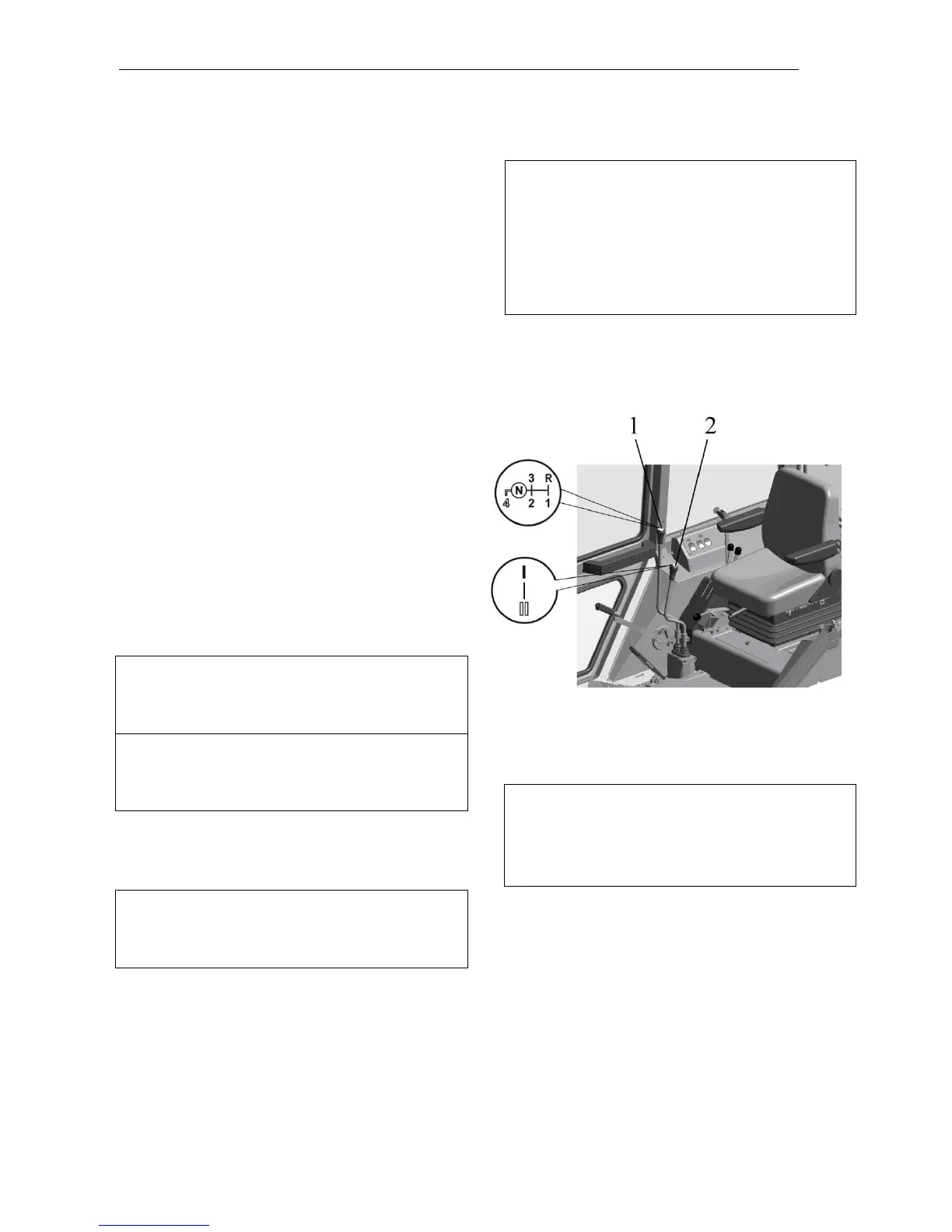
The gears are shifted and the rang-
es are selected by means of separate lev-
ers according to the patterns shown in Fig.
Select the required speed of the
tractor motion according to the information
plate on the right side glass of the cab.
To put in the gear corresponding to
the required speed of the tractor motion,
proceed as follows:
1. Step on the clutch pedal and set the re-
quired range in the gearbox by moving the
range reduction gear lever (2) forward or
backward, according to the pattern shown
on its handle.
ATTENTION: The stages of the range re-
duction gear are switched over when the
tractor is completely stopped and the
clutch pedal is stepped on.
ATTENTION: The gearbox range reduc-
tion gear has no neutral position; therefore
the 1
st
or 2
nd
reduction stage is always en-
gaged in the reduction gear.
2. Step on the clutch pedal and move the
change-gear lever (1) to the position of the
required gear according to the pattern
shown on its handle.
ATTENTION: The first forward gear and
the reverse gear are put in after full stop of
the tractor with the clutch pedal stepped
on.
Putting on the 1
st
forward gear and
reverse gear as well as switching over the
stages of the range reduction gear are not
synchronized and are performed by mova-
ble pinions on the tractor fully stopped.
Prior to putting in the said gears or stages
of the range reduction gear release slightly
and step on fully the clutch pedal again. It
will ensure the turning-over of the pinions
and light putting-in of the gears or ranges.
3. Start the smooth motion of the tractor in
the gear selected by releasing the clutch
pedal.
ATTENTION: When operating the tractor,
do not hold the foot on the clutch pedal. It
will prevent the clutch slip, which causes
the overheating and premature failure of
the clutch.
ATTENTION: To avoid the increased noise
in the gearbox, the design of the gearbox
control mechanism is provided with an inter -
lock excluding the simultaneous putting-in of
the 4
th
(direct) gear and the 1
st
stage of the
range reduction gear. Therefore, the 4
th
gear can be put in with the 2
n d
stage of the
range reduction gear only.



 To Next Page