Working Environment: 0 to 50
℃
(32 to 122
1. Product Descriptions
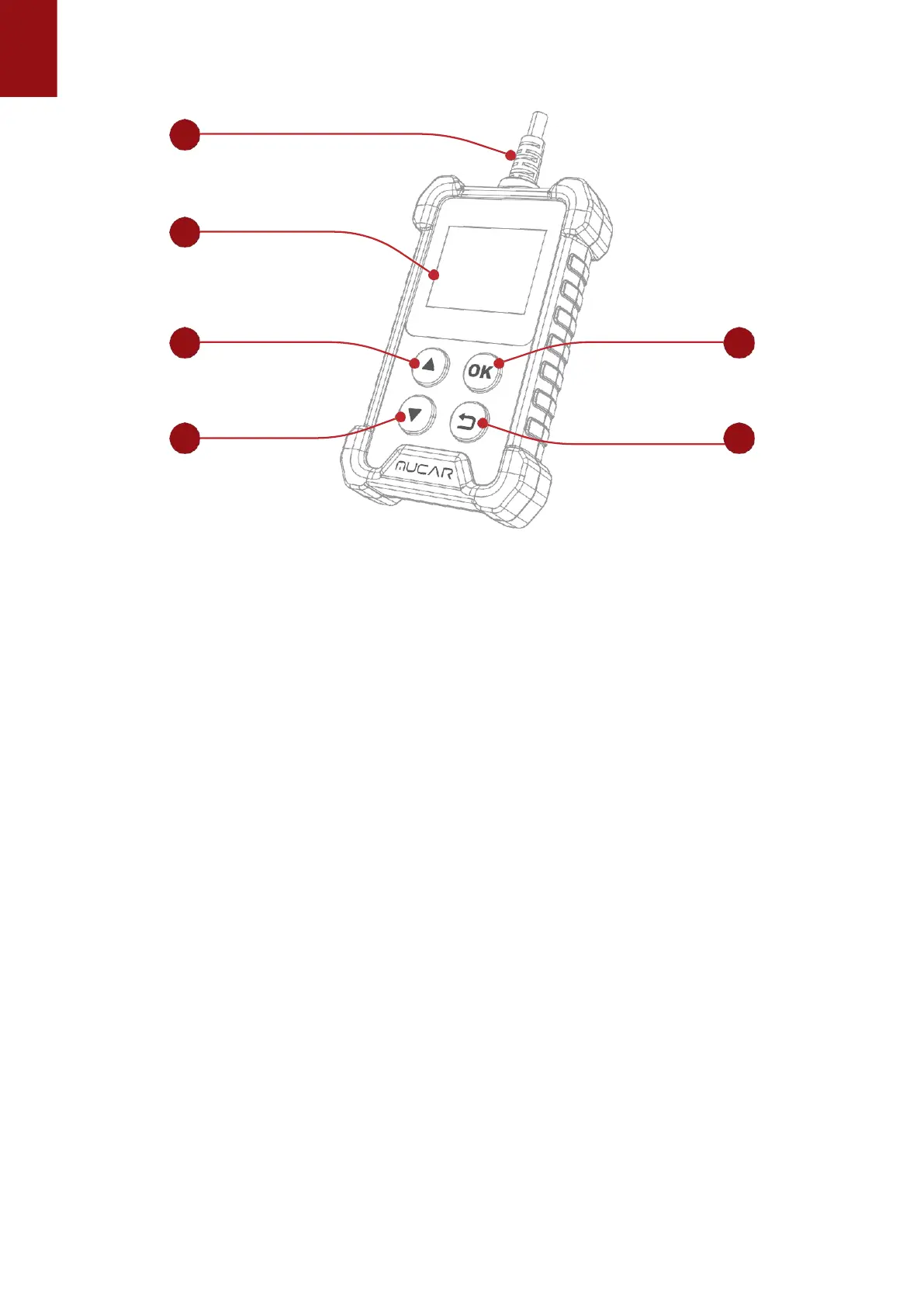
(1) Diagnostic Cable: Standard OBDII TXGA Diagnostic Cable
(2) LCD Display: 1.77 inch display (128*160)
(3) Up, down keys: used to select interactive functions
(4) Return key: Return to upper function
(5) OK Return: Confirm button
Code severity alert
Full OBDII diagnostics functions,I/M readiness,Freeze Frame date,View data stream,O2 Sensor
test,Evap system test,On Board Monitor test,Read&Clear Codes.
Technical Specifications
Display:
1.7 inch display
Storage Environment: -20 to 60 (-4 to 140 )
Power Supply: 9-18V vehicle power
Supported Protocols: ISO9141, KWP2000 (ISO 14230), J1850PWM,J1850VPM and CAN
OBDII protocol
2. How To Use
2.1 Data Link Connector (DLC) Location
The DLC (Data Link Connector or Diagnostic Link Connector) is typically a 16pin connector
where diagnostic code readers interface with the vehicle’s onboard computer. The DLC is
usually located 12 inches from the center of the instrument panel (dash), under or around the
driver’s side for most vehicles. If Data Link Connector is not located under dashboard, a label
1


 To Next Page