User Manual: PS020A DMX-controlled 3-CHANNEL Power Supply
V1.00 (06-2007) © Multiform, Leigh-on-Sea, UK 8
■ Operation
The PS020A DMX-controlled 3-Channel power supply supplies the necessary power to
the passive RGB LED Panel unit, plus provides all necessary functional control.
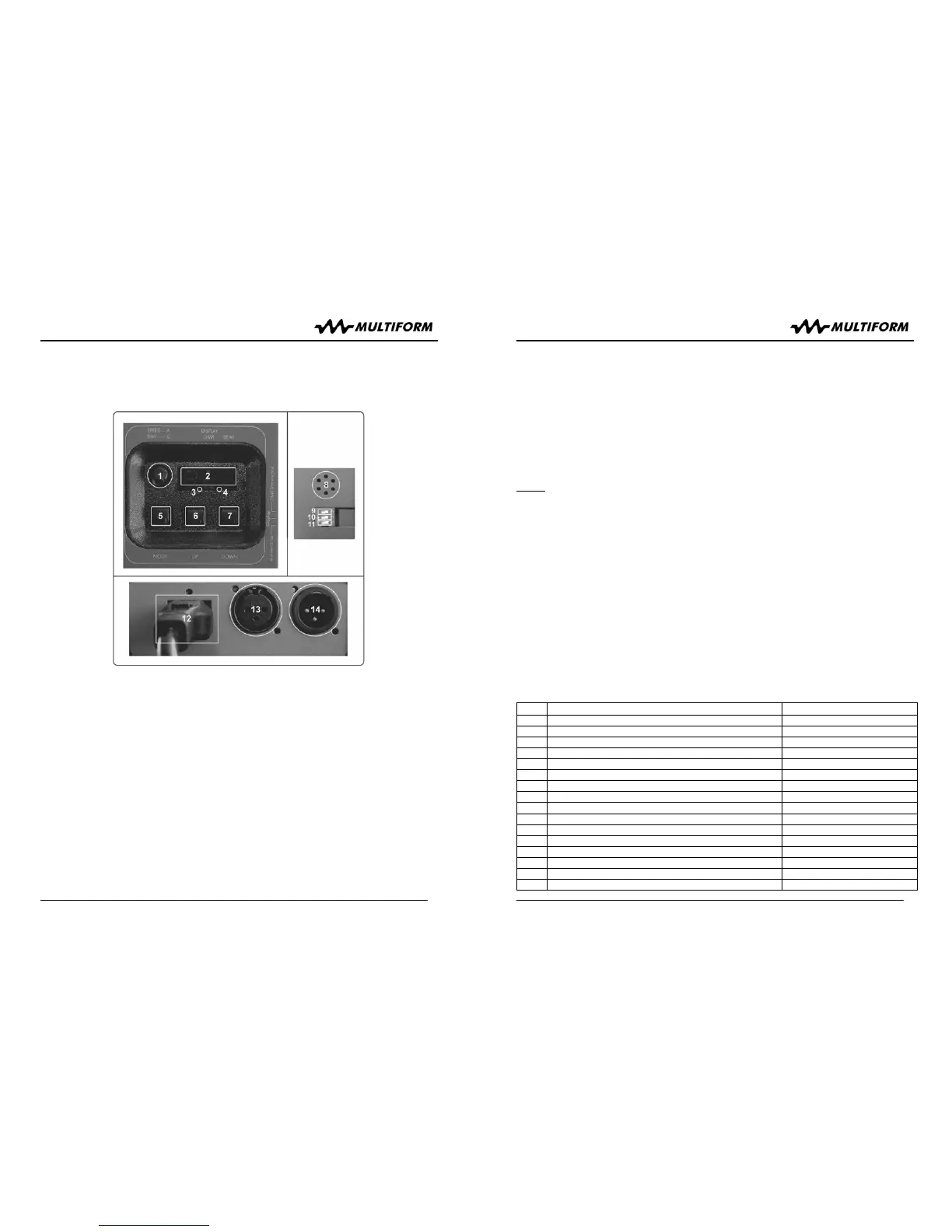
User interface overview:
1 In A-Mode: Speed Control (except A1 = Colour Mix Control)
In C-Mode: Dim-Level-Control
2 Display showing the Mode, DMX-address, LOC-function etc.
3 Indicates presence of a DMX signal
4 Indicates the sound-to-light mode (internal microphone)
5 MODE selection button
6 UP-button
7 DOWN-button
8 Internal microphone
9 Switches on the termination for the last unit in the DMX-chain
10 Switching the display on or off (with delay)
11 Maintenance (not in use)
12 Power-Input 85-240V AC
13 DMX-Output connector
14 DMX-Input connector
User Manual: PS020A
DMX-controlled 3-CHANNEL Power Supply
V1.00 (06-2007) © Multiform, Leigh-on-Sea, UK 9
Upon the user’s choice, the unit can work stand-alone or may be controlled by external
DMX-controllers. Available modes:
“A” Auto Mode
Press the MODE button (5) until the first digit on the display shows “A”, indicating
operation in “A” (AUTO) mode. Then choose your desired pattern by using the
UP/DOWN buttons (6/7), see list below. Changing the setting becomes effective 1
second after the new setting is made to allow stepping through presets without
previewing all intermediate presets.
NOTE
: The “A” Mode is automatically disabled and can not be chosen when an
external DMX signal is received [DMX indicator LED (3) is lit].
Whilst being in pattern A 1 (static scene), turning knob (1) determines the colour,
whereas being in one of the other 26 patterns, knob (1) controls the speed or selects
the sound-to-light function (refer to below pattern list). The sound-to-light function can
be activated by setting the knob (1) inside the first 10 degrees of its travel from left
detent and it works from a built-in microphone (8) which picks up the environmental
sound. Its activity is shown by the flashing of the right dot (4) in the display. The level
for all patterns is maximum.
In “A” mode, the unit does not receive any values from the DMX input, but generates
related DMX values on the output according to the selected pattern, so that other
similar units from the Multiform LS series of LED devices can show the same pattern if
they are connected by DMX signal cables and set to Slave Mode “SLA”.
If you leave mode “A” for any reason and come back later into mode “A”, the unit will
recall the last chosen pattern (even if the unit was switched off in between). Pattern list:
# Description Function of Knob (1)
A 0 All off none
A 1 Static scene Colour
A 2 Soft fade red-green Speed
A 3 Soft fade green-blue Speed
A 4 Soft fade red-blue Speed
A 5 Soft fade red-yellow Speed
A 6 Soft fade candy-lime Speed
A 7 Soft fade pink-blue Speed
A 8 Soft fade turquoise-pink Speed
A 9 Soft fade red-green-blue (RGB) Speed
A10 Hard switch red-green Sound-to-light, Speed
A11 Hard switch green-blue Sound-to-light, Speed
A12 Hard switch red-blue Sound-to-light, Speed
A13 Hard switch red-yellow Sound-to-light, Speed
A14 Hard switch candy-lime Sound-to-light, Speed
A15 Hard switch pink-blue Sound-to-light, Speed



 To Previous Page
 Loading...