The ML4062-CNT-Gen2 is a sophisticated controller designed for efficient programming and testing of ML4062-TL2a-CON modules. It serves as a host, providing power and I2C communication to the connected modules, enabling users to access and control various registers in the module's memory via the I2C bus. This allows for comprehensive control over power, voltage monitoring, temperature monitoring, and other critical parameters.
Function Description:
The primary function of the ML4062-CNT-Gen2 is to facilitate the interaction between a PC and up to eight ML4062-TL2a-CON modules simultaneously. It acts as an I2C master, driven by an on-board microcontroller, to send and receive commands to and from the modules. The device is equipped with current sensors at each port, allowing for precise monitoring of current consumption. A user-friendly graphical user interface (GUI) simplifies I2C read/write operations and the loading of custom MSA memory maps. Communication with the host PC is established via a USB interface.
The ML4062-TL2a-CON modules, when connected to the controller board via the ML4062-CNT-CBL-G2 cable, receive power and enable I2C communication. These modules are designed to operate in a "ModuleReady" state upon power-up. Users can force the module into a "ModuleLowPwr" state by setting a specific register bit (register 26, bit 4 - ForceLowPwr), which disables all power spots. Clearing this bit reactivates the power spots.
Important Technical Specifications:
- Power Output:
- Supports up to 150W in total.
- Supports up to 19W/port maximum.
- Connectivity:
- Eight interfaces, allowing simultaneous operation of eight modules.
- USB interface for PC connection (Type-B mini to Type-A USB cable).
- Input Voltage:
- Minimum: 36V
- Typical: 48V
- Unit: V
- Temperature Monitoring (ML4062-TL2a-CON):
- Four internal temperature sensors: two on the PCBA and two on the shell.
- Temperature represented as a 16-bit signed two's complement value.
- Increments of 1/256 degrees Celsius.
- Total range: -127°C to +128°C.
- Valid range: -40°C to +125°C.
- Temperature sensor locations:
- TempSense4 (shell T.S.): Registers 14 (MSB) and 15 (LSB) in the lower page.
- TempSense1 (PCB Bottom): Registers 150 (MSB) and 151 (LSB) in page 03.
- TempSense2 (shell T.S.): Registers 152 (MSB) and 153 (LSB) in page 03.
- TempSense3 (PCB Bottom): Registers 154 (MSB) and 155 (LSB) in page 03.
- Voltage Sense (ML4062-TL2a-CON):
- Measures internal module supplied voltage Vcc.
- LSB unit: 0.1 mV.
- Supply voltage MSB: Register 16.
- Supply voltage LSB: Register 17.
- Current Sense (ML4062-TL2a-CON):
- Monitors current consumption of heaters distributed over ten power spots.
- Measurement range: Up to 6.665 Amps.
- Max module current consumption: 7.1 Amps (current sense reads up to 6.665 Amps).
- Current consumption MSB: Register 24.
- Current consumption LSB: Register 25.
- Programmable Power Dissipation and Thermal Emulation (ML4062-TL2a-CON):
- Ten thermal spots for emulating optical module thermal behavior.
- Control types: PWM (Pulse Width Modulation) and ON/OFF.
- Power Spot to Register mapping:
- Spot 1 (1.2W): Register 135 (7:0), PWM.
- Spot 2 (1.2W): Register 140 (0), ON/OFF.
- Spot 3 (2W): Register 136 (7:0), PWM.
- Spot 4 (1.2W): Register 140 (1), ON/OFF.
- Spot 5 (1.6W): Register 137 (7:0), PWM.
- Spot 6 (2W): Register 138 (7:0), PWM.
- Spot 7 (2W): Register 140 (2), ON/OFF.
- Spot 8 (2.8W): Register 140 (3), ON/OFF.
- Spot 9 (4.7W): Register 140 (4), ON/OFF.
- Spot 10 (4.7W): Register 140 (5), ON/OFF.
- Registers 135, 136, 137, 138, and 140 (page 03h) are 8-bit data wide and used to control thermal spots over I2C.
- Values written to these registers are permanently stored.
- Cut-OFF Temperature (ML4062-TL2a-CON):
- Pre-defined to prevent overheating.
- Default maximum Cut-Off temperature: 100°C.
- Programmable via register 134 of memory page 3.
- All power spots automatically turn off when module temperature reaches the cut-off temperature.
- Power spots reactivate when temperature drops 5 degrees below the cut-off value.
Usage Features:
- Power-Up Procedure:
- Apply a minimum of 36V input power via banana plugs U6 and U7.
- Connect the host to a PC using a Type-B mini to Type-A USB cable.
- LED Indicators for Debugging and Monitoring:
- D3: Indicates if a USB cable is plugged in.
- D1 (Green) & D2 (Red): Diagnostic purposes.
- D1 on: USB is locked, and the device is recognized by the USB driver.
- D2 on: USB is not connected, or the USB driver is not found.
- Both off: Board is not powered correctly, or firmware is corrupted.
- Both blinking: Board is in Bootloader mode.
- Software Control:
- Accessible and controlled through application software.
- User-friendly GUI for operating the board and accessing all features.
- Communication established via USB connection.
- USB Driver Installation:
- Power up the board.
- Connect the board to the PC via USB.
- Download the USB driver file from the MultiLane website.
- Go to "Device Manager" on your PC.
- Locate the target device.
- Right-click and select "Update Driver Software."
- Choose "Browse my computer for driver software."
- Browse to and select the downloaded driver file.
- Click "Next" and wait for installation to complete.
- GUI Usage: Refer to the GUI user manual for detailed instructions, available on the MultiLane website.
Maintenance Features:
- Hardware Revisions:
- ML4062-Controller-RevA: Initial Version.
- ML4062-Controller-RevB:
- Added capacitor at the current sense output.
- Fixed the issue of the power switcher connection.
- Firmware Revision:
- ML4062Controller_V1.3: Latest FW revision, compatible with ML4062-CNT-GEN2 RevB hardware.
- Bootloader Mode for Microcontroller Reprogramming:
- Connect a jumper on J1 (near the microcontroller).
- Connect a USB cable between the PC and the board.
- Power up the board with a +3.3V supply.
- LEDs D1 and D2 will start blinking.
- Remove the jumper.
- Open the "Microchip USB HID Bootloader v2.3" software.
- Click "Open Hex File" and choose the new FW to download.
- Click "Program/Verify."
- After programming, press "Reset Device."
- The firmware will be successfully updated after the reset.

 Need help?
 General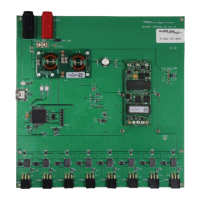

 To Next Page