135
www.multilaser.com.br
4.5.2 WAN
Choose menu “Network > WAN”, you can configure the IP parameters of the WAN on the screen below.
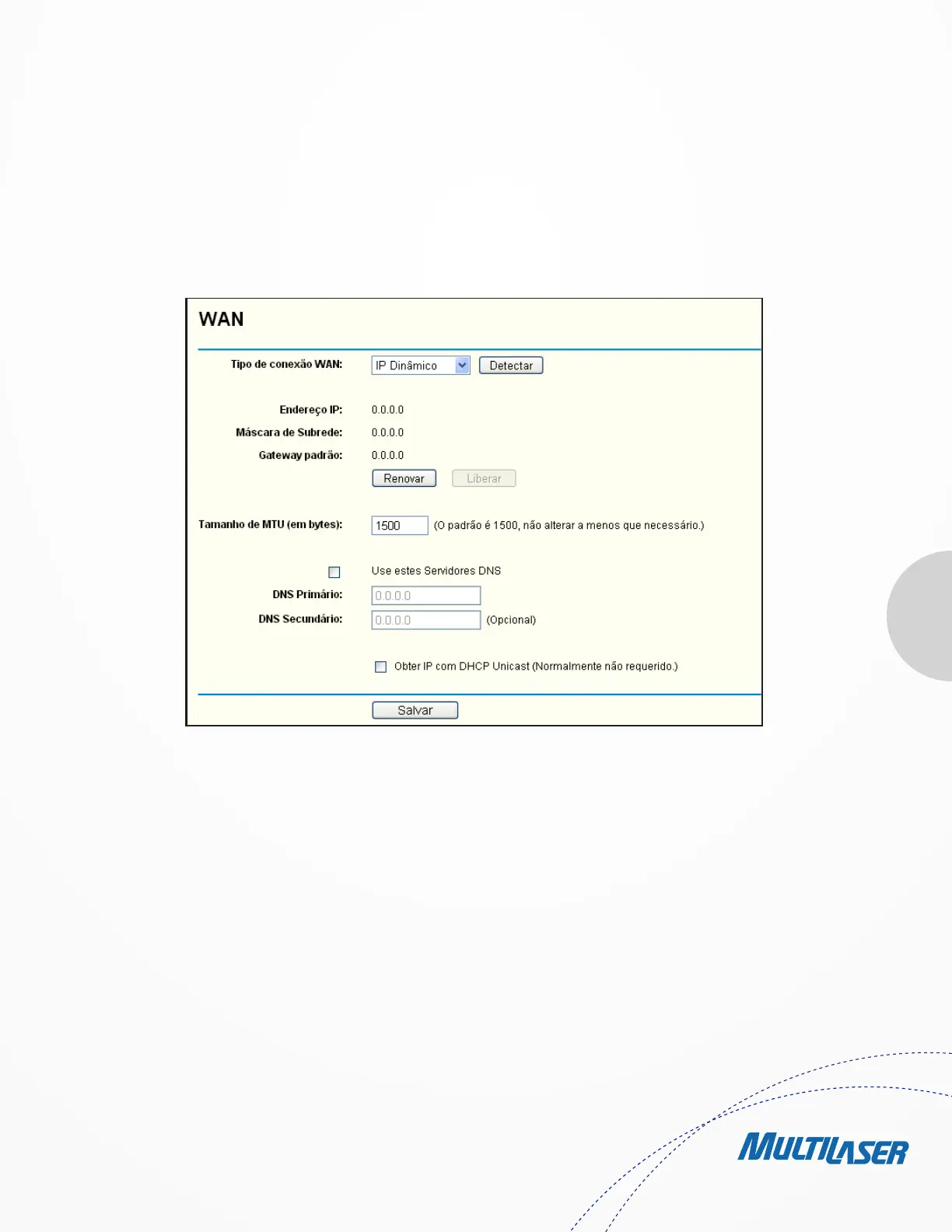
1. If your ISP provides the DHCP service, please choose Dynamic IP type, and the Router will automatically get IP parameters
from your ISP. You can see the page as follows (Figure 4-7):
This page displays the WAN IP parameters assigned dynamically by your ISP, including IP address, Subnet Mask, Default Gateway, etc.
Click the Renew button to renew the IP parameters from your ISP. Click the Release button to release the IP parameters.
• MTU Size – The normal MTU (Maximum Transmission Unit) value for most Ethernet networks is 1500 Bytes. It is not
recommended that you change the default MTU Size unless required by your ISP.
• Use These DNS Servers – If your ISP gives you one or two DNS addresses, select Use These DNS Servers and enter the
primary and secondary addresses into the correct fields. Otherwise, the DNS servers will be assigned dynamically from
your ISP.
Note:
If you find error when you go to a website after entering the DNS addresses, it is likely that your DNS servers are set up improperly.
You should contact your ISP to get DNS server addresses.
Figure 4-7 WAN – Dynamic IP


 To Next Page
 Loading...