151
www.multilaser.com.br
• Group Key Update Period – Specify the group key update interval in seconds. The value should be 30 or above. Enter
0 to disable the update.
Click the Save button to save your settings.
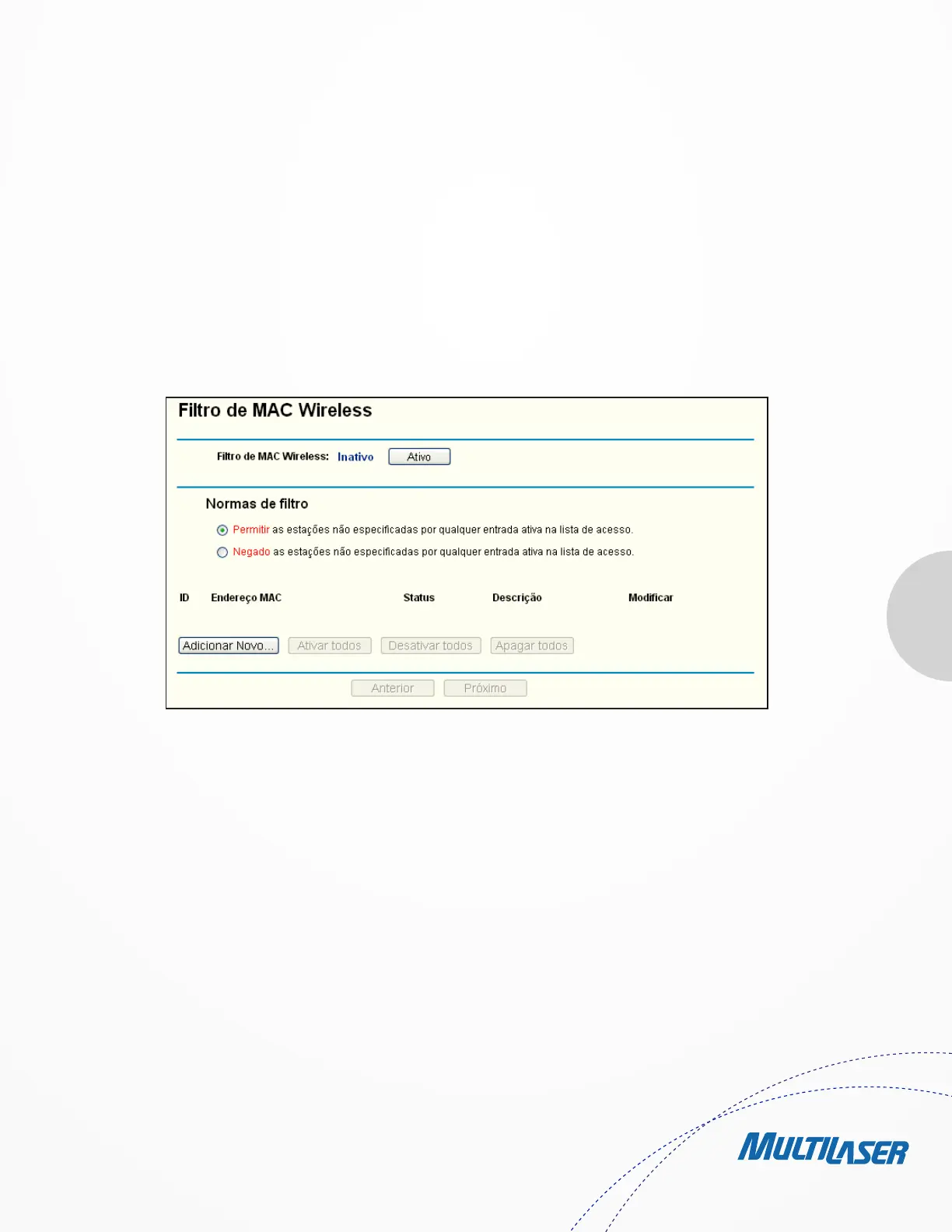
4.6.3. Wireless MAC Filtering
Choose menu “Wireless > MAC Filtering”, you can control the wireless access by configuring the Wireless MAC Filtering function,
shown in Figure 4-22.
To filter wireless users by MAC Address, click Enable. The default setting is Disable.
• MAC Address - The wireless station’s MAC address that you want to filter.
• Status - The status of this entry, either Enabled or Disabled.
• Description - A simple description of the wireless station.
To Add a Wireless MAC Address filtering entry, click the Add New… button. The “Add or Modify Wireless MAC Address Filtering
entry” page will appear, shown in Figure 4-23:
1. Enter the appropriate MAC Address into the MAC Address field. The format of the MAC Address is XX-XX-XX-XX-XX-XX (X
is any hexadecimal digit). For example: 00-0A-EB-B0-00-0B.
2. Give a simple description for the wireless station in the Description field. For example: Wireless station A.
3. Select Enabled or Disabled for this entry on the Status pull-down list.
4. Click the Save button to save this entry.
To modify or delete an existing entry:
Figure 4-22 Wireless MAC Filtering


 To Next Page
 Loading...