163
www.multilaser.com.br
Note:
After you set the DMZ host, the firewall related to the host will not work.
4.8.4. UPnP
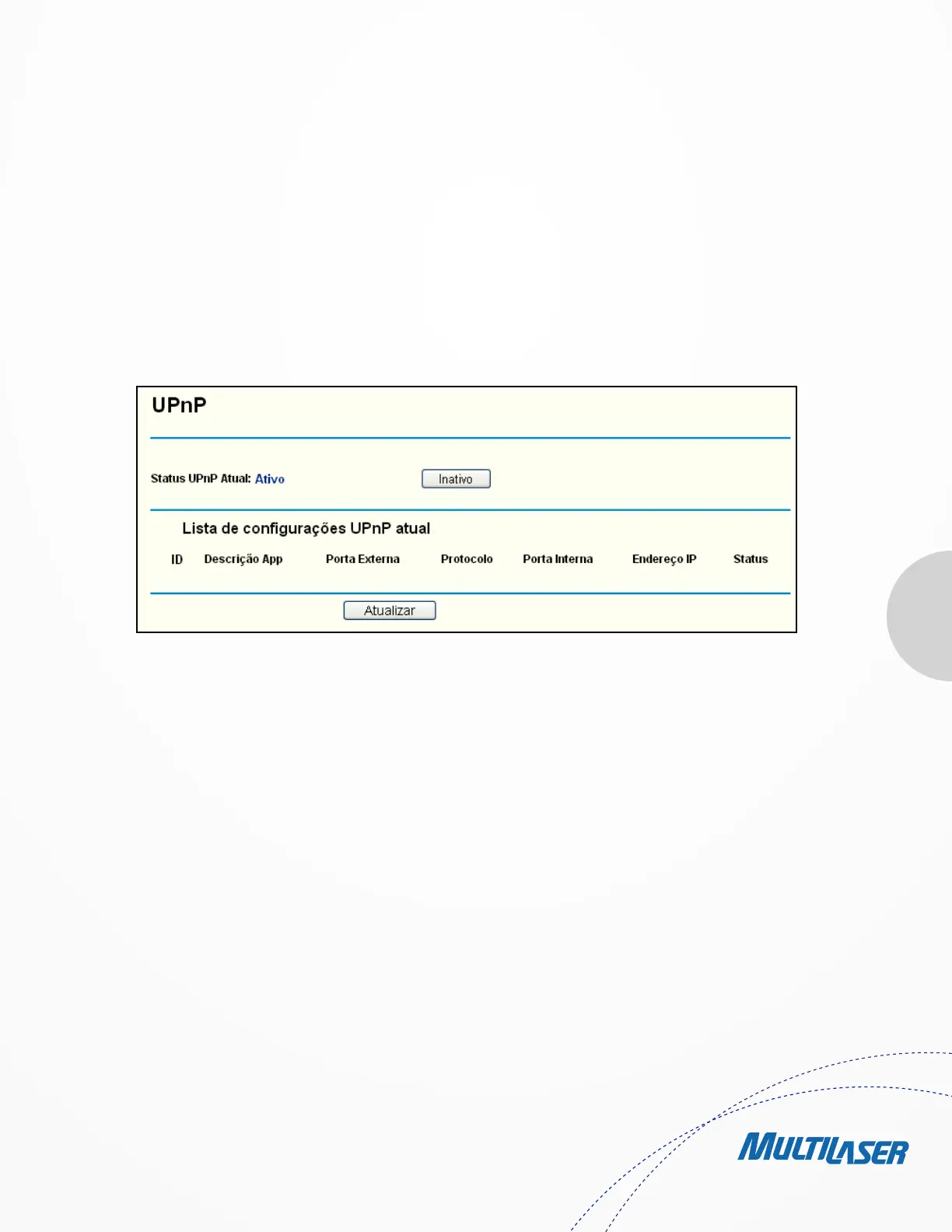
Choose menu “Forwarding > UPnP”, you can view the information about UPnP (Universal Plug and Play) in the screen as shown in
Figure 4 37. The UPnP feature allows the devices, such as Internet computers, to access the local host resources or devices as needed.
UPnP devices can be automatically discovered by the UPnP service application on the LAN.
• Current UPnP Status - UPnP can be enabled or disabled by clicking the Enable or Disable button.
• Current UPnP Settings List - This table displays the current UPnP information.
• App Description - The description provided by the application in the UPnP request.
• External Port - The external port the Router opens for the application.
• Protocol - The type of protocol the Router opens for the application.
• Internal Port - The Internal port the Router opens for local host.
• IP Address - The IP address of the UPnP device that is currently accessing the Router.
• Status - The status of the port is displayed here. “Enabled” means that the port is still active. Otherwise, the port is
inactive.
Clique em Atualizar para atualizar a Lista de Configurações Atuais do UPnP.
Figure 4-37 UPnP


 To Next Page
 Loading...