Chapter 5: FaxFinder Operation
Multi-Tech Systems, Inc. FaxFinder Admin User Guide 74
Sending Faxes
Sending faxes through the FaxFinder is quick and simple and offers a variety of methods that can be
used to accomplish this. This section will show all the possible ways to send a fax with the FaxFinder.
Depending on how your administrator has set up the unit, several or even all options may be available.
First, the FaxFinder Schedule Fax window will be explained as it is used for the majority of faxing through
the FaxFinder unit.
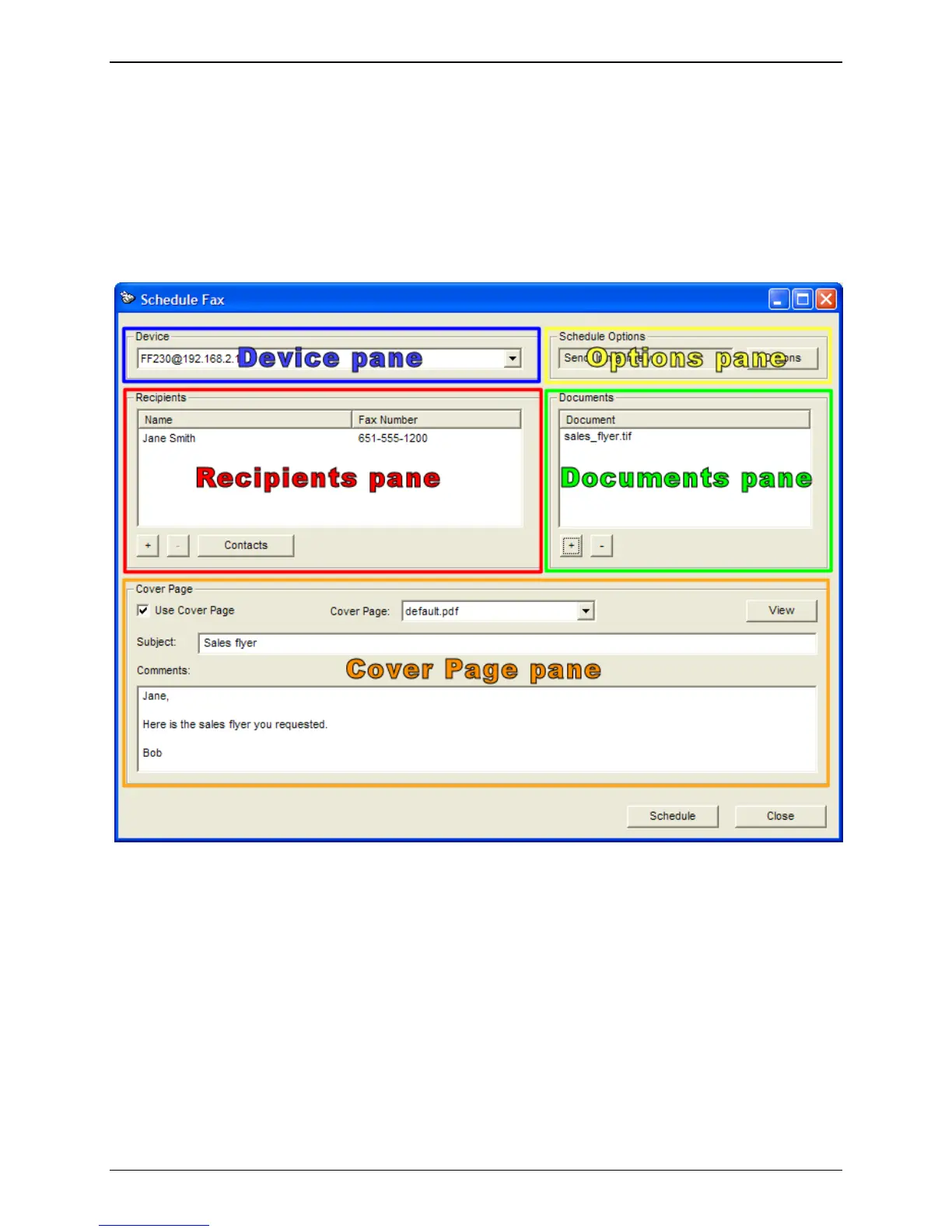
The FaxFinder Schedule Fax Screen (New Fax)
The FaxFinder Schedule Fax screen appears (a) when you double-click an item from the Print Capture
tab of the client, or (b) when you select the New Fax command from the File menu of the Client
Software screen or (c) when you Right-click an item in the Print Capture tab and select ‘Fax.’
There are four sections (called ‘panes’ hereafter) to the Fax Scheduler: the Recipients pane, the
Documents pane, the Options pane and the Cover Page pane. At the bottom are the two main function
buttons – one to send or schedule the fax and the other to cancel it entirely.
Device pane
The device pane provides a drop-down list of all FaxFinder units available to this client. Select the unit
that you want this fax sent from.



 To Next Page