4.0. Initial Setup
ITPP098PUITPP098PU
65
Open the downloaded Windows driver and install it.
Demo video: http://u.pc.cd/enX
4.1. Set Up The ITPP098PU for First Use on Windows
4.1.1. Download Windows Driver
Please download the driver from the MUNBYN website or the
link below.
Driver download: http://u.pc.cd/UeTctalK
MUNBYN website: munbyn.biz/hpDrivers
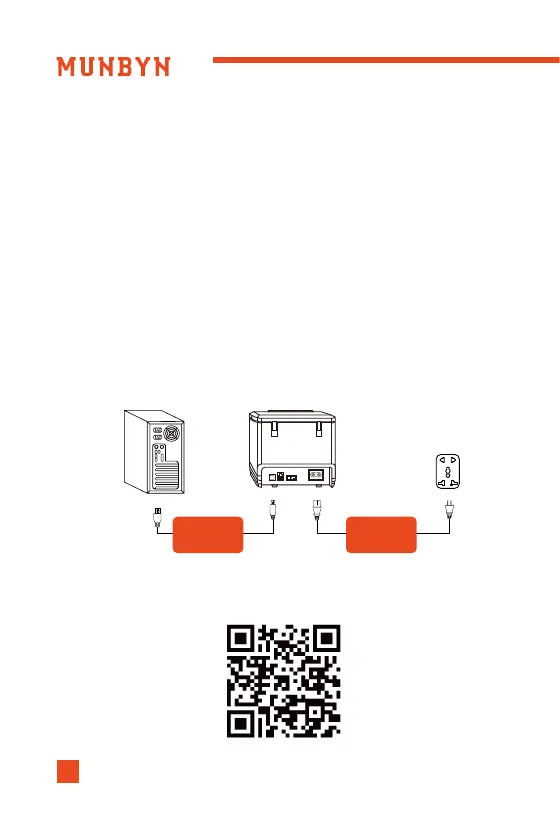
4.1.2. USB Interface
(1)Connect the printer to the power outlet via the power cord.
(2)Connect the printer to your Windows computer via USB
cable.
(3)Place the thermal paper into the printer and power it on.
Computer
USB
Interface
Power
Cord
Printer
Open the downloaded MacBook driver and install it.
Demo video: http://u.pc.cd/3sSrtalK
4.2. Set Up The ITPP098PU for First Use on MacBook
4.2.1. Download MacBook Driver
Please download the driver from the MUNBYN website or the
link below.
Driver download: http://u.pc.cd/5IHctalK
MUNBYN website:munbyn.biz/hpDrivers
4.1.2. USB Interface
(1)Connect the printer to the power outlet via the power cord.
(2)Connect the printer to your MacBook computer via USB
cable.
(3)Place the thermal paper into the printer and power it on.
Computer
USB
Interface
Power
Cord
Printer


 To Next Page
 Loading...

