MAINTENANCE
30
F–040741L
HOW TO REPLACE
THE MOTION DRIVE BELT
REMOVAL
1. Remove the mower housing. See the instructions on “How To
Remove The Mower Housing”.
2. Completely push the pedal forward and engage the parking
brake.
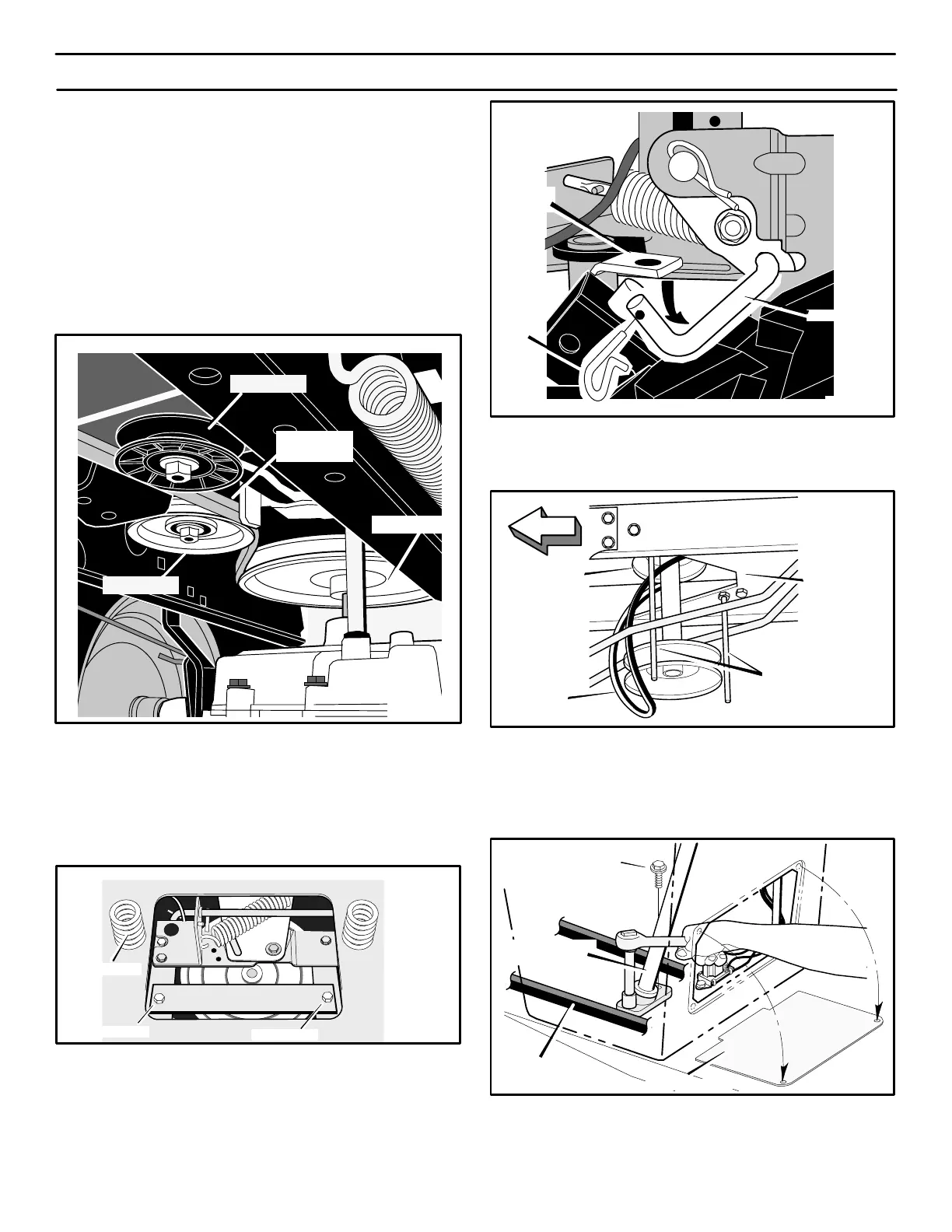
3. Remove the idler pulleys (Figure 32).
Idler Pulley
Motion
Drive Belt
Drive Pulley
Figure 32
Idler Pulley
4. To access the belt guides, remove the battery and battery tray.
See “How To Remove The Battery”.
5. Loosen the belt guides at the drive pulley (Figure 33).
Figure 33
Belt Guide
Seat Spring
Belt Guide
6. Remove the motion drive belt from the drive pulley
(Figure 32).
7. Remove the hair pin from the shift link (Figure 34). Pull the
motion drive belt over the shifter bracket.
Hair
Pin
Shift Link
Shifter
Bracket
Figure 34
8. To remove the motion drive belt from the stack pulley, pull the
front end of the belt under the stack pulley and then back
between the stack pulley and the steering plate (Figure 35).
Motion
Drive
Belt
Figure 35
FRONT
Stack Pulley
Steering
Plate
Belt Guides
9. Remove the access panel (Figure 36).
10. Remove the two screws that attach the steering shaft
assembly (Figure 36). Raise the steering wheel and steering
shaft assembly. Pull the motion drive belt under the steering
shaft assembly.
Figure 36
Screw
Steering Shaft
Assembly
Motion Drive
Belt
Access Panel
11. Remove the motion drive belt. A correct replacement part or
assistance is available from an Authorized Service Center in
your area.



 To Next Page