
 Need help?
Do you have a question about the MUSIC HALL dac25.3 and is the answer not in the manual?
Read all instructions before connecting or operating the unit and keep the manual for reference.
Avoid exposing the unit to moisture or water to reduce fire or electric shock risk.
Prevent foreign objects or liquids from entering the unit to avoid damage and hazards.
Ensure 2 inches (5 cm) clearance around the unit for proper cooling and ventilation.
Keep the unit away from heat sources like radiators, stoves, or other heat-producing appliances.
Designed for moderate climates; avoid use below 41°F (5°C) or above 95°F (35°C).
Place on a fixed, level surface; avoid carts that could tip over or placing near speakers.
Unplug before cleaning; use a soft lint-free cloth for the case.
Connect only to the specified power supply type and voltage as described.
Use supplied cord, do not modify, defeat grounding, or route cord where it can be damaged.
Unplug the power cord from the wall outlet if the unit is left unused for a long period.
Stop use and seek service if cord, liquid spill, exposure to rain, malfunction, or damage occurs.
Introduction to the dac25.3, its high-performance components, and audio quality.
Guidance on placing the unit for optimal performance, ventilation, and stability.
Instructions for connecting digital sources via coaxial, optical, USB, and XLR inputs.
Details on connecting RCA and XLR analog outputs to amplifiers or receivers.
Steps for plugging the unit into the power outlet, including voltage selector check.
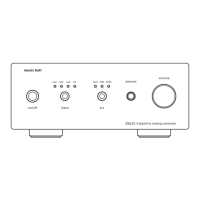
How to turn the unit on and off using the front panel button.
Instructions for toggling between different digital input sources (coa, opt, usb, xlr).
Explanation of SRC modes (Lock, 96k, 192k) for selecting sample rates.
Information on the 1/4" headphone output jack.
How the volume knob controls the headphone output level.
Steps to diagnose no sound problems, checking connections, signal source, and lock light.
Guidance for resolving issues with USB recognition and driver installation on computers.
Troubleshooting no output despite lock light, including headphone test and tube seating.
Detailed specifications including THD+N, output level, frequency response, SNR, and dynamic range.
Information on USB and other input formats, headphone output, and power supply requirements.
Lists key internal components like DAC, SRC, and the vacuum tube.
Specifies the unit's physical size, weight, and supplied accessories.
Information on free repair/replacement service for one year with proof of purchase.
Details that the warranty covers parts and labor for one year from purchase date.
Instructions for returning the unit for service, including packing and shipping advice.
 General
| Type | DAC |
|---|---|
| Bit Depth | 24-bit |
| Power Supply | External |
| Sample Rates Supported | 32kHz, 44.1kHz, 48kHz, 88.2kHz, 96kHz, 176.4kHz, 192kHz |
| Output Voltage | 2.0V RMS |
| Output Impedance | 100 Ohms |
| USB Compatibility | USB 2.0 |
| USB Input Support | Yes |
| Digital Input Support | Coaxial, Optical |
| Frequency Response | 20Hz - 20kHz (±0.5dB) |
| Digital Inputs | Coaxial, Optical, USB |
| Analog Outputs | RCA |
| DAC Chip | Burr-Brown PCM1796 |
| Sample Rate | 24-bit/192kHz |
| Signal-to-Noise Ratio | 110 dB |

 To Next Page