EasyManua.ls Logo

Mustang MV-PROJSP-FLAT - Parts Assembly Guide; Finding Projector Center of Gravity (CG); Attaching Extension Bracket and Base Plate; Final CG Check and Tightening

Mustang MV-PROJSP-FLAT
6 pages
Print Icon
To Next Page IconTo Next Page
To Previous Page IconTo Previous Page
Loading...
Installation
Guide
1.
Parts
Assembly
-
Installation
of
Universal
Base
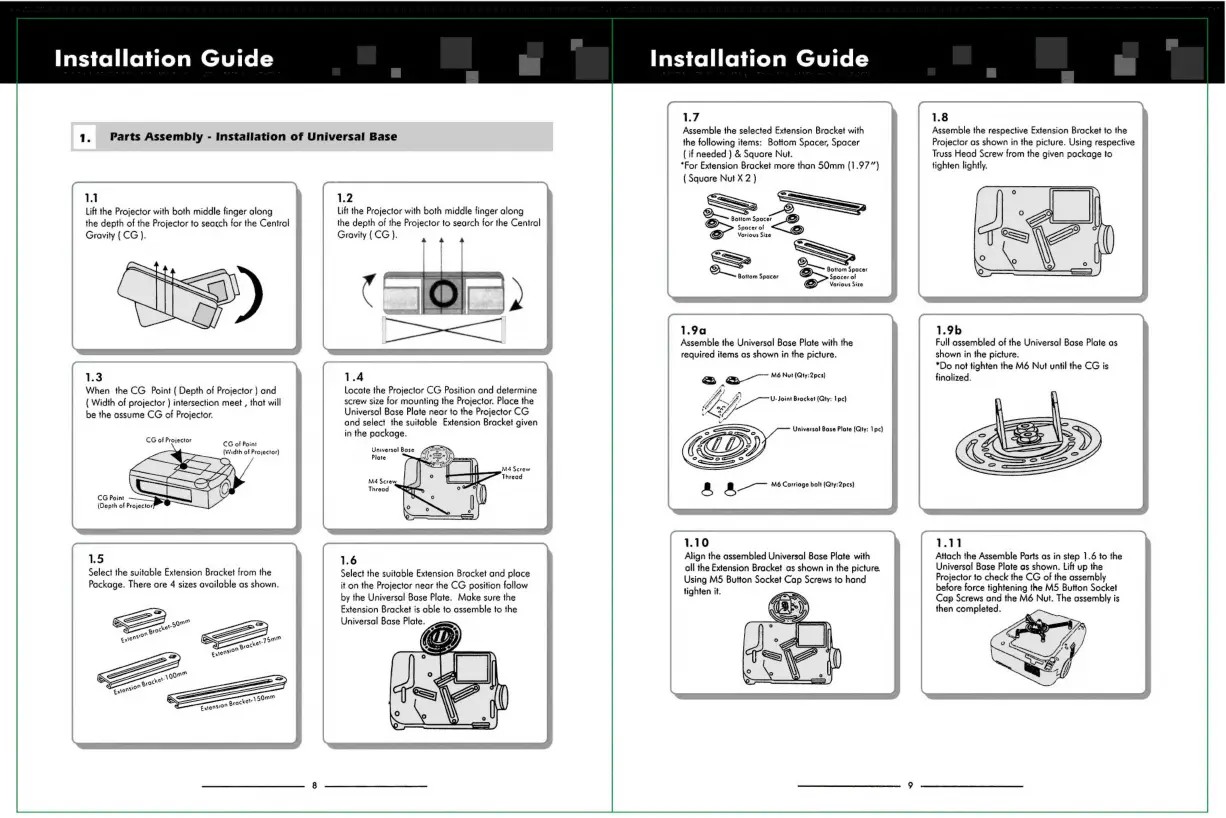
1.1
Lift
the
Projector
with
both
middle
finger
along
the
depth
of
the
Projector
to
search
for
the
Central
Gravity
(CG).
1.3
When
the
CG
Point
(
Depth
of
Projector
)
and
(
Width
of
projector
)
intersection
meet
,
that
will
be
the
assume
CG
of
Projector.
CG
of
Projector
CG
of
Point
(Width
of
Projector)
Select
the
suitable
Extension
Bracket
from
the
Package.
There
are
4
sizes
available
as
shown.
1.2
Lift
the
Projector
with
both
middle
finger
along
the
depth
of
the
Projector
to
search
for
the
Central
Gravity
(CG
).
Ù
h
1.4
Locate
the
Projector
CG
Position
and
determine
screw
size
for
mounting
the
Projector.
Place
the
Universal
Base
Plate
near
to
the
Projector
CG
and
select
the
suitable
Extension
Bracket
given
in
the
package.
Thread
1.6
Select
the
suitable
Extension
Bracket
and
place
it
on
the
Projector
near
the
CG
position
follow
by
the
Universal
Base
Plate.
Make
sure
the
Extension
Bracket
is
able
to
assemble
to
the
Universal
Base
Plate.
Installation
Guide
1.7
Assemble
the
selected
Extension
Bracket
with
the
following
items:
Bottom
Spacer,
Spacer
(
if
needed
)
&
Square
Nut.
*For
Extension
Bracket
more
than
50mm
(1.97)
(
Square
Nut
X
2
)
Bottom
Spacer
Spacer
of
Various
Size
=
ST
Oo
si
Bottom
Spacer
Bottom
Spacor
Spacer
of
Various
Sizo
1.9a
Assemble
the
Universal
Base
Plate
with
the
required
items
as
shown
in
the
picture.
M6
Nut
(Qty:2pcs)
&
2
4)
A
Gi
U-
Joint
Bracket
(Qty:
Ipc)
Universal
Base
Plate
(Qty:
Ipc)
A
A
M6
Carriage
bolt
(Qty:2pcs)
1.10
Align
the
assembled
Universal
Base
Plate
with
all
the
Extension
Bracket
as
shown
in
the
picture.
Using
M5
Button
Socket
Cap
Screws
to
hand
tighten
it.
1.8
Assemble
the
respective
Extension
Bracket
to
the
Projector
as
shown
in
the
picture.
Using
respective
Truss
Head
Screw
from
the
given
package
to
tighten
lightly.
Full
assembled
of
the
Universal
Base
Plate
as
shown
in
the
picture.
*Do
not
tighten
the
M6
Nut
until
the
CG
is
finalized.
1.11
Attach
the
Assemble
Parts
as
in
step
1.6
to
the
Universal
Base
Plate
as
shown.
Lift
up
the
Projector
to
check
the
CG
of
the
assembly
before
force
tightening
the
M5
Button
Socket
Cap
Screws
and
the
Nut.
The
assembly
is
then
completed.