TA SEEK
SEL
2 sec.
SEL
SEL
MASK DPI
SEL
ESP
ESP12 / ESP 45
LOCAL/DX
LOCAL
SEL
TA SEEK
SEL
2 sec.
TA SEEK / TA ALARM
TA SEEK
SEL
MASK DPI
SEL
2 sec.
MASK DPI / MASK ALL
TA SEEK
SEL
RETUNE
SEL
RETUNE DSP
SEL
MASK DPI
SEL
TA SEEK
SEL
2 sec.
SEL
SEL
MASK DPI
SEL
RETUNE DSP
SEL
TA SEEK
SEL
2 sec.
SEL
DSP ONMASK DPI
SEL
RETUNE
SEL
2 sec.
RETUNE L / RETUNE S
STEREO/MONO
STEREO
SEL
POP M --- ROCK M --- CLASS M --- FLAT M --- DSP OFF
SEL
SEEK1 / SEEK 2SEEK
LOUD
LOUD ON/OFF
TA SEEK
SEL
2 sec.
SEL
LOUD
SEL
MASK DPI
SEL
SEL
RETUNE DSP
SEL
ESP
ON/OFF
SEL
SEL
BEEP
TA SEEK
SEL
2 sec.
SEL
LOUD
SEL
MASK DPI
SEL
SEL
RETUNE DSP
SEL
ESP
SEL
BEEP
SEL
SEEK
TA SEEK
SEL
2 sec.
SEL
LOUD
SEL
MASK DPI
SEL
SEL
RETUNE DSP
SEL
ESP
SEL
BEEP
STEREO
SEL
SEL
SEEK
TA SEEK
SEL
2 sec.
SEL
LOUD
SEL
MASK DPI
SEL
SEL
RETUNE DSP
SEL
ESP
SEL
BEEP
LOCAL
SEL
STEREO
SEL
SEL
SEEK
TA SEEK
SEL
2 sec.
SEL
LOUD
SEL
MASK DPI
SEL
SEL
RETUNE DSP
SEL
ESP
SEL
BEEP
VOL LAST /
VOL ADJ
VOL LAST
SEL
VOL
VOL
VOL
VOL
VOL
VOL
VOL
VOL
VOL
VOL
VOL
TA SEEK
SEL
2 sec.
SEL
SEL
MASK DPI
SEL
ESP
ESP12 / ESP 45
LOCAL/DX
LOCAL
SEL
TA SEEK
SEL
2 sec.
TA SEEK / TA ALARM
TA SEEK
SEL
MASK DPI
SEL
2 sec.
MASK DPI / MASK ALL
TA SEEK
SEL
RETUNE
SEL
RETUNE DSP
SEL
MASK DPI
SEL
TA SEEK
SEL
2 sec.
SEL
SEL
MASK DPI
SEL
RETUNE DSP
SEL
TA SEEK
SEL
2 sec.
SEL
DSP ONMASK DPI
SEL
RETUNE
SEL
2 sec.
RETUNE L / RETUNE S
STEREO/MONO
STEREO
SEL
POP M --- ROCK M --- CLASS M --- FLAT M --- DSP OFF
SEL
SEEK1 / SEEK 2SEEK
LOUD
LOUD ON/OFF
TA SEEK
SEL
2 sec.
SEL
LOUD
SEL
MASK DPI
SEL
SEL
RETUNE DSP
SEL
ESP
ON/OFF
SEL
SEL
BEEP
TA SEEK
SEL
2 sec.
SEL
LOUD
SEL
MASK DPI
SEL
SEL
RETUNE DSP
SEL
ESP
SEL
BEEP
SEL
SEEK
TA SEEK
SEL
2 sec.
SEL
LOUD
SEL
MASK DPI
SEL
SEL
RETUNE DSP
SEL
ESP
SEL
BEEP
STEREO
SEL
SEL
SEEK
TA SEEK
SEL
2 sec.
SEL
LOUD
SEL
MASK DPI
SEL
SEL
RETUNE DSP
SEL
ESP
SEL
BEEP
LOCAL
SEL
STEREO
SEL
SEL
SEEK
TA SEEK
SEL
2 sec.
SEL
LOUD
SEL
MASK DPI
SEL
SEL
RETUNE DSP
SEL
ESP
SEL
BEEP
VOL LAST /
VOL ADJ
VOL LAST
SEL
VOL
VOL
VOL
VOL
VOL
VOL
VOL
VOL
VOL
VOL
VOL
TA SEEK
SEL
2 sec.
SEL
SEL
MASK DPI
SEL
ESP
ESP12 / ESP 45
LOCAL/DX
LOCAL
SEL
TA SEEK
SEL
2 sec.
TA SEEK / TA ALARM
TA SEEK
SEL
MASK DPI
SEL
2 sec.
MASK DPI / MASK ALL
TA SEEK
SEL
RETUNE
SEL
RETUNE DSP
SEL
MASK DPI
SEL
TA SEEK
SEL
2 sec.
SEL
SEL
MASK DPI
SEL
RETUNE DSP
SEL
TA SEEK
SEL
2 sec.
SEL
DSP ONMASK DPI
SEL
RETUNE
SEL
2 sec.
RETUNE L / RETUNE S
STEREO/MONO
STEREO
SEL
POP M --- ROCK M --- CLASS M --- FLAT M --- DSP OFF
SEL
SEEK1 / SEEK 2SEEK
LOUD
LOUD ON/OFF
TA SEEK
SEL
2 sec.
SEL
LOUD
SEL
MASK DPI
SEL
SEL
RETUNE DSP
SEL
ESP
ON/OFF
SEL
SEL
BEEP
TA SEEK
SEL
2 sec.
SEL
LOUD
SEL
MASK DPI
SEL
SEL
RETUNE DSP
SEL
ESP
SEL
BEEP
SEL
SEEK
TA SEEK
SEL
2 sec.
SEL
LOUD
SEL
MASK DPI
SEL
SEL
RETUNE DSP
SEL
ESP
SEL
BEEP
STEREO
SEL
SEL
SEEK
TA SEEK
SEL
2 sec.
SEL
LOUD
SEL
MASK DPI
SEL
SEL
RETUNE DSP
SEL
ESP
SEL
BEEP
LOCAL
SEL
STEREO
SEL
SEL
SEEK
TA SEEK
SEL
2 sec.
SEL
LOUD
SEL
MASK DPI
SEL
SEL
RETUNE DSP
SEL
ESP
SEL
BEEP
VOL LAST /
VOL ADJ
VOL LAST
SEL
VOL
VOL
VOL
VOL
VOL
VOL
VOL
VOL
VOL
VOL
VOL
OPERATING INSTRUCTIONS
1. POWER ON/OFF
By pressing this key, the unit is switched on or off.
This unit is turned on by pressing any key.
2. SELECT
3. VOLUME UP/DOWN
Turning the VOL knob Right or Left (3), you can adjust VOL/BASS/TREB/BAL/FAD. To
select other functions, press the VOL knob shortly until the desired functions is shown on
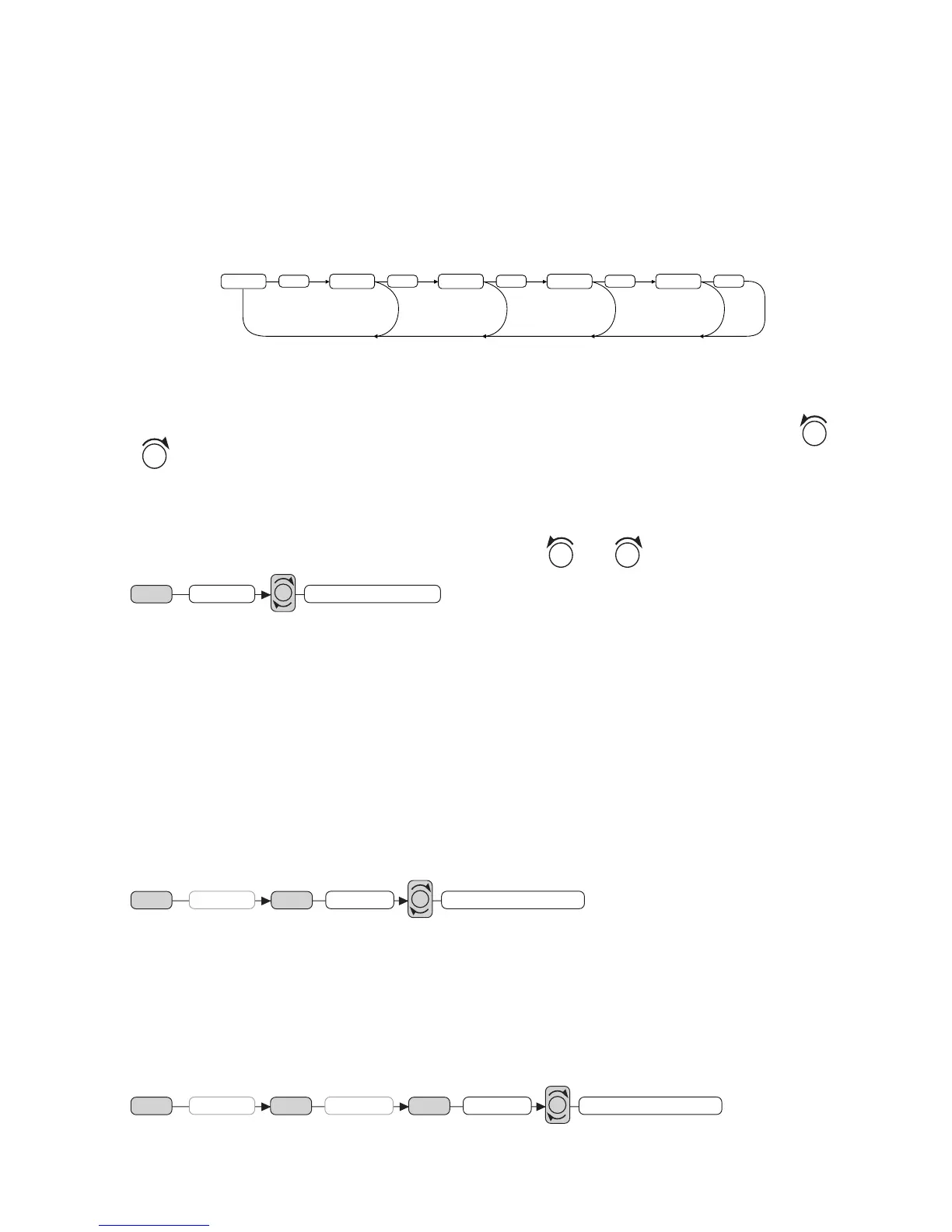
the display. Figure 1 shows how control functions are selected using the VOL knob.
Fig. 1 Selection of sound control functions
1. VOL 2. SEL 3. BAS 4. TRE 5. BAL 6. FAD
Turning the VOL knob Right or Left. Increase or decrease the volume by turning
. These buttons can be used to adjust the BASS, TREBLE, BALANCE and FADER.
TA SEEK/TA ALARM (2)
When press the SEL button for more than 2 seconds, it is activated as selecting mode of
these function.
TA SEEK Mode or TA ALARM mode is selected by
.
- TA SEEK mode:
When newly turned station does not receive TP information for 5 sec., the radio retunes to
next station which has not the same station (PI) as the last station, but has the TP informa-
tion.
In TA seek mode, the current station can be changed to the completely different station
because the unit searches TP station when the field strength of the current station is very
weak, or the current station has no TP signal.
- TA ALARM mode:
Any automatic retune mode is not activated, just can hear Beep sound.
MASK DPI (2)
When press the VOL knob for more than 2 seconds, it is activated as selecting mode of
these function.
MASK DPI: masked only the AF which has different PI.
MASK ALL: masked the AF which has different PI and NO RDS signal with field strength.
RETUNE L / S CONTROLS (2)
When press the VOL knob for more than 2 seconds, it is activated as selecting Retune
mode.
RETUNE L: Select 90 seconds as the initial time of automatic TA search.
RETUNE S: Select 30 seconds as initial time.


 To Next Page
 Loading...