EasyManua.ls Logo

Muzak ENCOMPASS CM1 - User Manual

Muzak ENCOMPASS CM1
2 pages
Print Icon
To Next Page IconTo Next Page
Loading...
ENCOMPASS CM1 – QUICK START GUIDE
(SMALL DISPLAY)
The ENCOMPASS CM1 is a digital audio playback device that stores all content locally on a hard disk drive. Audio content
is preloaded. Content may be loaded via CD-ROM, the public Internet or the client’s wide area network. The system is
designed to be virtually “plug and play” once it is properly connected to the client network or configured for disc updates.
Your box should include: 1.) ENCOMPASS CM1 2.) Power Module 3.) This one-page installation guide
The ENCOMPASS CM1 has been preloaded with audio content for the client specified on system packaging. To ensure the
system is properly installed and configured, call Muzak Network Operations Center (NOC) at 800 327.6549 upon completing
the installation.
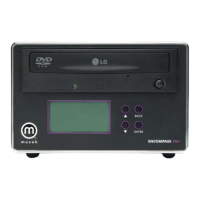
The ENCOMPASS CM1 is fully digital, IP addressable and includes a dual 16-segment back-lit front-panel LCD display and
three front-panel buttons, up S, down T and enter. If you need assistance with installation, please contact Muzak NOC at
800 327.6549.
ENCOMPASS CM1 connections – Reference diagram on reverse
1 Power
Using the enclosed power module (only), connect the appropriate end to the ENCOMPASS CM1 rear
panel port labeled DC POWER IN. Connect the other end into an appropriate 105-130 VAC, 60 Hz,
three-pronged power outlet.
2 Audio Output
Using a standard RCA-type audio cable, connect one end to the ENCOMPASS CM1 rear panel RCA-type
connector labeled 1. Connect the other end to an audio amplifier. The remaining three audio outputs
may be used for a client requiring multiple zones.
3 Ethernet
Where applicable, connect one end of a standard CAT-5 Ethernet cable to the ENCOMPASS CM1 rear
panel port labeled 10/100 BASE-T Network. Connect the other end to the Local Area Network switch or
hub port as identified by the client.
4
Date & Time
When networked, the ENCOMPASS CM1 will synchronize its date and time with the media distribution
server, offsetting for time zone differences. If updates will be received via disc, please perform the
following steps. Press the enter button on the faceplate to access the control/diagnostic menu. Press the
button until Date/Time appears, then press enter to access the date and time. To change the time,
simultaneously press and hold the up and down buttons for two seconds. A cursor will begin
blinking on the second digit of the month. Use the & arrows to set the month. Press enter to move
to the next number in the group. Continue this process until the date and time are correct, then press
enter to display the time zone screen. Next, use the & arrows to change the time zone, then press
enter to display the Daylight Savings Time screen. Finally, use the & arrows to confirm the Daylight
Savings Time settings. In most cases, this will be YES. If you are in an area which does not participate in
Daylight Savings Time, select NO.

Questions and Answers

Summary

ENCOMPASS CM1 Connections

Power Connection

Connect the enclosed power module to the CM1 and a 105-130 VAC outlet.

Audio Output Connection

Connect CM1's RCA output to an audio amplifier using a standard RCA cable.

Ethernet Network Connection

Connect CM1 to a LAN switch/hub using a CAT-5 cable.

Date and Time Setup

Configure date, time, and time zone settings for accurate operation.

Network and System Configuration

Network Settings

Configure IP settings for Pull or Push models, including DHCP and static addresses.

Startup and Operation

Understand the startup sequence, audio playback, and network confirmation.

Environmental and Physical Specifications

Troubleshooting

Overview

The ENCOMPASS CM1 is a digital audio playback device designed for commercial use, storing and playing back preloaded audio content from a hard disk drive. It supports content loading via CD-ROM, the public Internet, or a client's wide area network, making it a versatile solution for background music. The system is designed for ease of use, aiming for a "plug and play" experience once properly connected to a client network or configured for disc updates.

Function Description:

The primary function of the ENCOMPASS CM1 is to provide digital audio playback. It is fully digital and IP addressable, allowing for remote management and content updates. The device features a dual 16-segment back-lit front-panel LCD display that shows artist names and song titles during playback, as well as menu options for configuration. User interaction is facilitated by three front-panel buttons: up, down, and enter, which are used for navigation and selection within the device's menus.

Important Technical Specifications:

  • Audio Output: Unbalanced, 10K. The device includes RCA-type audio connectors, with one primary output for connection to an audio amplifier and three additional outputs for multi-zone setups.
  • Network Connectivity: 10/100 BASE-T Ethernet port for network connection.
  • Power Input: DC POWER IN port, requiring an enclosed power module (90-230 VAC, 50/60 Hz input) to provide +5V/3.5A output.
  • Power Consumption: Less than 30 watts.
  • Storage: Hard disk drive for local content storage.
  • Display: Dual 16-segment back-lit LCD.
  • Controls: Up, down, and enter buttons on the front panel.
  • Dimensions (H x W x D): 4.5" x 6.8" x 8.25".
  • Weight (without power supply): 8.6 pounds.
  • Environmental Operating Conditions:
    • Use: Indoor.
    • Altitude: -975' to 9,900'.
    • Temperature Range: 5° to 55° C.
    • Relative Humidity: 8 to 90% non-condensing.
  • Device Approval: FCC Class A.
  • Power Supply Approvals: FCC, UL, CSA, VDE.

Usage Features:

  • Initial Setup: Upon applying power, the LCD illuminates green and initiates a startup routine. Audio playback typically begins within 15 seconds, with the LCD displaying artist and song information.
  • Network Configuration: The device supports both Pull Model (contacting a Muzak server via the Public Internet) and Push Model (being contacted by a server running Muzak's Command software).
    • IP Address Setting: Accessible via the "Net Settings" menu. Users can configure DHCP (Dynamic Host Configuration Protocol) or set a static IP address. For static IP, the up and down buttons are used to set each digit of the IP address, gateway, and netmask, with the enter button to move between segments and store the settings.
    • DHCP Toggle: For Pull Model, DHCP is commonly used. It can be toggled to "Yes" by pressing and holding the up and down buttons for two seconds.
  • Date & Time Configuration: Accessible via the "Date/Time" menu. This is crucial for systems receiving updates via disc.
    • Setting Time: Simultaneously pressing and holding the up and down buttons for two seconds activates a blinking cursor on the second digit of the month. The up and down arrows adjust values, and the enter button moves to the next digit/group (month, day, year, hour, minute, second).
    • Time Zone: After setting the date and time, the up and down arrows adjust the time zone, followed by pressing enter.
    • Daylight Savings Time: The up and down arrows confirm Daylight Savings Time settings, typically "YES" unless the area does not participate.
  • Audio Output: Connects to an audio amplifier using a standard RCA-type audio cable. Multiple audio outputs are available for multi-zone installations.
  • Troubleshooting: The LCD display provides information. If any message other than the artist and song title is displayed, users are advised to contact Muzak NOC for technical assistance.

Maintenance Features:

  • Remote Management: Being IP addressable, the ENCOMPASS CM1 can be remotely managed and configured by Muzak Network Operations Center (NOC) once installed and connected to a network. This includes confirming remote addressability.
  • Content Updates: Content can be updated via CD-ROM, the public Internet, or the client's wide area network, providing flexibility in content delivery.
  • NOC Support: Muzak NOC (800 327.6549) is the primary contact for installation assistance, configuration, and troubleshooting. They collect installation details and confirm remote addressability.

The ENCOMPASS CM1 is a robust and user-friendly device designed to deliver reliable background music in commercial environments, with comprehensive support and flexible configuration options.

Muzak ENCOMPASS CM1 Specifications

General IconGeneral
BrandMuzak
ModelENCOMPASS CM1
CategoryDVD Player
LanguageEnglish