www.muzak.com Muzak Central Product Support 800 329.1179 (option #2)
REV 07.06.10
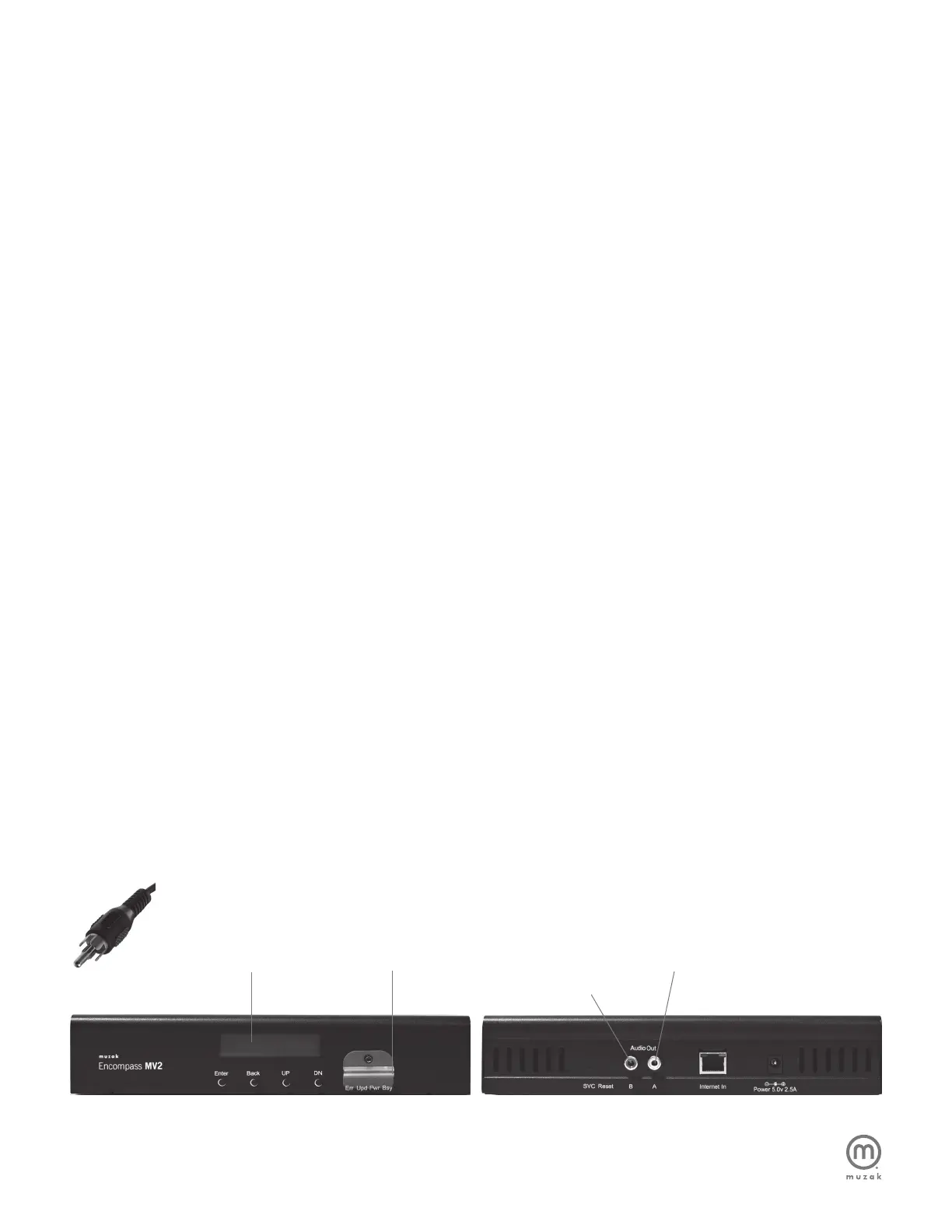
Display
Front Back
B: RCA audio out for On-Hold or
In-Store Music / Messaging
PIC 1
STEP 1. EVALUATING YOUR EXISTING SOUND
SYSTEM COMPONENTS
If you are exchanging a different technology for an Encompass
MV2, please make sure that your existing services are working
properly before you switch players.
Please begin by verifying that your existing sound system and/or
Music On Hold (MOH) are working properly. If there is any problem
found with these components, please follow your normal protocol
for resolution.
STEP 2. CONNECTING THE ENCOMPASS MV2
TO YOUR EXISTING AMPLIFIER
1. Turn the MASTER volume knob on the existing amplifier
all the way down.
2. Power off the amplifier but leave plugged in.
3. Place the Encompass MV2 unit in an available space near
the amplifier, but away from any heat source.
4. Connect the Encompass MV2 “AUDIO OUT A” to the
existing amplifier line input for In-Store Music using an
RCA style cable (PIC 1).
5. Connect the Encompass MV2 “AUDIO OUT B” to the existing
amplifier input for Music On Hold, completing the circuit to the
telephone system, also using an RCA style cable.
STEP 3. POWERING UP THE ENCOMPASS MV2
1. There is no power button; the Encompass MV2 simply needs
to be plugged in. Please use the provided 5.0-volt – 2.5A power
module. Connect the appropriate end to the Encompass MV2
rear panel port labeled POWER 5.0v–2.5A.
2. Connect the other end to an appropriate two-pronged
power outlet. A surge protector power strip is recommended,
but not required.
3. Upon activation, the LCD screen will read “Initializing Device”
and begin a short start up routine. Approximately 15 seconds
later, the screen will display the “Artist Name & Song Title” of
the current selection.
4. Your device also comes with an SD card lock and Allen screw.
Please attach the lock to secure the SD card to your MV2
device, using an Allen wrench.
STEP 4. LEVEL ADJUSTMENTS
1. Turn the power back on to the amplifier.
2. Adjust volume to appropriate listening level using the
volume control knobs on the front of the amplifier.
3. If using Music / Messaging On-Hold, be certain to place
yourself on-hold to test the Music On Hold volume.
STEP 5. SET-UP COMPLETION & UNIT REGISTRATION
1. Connect the Encompass MV2 to your existing network using
the network cable provided. Plug the cable into the Encompass
MV2’s Internet In port. You should then see a solid orange and
flashing green set of lights above the port.
2. Call Muzak Central Product Support at 800 329.1179 (option
#2) for further instructions and to report the unit’s serial number
for authorization of future content updates.
Note: Content updates will not be available until Step 5 is completed.
VERY IMPORTANT!
• The SD card must remain in the device to play
• The device must remain powered on to receive
regular content updates
• The device must maintain an active Internet connection to
receive regular content updates
2
Encompass MV2 Self Set-Up Instructions
(Skip this page if installation is performed by a Muzak Service Technician)
SD Card A: RCA audio out for In-store music


 To Next Page
 Loading...