OPERATION 4
4
GB
- 62 -
q Setting of “Custom” mapping
Press the start button when the engine is switched
on until selecting the mapping “C” of the control unit
(“Custom” mapping).
WARNING
The “Custom” mapping setting operations must
be performed when the the gear is in neutral and
the motorbike stationary with your feet on the
ground. Do not change the display while driving.
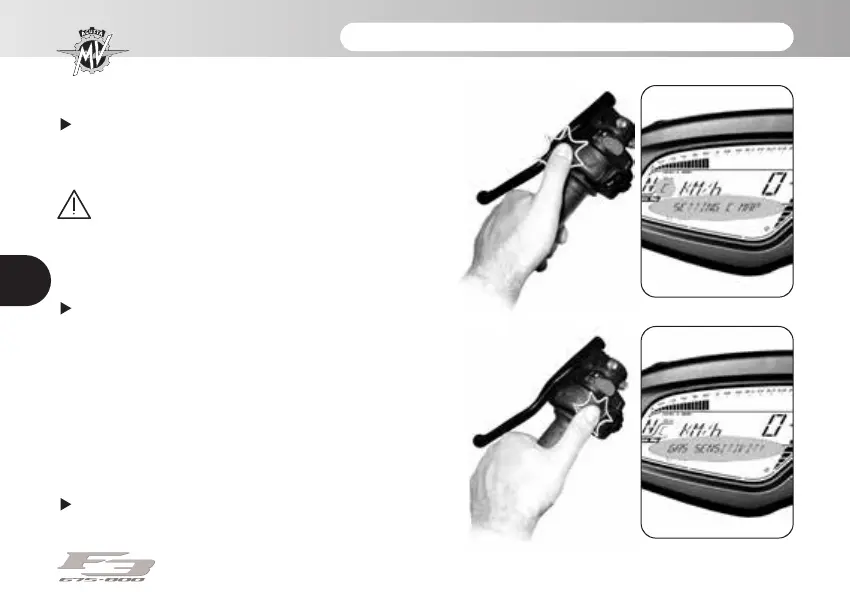
Press “SET” until “SETTING C MAP” appears.
In order to adjust the “Custom” mapping parameters to
your driving requirements, perform the following opera-
tions.
NOTE:
The “Custom” mapping can be defined
by mixing the Normal, Rain and Sport map-
ping characteristics when defining the fol-
lowing parameters.
Throttle control sensitivity: Press “OK” for less than
three seconds until “GAS SENSITIVITY” appears.
2_MU_F3_E4_17_GB_Ed.1_2_MU_F3_E4_17_GB_Ed.1.qxd 14/06/17 09:26 Pagina 62





 To Next Page