Need help?
Do you have a question about the MVE TEC 3000 and is the answer not in the manual?
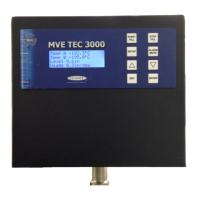
The front panel is the user interface with its LCD display showing current conditions and alarms.
Includes Start Fill, Stop Fill, Setup, Alarm Mute, Up/Down Arrows, Escape, and Enter for operation and adjustments.
Ports for temperature probes (A & B) and incoming power.
RS-485 communication ports and discrete/global alarm connections.
Includes Manual Fill override, main wiring harness, and level sensing connection.
Procedure to adjust the high level alarm threshold for liquid nitrogen.
Procedure to adjust the high level setpoint for liquid nitrogen.
Procedure to adjust the low level setpoint for liquid nitrogen.
Procedure to adjust the low level alarm threshold for liquid nitrogen.
High and Low temperature alarms for probes A and B.
High and Low level alarms for liquid nitrogen depth.
Includes Usage Warning, Fill Time, Bypass Time, Low Battery, Power Failure, Lid Open, Communication Loss.
 General
| Brand | MVE |
|---|---|
| Model | TEC 3000 |
| Category | Controller |
| Language | English |


 To Next Page