FCC ID: 2 A3ZO-EBT4 -21175
FUN C TIO N K EYS
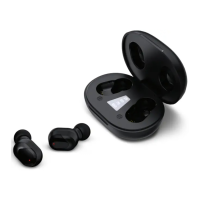
1. EARBUDS : Just place the earbuds into the
charging case. The earbuds will
automatically enter charging mode if the
cradle is charged or connec ted to the
power supply. The earbuds will display a red
LED light while they are charging, and
turn off when they are fully charged.
2. CASE: Use the cable provided to connect
the charging case to the power supply.
To activate the voice assistant (i.g ., Siri), press
and hold the either earbud ’s control button for
2 seconds.
VO IC E ASSISTAN T
C H ARG IN G
BLU ETO O TH C O N N EC T
1. Power the device on. The earbuds will pair
with one another automatically when they
are turned on.
2. Turn on your device’s Bluetooth from the
Bluetooth men u and select “MV-EB5579 ”.
3. When paired successfully the device will
make a tone to confirm the connection has
been made to your device.
use to ensure longest play time.
Note: The earbuds will reconnect automatically if your device has been paired previously.
Depending on your device’s type and configuration, manual reconnection may be
required each time.
Note: If you hold control button for 3 seconds earbuds will power down.
Take the two earbuds out of the charging
case. They will automatically turn on. Once
the earbuds have powered up, you should
hear a sound indicatin
g that they have
automatically connected with one another.
TU R N O N
1. PL AY/STOP MUSIC: When playing music,
quickly press either earbud’s control but ton.
2. MUSIC CONTROL: When playing music, triple
press either control button for next song / last
song, Double press either button to decrease
volume / increase volume.
3. ANSWERING CALL: When a call is received,
briefly press either earbud’s control but ton.
4. HANGI NG UP: During a phone call, briefly
press
earbud ’s control button to end call.
5. DECLINING CALL: When playing music, press
and hold control button for 1 .5 seconds*.
WARNING: The artwork and design of this package are
protected by United States Copyright law and may not be
reproduced, distributed, displayed, published, or used for
any purpose without prior written permission. You may
not alter or remove any trademark or copyright
notice
from this package. Because of continuous improvements,
images and product specifications on packaging may
©2022 Argento SC , All Rights Res erved.
Distributed by Argento SC, New York , NY 1001 8.
Designed in N ew York. Made in China.
MVMT and MV MT logo are registered tradema rk s of
Argento SC . The Bluetooth® word mark an d logos are
registered tra demarks own ed by Bluetooth SI G, In c. and
any use of such marks by Argento SC is u nder licen se .
www.argentosc .com
suppor t@ argentosc.com
Long press the control button until LED turns
away f rom case for more than 5 mins.
TU R N O FF


 To Next Page
 Loading...