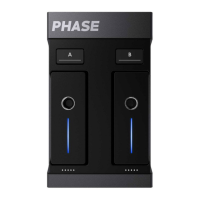
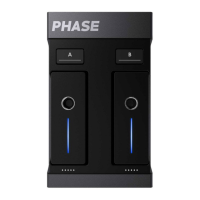
Your Remote is paired with the Receiver when its LED stops ashing. The Setup button on the Receiver and
the LED of the Remote you just paired should now have the same color.
- Once pairing has been successfully completed take the Remote out of the Receiver and place it on a static
support to start the calibration process.
- Once the calibration has been successfully completed, retry to pause the Remote.
I have issues connecting Phase to my DJ controller
If you’re experiencing issues to connect Phase to your DJ controller, check the following points:
- Check that your controller is truly DVS compatible and has “CD/Line” audio inputs.
- Check that your controller and your DJ software are congured in DVS mode.
- Check that the Receiver is connected to your controller through RCA cables. Change the RCA cables to
check if the cables are defective.
I have issues connecting Phase to my external DVS interface
If you have trouble connecting Phase to your external DVS interface, check the following points:
- Check that your DVS interface/sound card is DVS compatible and has “CD/Line” audio inputs.
- Check that your DVS interface/sound card is properly connected to your DJ software.
- Check that Phase is properly connected to your DVS interface/sound card through the RCA cables.
- If nothing changes, check that your RCA cables are not defective.
I have issues connecting Phase to my integrated DVS mixer
If you have issues connecting Phase to your integrated DVS mixer, check the following points:
- Check that your DVS mixer is truly DVS compatible.
- Check that the Receiver is truly connected to the “CD/Line” audio inputs of the mixer. If not, make sure to
place the picker of your mixer in “Line” mode.
- Check that Phase is properly connected to your external DVS interface/sound card through the RCA cables.
If it still doesn’t work, check that the cables are not defective.
I have issues conguring Phase with Serato
If you’re experiencing issues using Phase with Serato, check the following points:
- Check the audio settings in Serato to make sure the software is congured in Line/CD.
Some mixers (like the Pioneer DJM-S9) require Serato to be congured in “CDJ” mode to receive audio from
“CD/Line” inputs.
- Check that your decks are both in “Relative” (REL) mode.
- Start the turntables to make the Remote move, then go to Serato settings. Adjust balances L/R - P/A in
order to get a perfect circle, which means optimum performances. We also recommend setting sensitivity
between -40 and -60.
I have issues conguring Phase with Traktor
If you’re experiencing issues using Phase with Traktor, check the following points:
- Check the audio settings in Traktor to make sure the software is congured in Line/CD.
- Check that your decks are both in “Relative” (REL) mode.
To activate “REL” mode, click once on the icon representing a record at the right of the “play” button.
I have issues conguring Phase with Rekordbox
If you’re experiencing issues using Phase with Rekordbox, check the following points:
- Check the audio settings in Rekordbox to make sure the software is congured in Line/CD.
- Check that both decks are in “Relative” (REL) mode.


 To Next Page
 Loading...