6
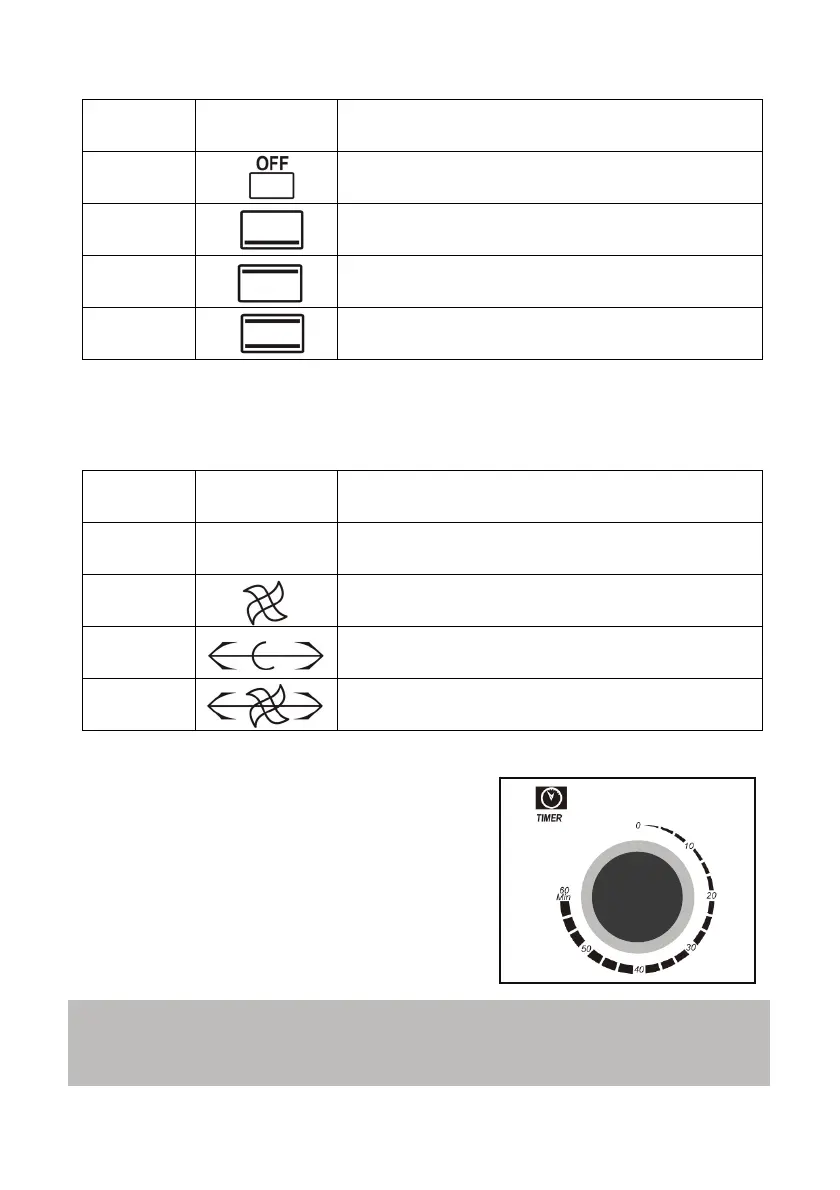
POSITION SYMBOL FUNCTION PERFORMING THE OVEN
1 All heating rods are off
2
Only the lower heating rods are on - heat at the
bottom
3
Only the upper heating rods are on - heat at
the top
4
The upper and lower heating rods are on - heat
at the top and bottom
Operating mode
This selector you can select the operating mode of convection system and
rotisserie. Refer to the following table:
POSITION SYMBOL OPERATING MODE
1
OFF
Operation of the oven in the
conventional mode
2 Operation of the oven in the convection mode
3
Operation of the oven in the conventional
manner with rotisserie
4
Operation of the oven in mode convection
with rotisserie
Timer
Turning the timer control in the clockwise
direction, the oven will operate, the
operation indicator lights up and the timer
will activate and start the countdown from
the set time. After the time an audible
indication and switch off the oven.
Note:
Anytime you can increase or decrease the timer, simply turn it to the left or
right to decrease or increase the time respectively.



 To Next Page