
 Need help?
Do you have a question about the MXQ PRO 4K and is the answer not in the manual?
Highlights features like IPTV support, various video/audio formats, USB ports, and network connectivity.
Specifies operating and storage temperature and humidity limitations.
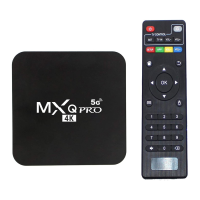
Lists included accessories such as power adapter, remote control, HDMI cable, and user manual.
Details the functions of each button on the remote controller for device operation.
Shows how to connect the device to a TV using an HDMI cable for high-definition output.
Configuration options for Wi-Fi and Ethernet network connections.
 General
| Operating System | Android 7.1 |
|---|---|
| Wi-Fi | 802.11 b/g/n |
| Ethernet | 10/100M |
| USB Ports | 4 x USB 2.0 |
| HDMI | HDMI 2.0 |
| GPU | Mali-450 |
| Bluetooth | No |
| Power Supply | DC 5V/2A |
| Storage | 16GB |
| Video Output | 4K |
| Ports | HDMI, AV, Ethernet, USB |
| RAM | 2GB DDR3 |

 To Next Page