3User and Safety guide
EN
USER GUIDE
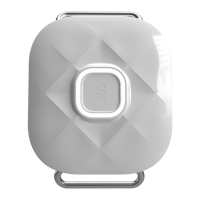
Box contents
Tracker ......................................................................................................................... 1pc.
Pogo pin magnetic connector ................................................................................... 1pc.
User manual and safety guide ................................................................................... 1pc.
Screwdriver ................................................................................................................. 1pc.
Screw ......................................................................................................................... 2pcs.
Tweezers ..................................................................................................................... 1pc.
Belt rings (two sizes) .............................................................................................. 2x1pc.
Necklace ...................................................................................................................... 1pc.
Specications
Name ............................................................................................................ MyKi™ SPOT
Model .......................................................................................................................... MKS
Power ............................................................................................................................. 5V
Operating temperature ....................................................................................... [0; 40],°C
SIM Card
1. Select a SIM card (g.1)
Make sure that the card is micro SIM and has active voice and data services. If the
SIM card PIN is active, it must be deactivated. More information you can nd at the
Web address: www.мykifamily.com/help-and-support.
2. SIM card insertion method (g.2)
Unscrew the screw on the cap with the supplied screwdriver. Carefully open the cover
and insert the SIM card into the slot with the chip upwards, according to the instruc-
tions (note: BEFORE inserting the SIM card, make sure the tracker is off). Close the
cover and screw it. After inserting the SIM card, turn on the tracker (by pressing and
holding for more than 4 seconds the SOS button). The device will detect that it is
turned on by vibration, audible and light signal. Wait up to 1 minute and proceed
registering the tracker in the application Myki™ SPOT.


 To Next Page
 Loading...