4.6 Settings: Open the settings icon to set auto play, sound, display,
language, etc.
(2) Volume setting: Under this option, you can adjust the system
based on volume 0-100
Note:SPDIF supports 5.1CH sound,AV supports 2CH sound
(4)Display: The resolution selection under Display Options only disp
lays the highest resolution supported by the current TV. When your
TV is up to 1080P resolution, only the 1920*1080P 60 and 1080P will
be displayed in the player resolution selection. If your TV supports 4K
version , then the player can be displayed up to 3840* 2160P-30. Tips:
To achieve 4K effect, you must meet 3 conditions below:
1. 4K TV; 2. HDMI2.0 cable; 3. Player supports 4K@30hz (support).
(5)Zoom: This function is mainly used to set the full screen size of
the TV display screen. As the size of different TV screens doesn't
match up with the standard,
you need to manually adjust the screen size to achieve the best
disp
lay effect as possible.
page9of16
page10of16
page11of16
page12of16
(6) Apps
When you encounter a video that cannot be played, you can try to
open your file by using VLC or kodi software.
(1) Playback settings: This function supports automatic play
back of videos, pictures, and music in internal memory or exte
rnal storage.
(3)Audio output device: The default output is in HDMI audio mode,
which can be connected to AV Lotus red and white output audio,
or SPDIF source output.
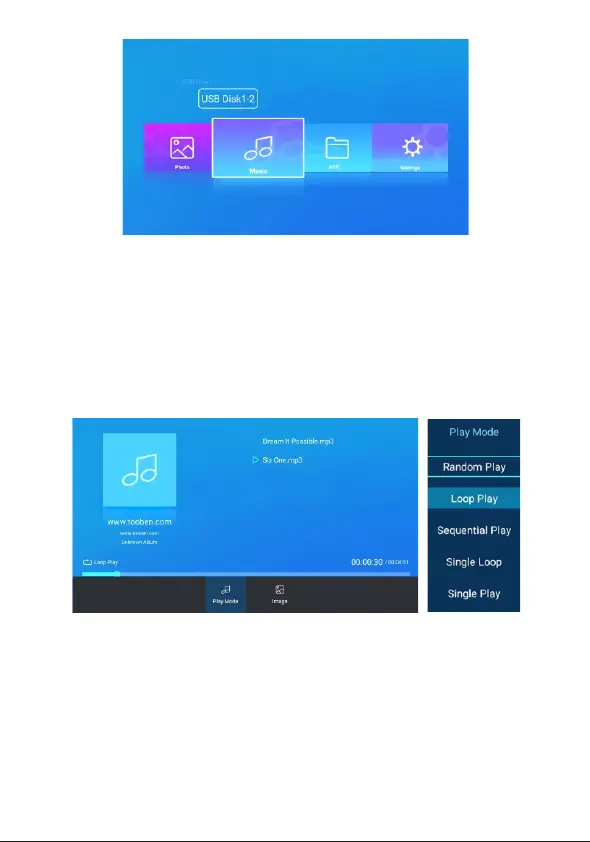
Paly mode: Random Play; Loop Play(For all audio files);
Sequential Play; Single Loop Single Play
Note: This unit does not support video + picture + music and
plays in sequence (for example: auto-play pictures after playing
video, playing music automatically after playing pictures; Sup
ports auto-play video, auto-play pictures + background music
or auto-play music)
When playing music files, press the menu button of the
remote control to set the music playback mode and backg
round image. Tips:Music subtitles should be supported in
LRC format when playing music files. If there isn't any subti
tles displayed, please check whether the subtitles are consi
stent with the music names.
How to switch music mode
1. Press the remote control menu button to options,Select the
playback mode
2.Press the up and down buttons on the remote control to switch
between different modes


 To Next Page
 Loading...