EasyManua.ls Logo

MYPIN TD Series - User Manual

MYPIN TD Series
8 pages
Print Icon
To Next Page IconTo Next Page
Loading...
TD Series Temperature Controller
Instruction Manual
Thanks a lot for selecting the product!
Before operating this instrument, please carefully read this
manual and fully understand its contents. If any probroms,
please contact our sales or distributors whom you buy from.
This manual is subject to change without prior notice.
Warning
Please do not turn on the power supply until all of the wiring is
completed. Otherwise electrical shock, fire or malfunction
may result.
Do not wire when the power is on. Do not turn on the
power supply when cleaning this instrument. Do not
disassemble, repair or modify the instrument. This may
cause electrical shock, fire or malfunction.Use this instru-
ment in the scope of its specifications. Otherwise fire or
malfunction may result.The use life of the output relay is
quite different according to is capacity and condictions. If
use out of its scope, fire or malfunction may result.
Applications
TA series of temperature controller is available for many TC
or RTD input, adopt some advanced techonology such multi
digital filter circuit, autotune PID, fuzzy PID that make it
is very precise, stable, strong anti-interference and
simple operation. The instrument is widely applied to
Panel
This instrument should be installed in a domestic environment.
Otherwires electricla shock, fire or malfunction may result.
To avoid using this instrument in environment full of dust
or caustic gas.
To avoid using this instrument in environment of strong
shock or concussion.
To avoid using this instrument in environment of overflow
water or explosive oil.
The power supply wire should not put together with large
current wire to aviod electromagnetic radiation, If it must to
put together, we suggest to use a individual pipe.
In case the instrument is used in environment of strong noise,
(such as motor, transformer, solenoid, etc.) A current suppresser
or noise filter should be used.
Power supply 90-260V AC/DC 50/60Hz
Consumption 5VA
Display range -1991800
Accuracy 0.3%F.S ± 2digit
Sampling cycle
300ms
Main output RELAY
normal open
AC 250V/3A DC 30V/3A COS=1
SSR/LOGIC 24V DC ± 2V/ 20mA
Specifications
RELAY:
normal open
AC 250V/3A DC 30V/3A COS=1
SSR/LOGIC:24V DC12V/ 30mA
K 0999/01200
J 0999 /01200
T -150400 (Special order)
S 01600
Rt Pt100 -199600
Cu50 -50150
Alarm
Input
T/C
Withstand voltage strength
1500V Rms
(Between power terminal and the housing)
Min 50M Ω(500V DC)
(Between power terminal and the housing)
Environment temperature
Save temperature
Environment humidity
Weight
050
-1060
3585%RH
Insulation resistance
Mounting and Sizes
D
B
A
E
C
G
H
Sizes
Model
TD4
TD6
TD9
TD7
44.5+0.5 45+0.5 65 65 48 48 8 80
43.5+0.5 91+0.5 65 115 48 96 12 80
67.5+0.5 67.5+0.5 95 95 72 72 12 100
91+0.5 91+0.5 115 115 96 96 12 100
A B C D E F G H
Parameter Setting &Autotuning
Parameters setting:
A: In display estate,press SET,P/MV lamp on means SV setting,
while off means MV manual output setting,but only on manual
operation & input connect do MV settable. B: Press the
/
M
key to select the digit you want to modify; C: Press and
key to modify the numerals; D: Press SET key to confirm.
In autotuning estate,output value modification is
impossible.
Antotuning operation.
In display estate,press SET and <</M key at the same time
until AT/M lamp flahses.Then ithe instrument is under
autotuning estate.Press again to quite.
Power on
Displays temperature unit
Input up limit
3S
3S
3S
Measured displaying
Set displaying
Shift and flashes
Modify
SET
Stop flashing
Confirm
Self-check
All LED on
Input type
350g
E 01000
Caution
TD8
91+0.5 43.5+0.5 65 115 96 48 12 80
Input low limit
In Manual operation/Non-autotune estate, press and hold
/ key for more than 3 seconds to enter/quit the below
menu for display range settings.
SET
1
Low limit value, it is adjustable
by the input signal.
automation systems of mechanism, chemical industrial,
chinaware, light industrial, metallurgy and petroleum chemical
industrial. It is also applied to the production line of foodstuff,
packing, printing, dry machine, metal heat process equipment
to control the temperature.
Up limit value, it is adjustable
by the input signal.
SET
AL1 hysteresis setting value.
Range ± 90, factory setting 1.0
SET
TD
□□ - □□□□
Models
Input signals:Default: K,J,T,S,Pt100/mA,lN
OUT2/AL2: R:RELAY S:SSR/Logic
-T:SCR N:Non
OUT1: I:4-20mA R:RELAY
S:SSR/Logic T:SCR
AL1:R:RELAY S:SSR/Logic T:SCR
Power supply:Default:90-260V AC/DC
E:24VDC or 18-30V AC/DC
Sizes: 4:48H × 48W 6:48H × 96W
TA series of temperature controller
7:72H × 72W 8:96H × 48W
9:96H × 96W
/M
F
MYPIN
mV
mV 0-75mV
mA mA
4-20mA /0-10V
. PV / parameter symbols
. SV / parameters preset value
. Indication lamps
OUT1: Heating/Main control output lamp
On: Output Off: No output
OUT2/AL2:
Colling/Alarm 2 output lamp
On: Output Off: No output
AT/M: On: manual operation Off: auto operation
Flash: under autotuning estate
P/MV: SV/MV display setting
On: MV manual output Off: SV setting
AL1: Alarm 1 lamp On: Alarm Off: No Alarm
AL2: Alarm 21 lamp On: Alarm Off: No Alarm
.Set key Parameter Setting/Changing
.Shift/Autotune key Press this key to shift digit of
parameter value setting. Or hold this key for more than 3
seconds can enter/quit autotune estate. When enter
autotune estate, AT lamp on. When quit autotune estate,
AT lamp off.
.Up key .Down key
O U T 1
O U T 2 /
AT/M
AL1
SET
>
>
/M
PV
SV
P / M V
A L 2
>
>
>
>
Question and Answer IconNeed help?

Do you have a question about the MYPIN TD Series and is the answer not in the manual?

Overview

The MYPIN TD Series Temperature Controller is a versatile instrument designed for precise temperature control in various industrial and automation systems. It is suitable for applications in mechanism, chemical, chinaware, light industrial, metallurgy, petroleum chemical, foodstuff, packing, printing, dry machine, and metal heat process equipment.

Function Description

The TD Series Temperature Controller offers advanced control features including multi-digital filter circuits, autotune PID, and fuzzy PID, ensuring high precision, stability, and strong anti-interference capabilities. It supports a wide range of thermocouple (TC) and Resistance Temperature Detector (RTD) inputs.

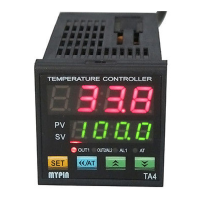
The controller features a dual display:

  • PV (Process Value): Displays the current measured temperature or parameter symbols.
  • SV (Set Value): Displays the desired temperature set point or parameter preset value.

It includes several indication lamps:

  • OUT1 (Heating/Main control output lamp): Illuminates when the main control output is active (heating).
  • OUT2/AL2 (Cooling/Alarm 2 output lamp): Illuminates when the cooling output or Alarm 2 is active.
  • AT/M (Manual/Auto operation lamp): Illuminates for manual operation, flashes during autotuning, and is off for auto operation.
  • AL1 (Alarm 1 lamp): Illuminates when Alarm 1 is active.

Usage Features

The controller is designed for simple operation with dedicated keys for setting, shifting, and adjusting values.

  • SET Key: Used for parameter setting and changing. Pressing it in display mode allows setting the SV (when the P/MV lamp is on) or MV (manual output, when P/MV lamp is off and in manual operation).
  • Shift/Autotune Key (<< / M):
    • Shifts the digit for parameter value setting.
    • Holding it for more than 3 seconds enters or exits the autotuning estate (AT lamp on during autotuning, off when exited).
    • Pressing SET and << / M simultaneously in display estate initiates autotuning until the AT/M lamp flashes.
  • Up Key (∧): Used to increase numerical values.
  • Down Key (∨): Used to decrease numerical values.

Parameter Setting and Autotuning

  • Parameter Setting: In display estate, press SET. The P/MV lamp indicates whether you are setting SV (on) or MV (off). Use the << / M key to select the digit, ∧/∨ keys to modify, and SET to confirm. Output value modification is impossible during autotuning.
  • Autotuning Operation: Press SET and << / M simultaneously until the AT/M lamp flashes. The instrument will then be in autotuning estate. Press again to exit.
  • Manual/Auto Conversion: In display estate, press << / M to switch between manual and auto operation. The AT/M lamp indicates manual operation (on) or autotuning (off).
  • Initial Autotuning: For the first time, press SET and << / M until the AT/M lamp flashes to enter autotuning.
  • Subsequent Autotuning: If the load/control temperature point changes within a small range (e.g., ±30°C), re-autotuning may not be necessary as the instrument retains previous PID parameters.
  • Autotuning for Huge Capacity Heating Equipment: For large systems, set the autotuning value 5%-10% lower than the normal control value to prevent overshooting.
  • Control Cycle:
    • Normal heating equipment: 20-30 seconds.
    • Huge capacity heating equipment: 30-120 seconds (to prolong relay life).
    • Non-contact output (e.g., SSR): 1-3 seconds.

Important Technical Specifications

  • Power Supply: 90-260V AC/DC 50/60Hz (Default), optional 24VDC or 18-30V AC/DC.
  • Consumption: <5VA
  • Display Range: -199 to 1800°C
  • Accuracy: 0.3%F.S ± 2 digits
  • Sampling Cycle: <300ms
  • Main Output:
    • RELAY: Normal open AC 250V/3A, DC 30V/3A (COSφ=1)
    • SSR/LOGIC: 24V DC ± 2V/20mA
  • Alarm Output:
    • RELAY: Normal open AC 250V/3A, DC 30V/3A (COSφ=1)
    • SSR/LOGIC: 24V DC 12V/30mA
  • Input Signals (Default): K, J, T, S (TC), Pt100, Cu50 (RTD), mV (0-75mV), mA (4-20mA / 0-10V).
    • TC Ranges:
      • K: 0-999°C / 0-1200°C
      • J: 0-999°C / 0-1200°C
      • T: -150-400°C (Special order)
      • S: 0-1600°C
      • E: 0-1000°C
    • RTD Ranges:
      • Pt100: -199-600°C
      • Cu50: -50-150°C
  • Withstand Voltage Strength: 1500V Rms (Between power terminal and housing)
  • Insulation Resistance: Min 50MΩ (500V DC) (Between power terminal and housing)
  • Environment Temperature: 0-50°C
  • Save Temperature: -10-60°C
  • Environment Humidity: 35-85%RH
  • Weight: 350g
  • Sizes (H x W):
    • TD4: 48H × 48W
    • TD6: 48H × 96W
    • TD7: 72H × 72W
    • TD8: 96H × 48W
    • TD9: 96H × 96W

Wiring and Installation

  • Safety Precautions:
    • Do not turn on power until all wiring is complete to prevent electrical shock, fire, or malfunction.
    • Do not wire or clean the instrument when power is on.
    • Do not disassemble, repair, or modify the instrument.
    • Use the instrument within its specified scope.
  • Installation Environment:
    • Install in a domestic environment.
    • Avoid environments with dust, caustic gas, strong shock, concussion, overflow water, or explosive oil.
  • Wiring Practices:
    • Power supply wires should not be run with large current wires to avoid electromagnetic radiation. If unavoidable, use individual pipes.
    • In noisy environments (motor, transformer, solenoid), use a current suppressor or noise filter.
  • Input Signals:
    • For TC input, use the appropriate compensation cable.
    • For RTD input, use low impedance cables of the same length for all three wires.

Maintenance Features

Malfunction Estimate and Troubleshooting

  • No Display:
    • Check all connections and wiring, especially power supply and signal input terminals.
  • Incorrect Display:
    • Verify that the input signal type matches the selected symbol.
    • For TC input, ensure the correct compensation cable is used.
    • For RTD input, ensure low impedance cables of equal length are used for all three wires.
    • If all connections are correct, use the PVF parameter to modify the display.
  • Incorrect Control:
    • If the temperature struggles to reach the set value, and the external system is functioning correctly, the instrument's parameters may be incorrect. Re-autotune the instrument.
    • If the instrument loses control, check the control connection.
    • External load issues (shorted, broken, wrong connection) or damaged components can also cause control loss.
    • If necessary, remove the PCB to check for damage to the output terminals.
  • Display Malfunction ("UUUU"):
    • Indicates that the input signal exceeds the measured high range.

Parameter Lock Code Setting:

  • LcK=000 means unlocked.
  • LcK=010 means locked.

The TD Series Temperature Controller is a robust and reliable solution for precise temperature management, designed with user-friendly features and comprehensive specifications to meet diverse industrial needs.

MYPIN TD Series Specifications

General IconGeneral
BrandMYPIN
ModelTD Series
CategoryMeasuring Instruments
LanguageEnglish

Related product manuals